YSM40R_Mainte_E.pdf - 第169页
4-9 Before using the machine 3.3.3 Pickup station (pallet clamp) T he following describes the cleaning and lubrication procedures for the pallet clamp. 1 Detach the co ver . Use a hex wrench to detach the cover as shown …
4-8
4
Maintenance of options
3.3 6-month inspection
3.3.1 AH-axis
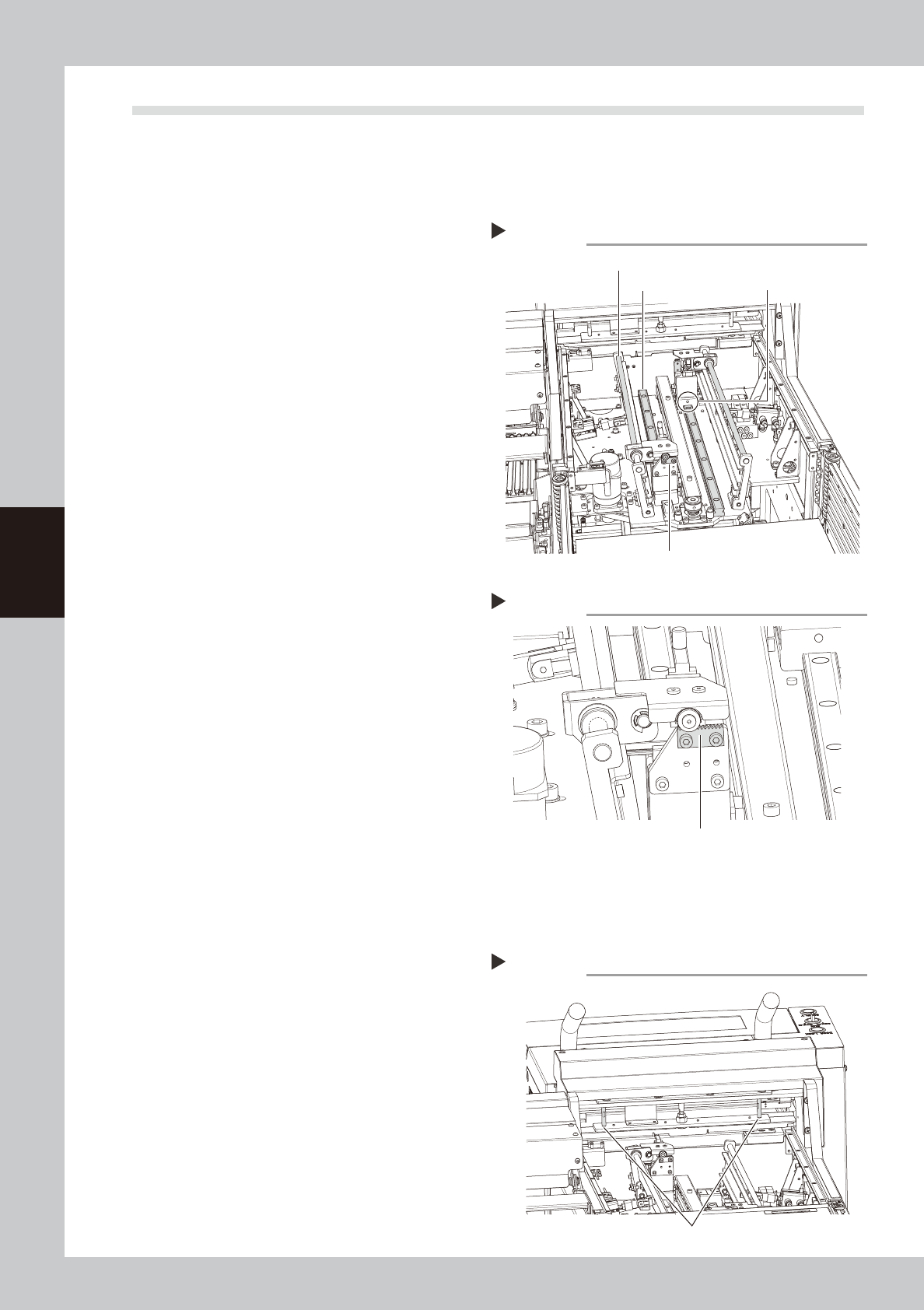
The following describes the cleaning and lubrication procedures for the AH-axis (guide, ball guide, rack &
pinion).
1
Clean the guide.
Use a lint-free cloth to wipe off the old
grease and dirt on the guide.
2
Apply grease.
1. As shown in the figure on the right, move
the grease nipple to a position where a
grease gun can be easily used.
2. Use a grease gun (bent type) to inject
grease into the grease nipple.
53407-N9-00
3
Clean the ball guide.
Use a lint-free cloth to wipe off the old
grease and dirt on the ball guide.
4
Apply grease.
Apply a thin coat of grease by hand to the
ball guide.
5
Clean the rack & pinion.
Use a lint-free cloth to wipe off the old
grease and dirt on the rack & pinion.
6
Apply grease.
Uniformly apply grease by hand to the rack
gear.
53408-N9-00
7
Remove excess grease.
1. After applying grease, move each unit
back and forth a few times.
2. Check the grease condition and wipe
away excess grease using a lint-free
cloth.
3.3.2 Magazine shaft
The following describes the cleaning and lubrication procedures for the magazine shaft ball guide.
1
Clean the ball guide.
Use a lint-free cloth to wipe off the old
grease and dirt on the ball guide.
2
Apply grease.
Apply a thin coat of grease by hand to the
ball guide.
53409-N9-00
Applying grease to the AH-axis
Step 2
Ball guide
Rack gear
Grease nipple for guide
Guide
Applying grease to the rack gear
Step 6
Rack gear
Applying grease to the magazine shaft
Step 2
Magazine shaft
4-9
Before using the machine
3.3.3 Pickup station (pallet clamp)
The following describes the cleaning and lubrication procedures for the pallet clamp.
1
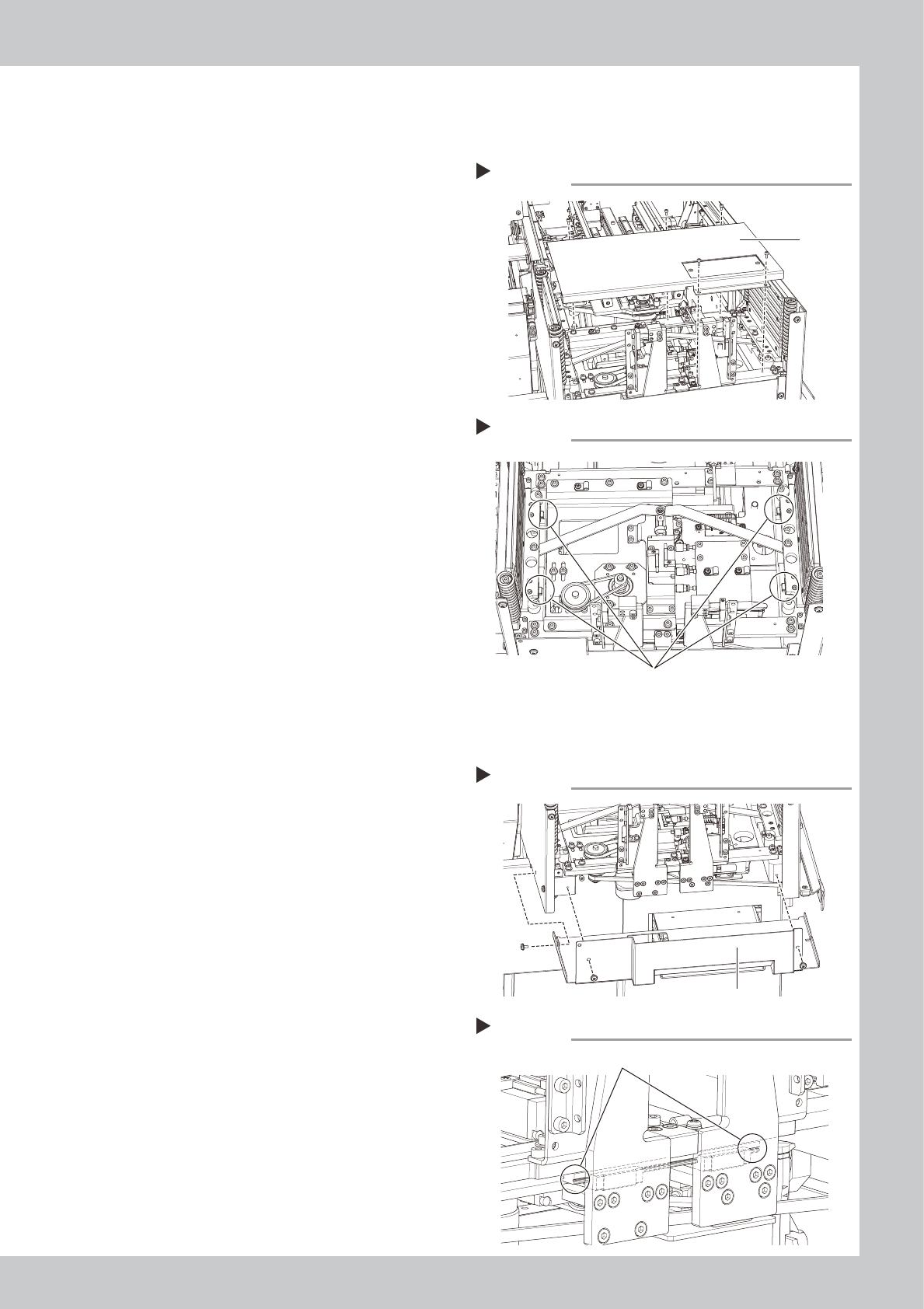
Detach the cover.
Use a hex wrench to detach the cover as
shown in the figure at right.
53410-N9-00
2
Clean the guide.
Use a lint-free cloth to wipe off the old
grease and dirt on the guides.
3
Apply grease.
Apply grease by hand to the guides.
53411-N9-00
4
Attach the cover.
Attach the cover that was detached in Step
1.
3.3.4 Pickup station (vertical guide)
The following describes the cleaning and lubrication procedures for the vertical guide.
1
Detach the cover.
Use a Phillips screwdriver to detach the
cover as shown in the figure at right.
53412-N9-00
2
Clean the guide.
Use a lint-free cloth to wipe off the old
grease and dirt on the guide.
3
Apply grease.
Apply grease by hand to the guide.
53413-N9-00
4
Reattach the cover.
Reattach the cover that was detached in
Step 1.
Detaching the cover
Step 1
Cover
Applying grease
Step 3
Guides
Detaching the cover
Step 1
Cover
Applying grease
Step 3
Guide
4-10
4
Maintenance of options
4. Nozzle station
4.1 Checking nozzle station sensor (1-year)
The machine with the nozzle station (option) is required to check the nozzle detection sensor status
periodically. This section describes the procedure for MU head unit as an example.
c
CAUTION
If the nozzle station sensor cannot detect the nozzle correctly, the nozzle change does not operate correctly or the
production cannot continue due to nozzle detection error.
e
1
Prepare for work.
1. Return all nozzles to the nozzle station.
2. Press the emergency stop button and
then open the machine safety cover.
2
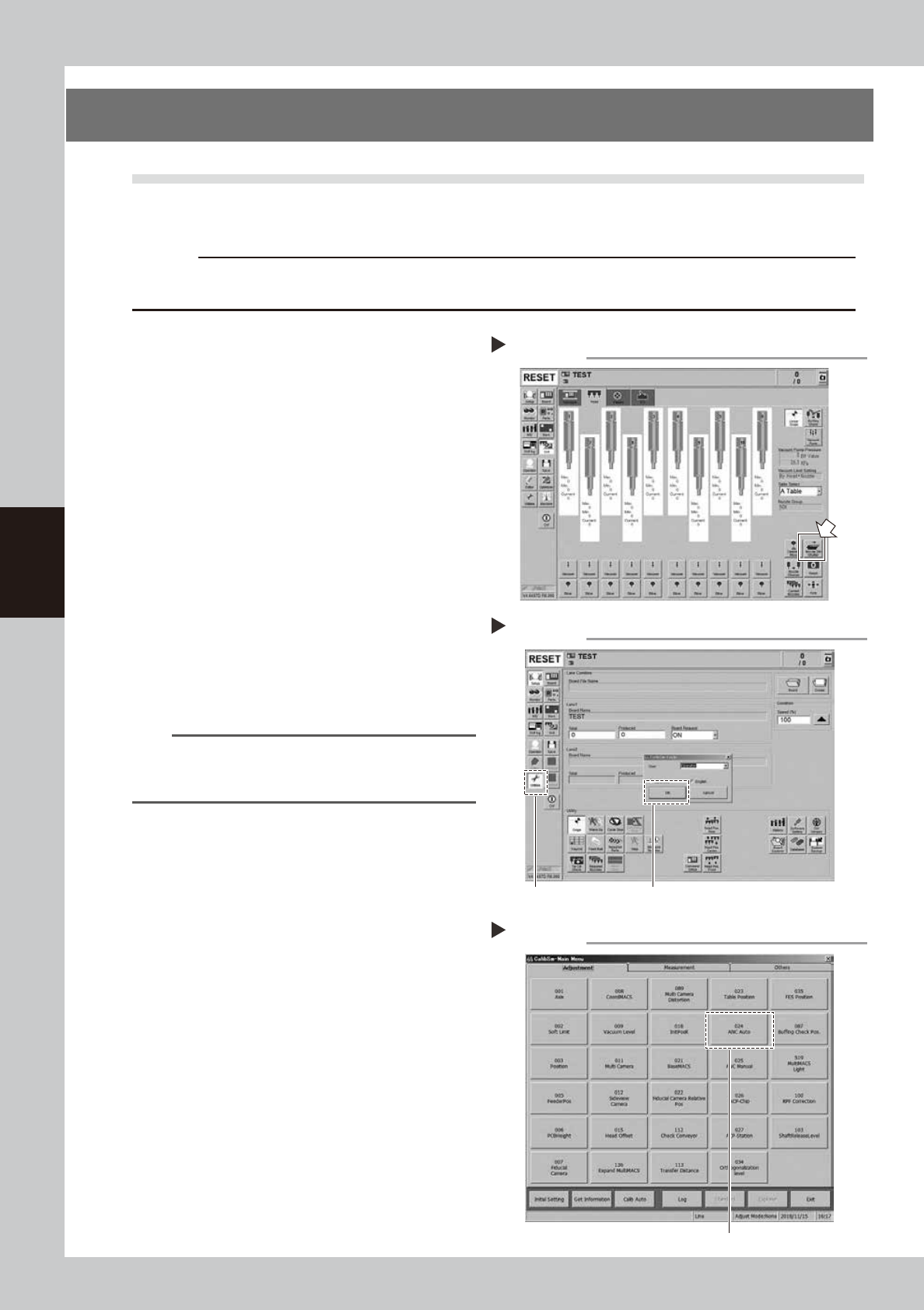
Open the shutter of the nozzle
station (hereafter "ANC").
1. Open the [Unit] - [Head] screen.
2. Press the [Nozzle. Stn Shutter] button to
open the ANC shutter.
54400-N9-00
3
Open the Utilities mode.
1. Press the [Utilities] button on the left of
the screen.
2. The "Login" window will appear. Check
that "Operator" is shown in the “User”
field, and then press the [OK] button.
54401-N9-00
n
NOTE
When logging-in to the Utilities mode with "User:
Operator", the machine set values cannot be changed
or saved.
4
Select [ANC Auto].
Press the [024 ANC Auto] button.
54402-N9-00
Opening the nozzle station shutter
Step 2
Opening the Utilities mode
Step 3
Select [Utilities].
Select [OK] with "User: Operator".
Selecting [ANC Auto]
Step 4
Select [024 ANC Auto].