YSM40R_Mainte_E.pdf - 第143页
3-73 3 Periodic maintenance items 6 Check the valv e operation. 1. T ur n on the air supply and main power supply. Then launch the application. 2. Open the [Unit]-[Head] tab. 3. Press the [T able select] button and selec…
3-72
3
Periodic maintenance items
6.1.4 Replacing the blow valves
The blow valve (rod 1, rod 2 and blow valve) of the air lines in RS head requires to replace every 2 years.
1
Prepare for work.
e
1. Remove all items sensitive to magnetic
fields such as wristwatches and magnetic
ID cards.
2. Press the emergency stop button and
then open the machine safety cover.
3. Use the CLAMP ON/OFF switch to lower
the feeder exchange carriage and
detach it.
4. Move the head unit to a convenient
position for maintenance work. Place a
square cloth under it.
5. Power off the machine.
6. Shut off the air supply to the machine.
2
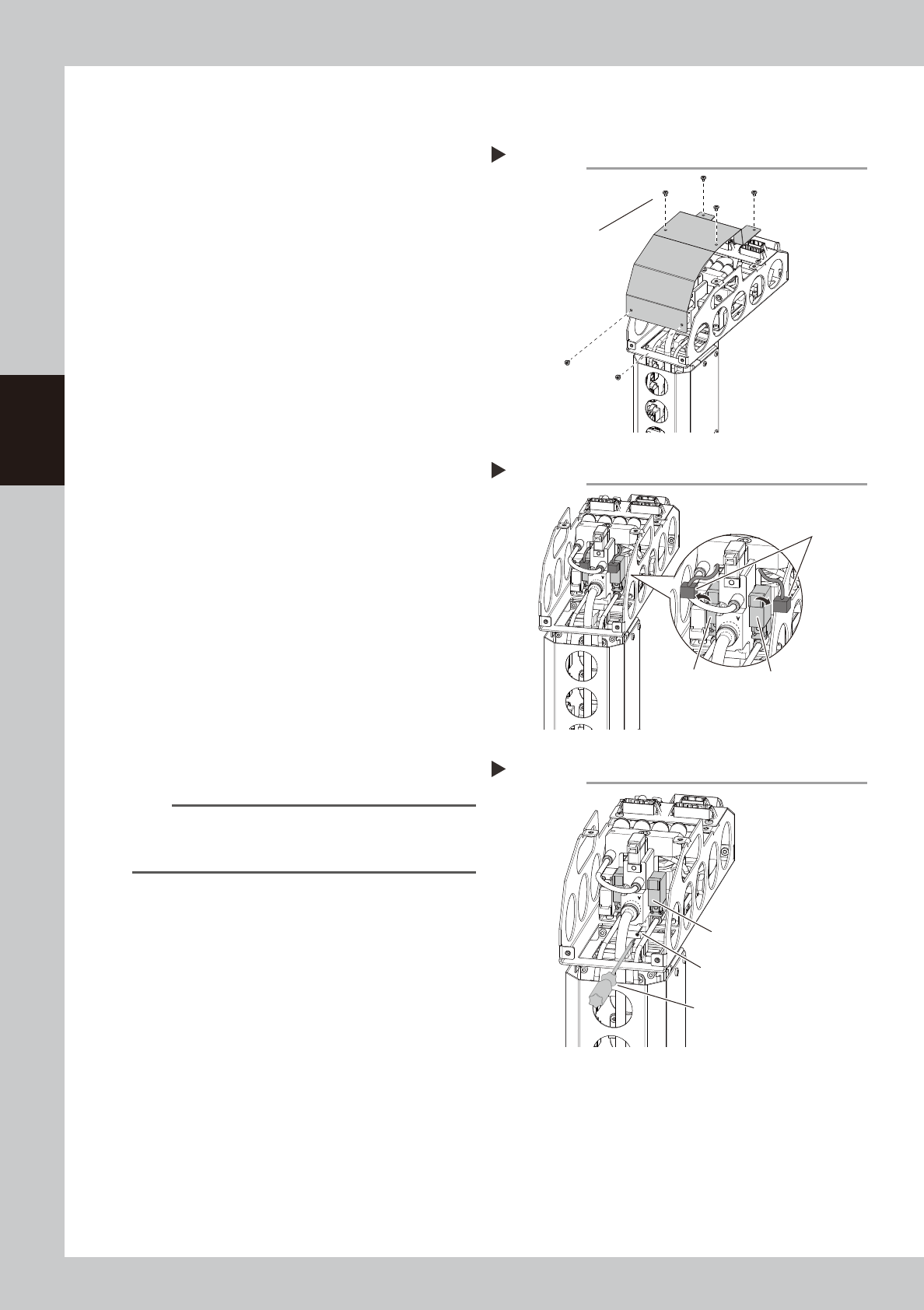
Detach the cover of the upper part
of the RS head.
Detach the cover mounting screws of the
upper part of the RS head with a Phillips
screwdriver.
533D7-N9-00
3
Disconnect blow valve connector.
533D8-N9-00
4
Replace the valve.
1. Detach the valve mounting screws with a
Phillips precision screwdriver.
2. Replace the valve with the new one.
3. Return the connector to the original
position.
533D9-N9-00
n
NOTE
The packing is attached to the back of the valve.
Replace the valve with a new one while carefully
checking the packing for dropping or catching.
5
Return head upper cover to original
position.
Detaching the cover
Step 2
Cover mounting screws
Disconnecting the valve conector
Step 3
Conector
Blow valve for rod 2 Blow valve for rod 1
Replacing the blow valve
Step 4
Phillips precision screwdriver
The packing is attached to
the back of the valve.
Carefully check this packing.
Valve mounting screw
3-73
3
Periodic maintenance items
6
Check the valve operation.
1. Turn on the air supply and main power
supply. Then launch the application.
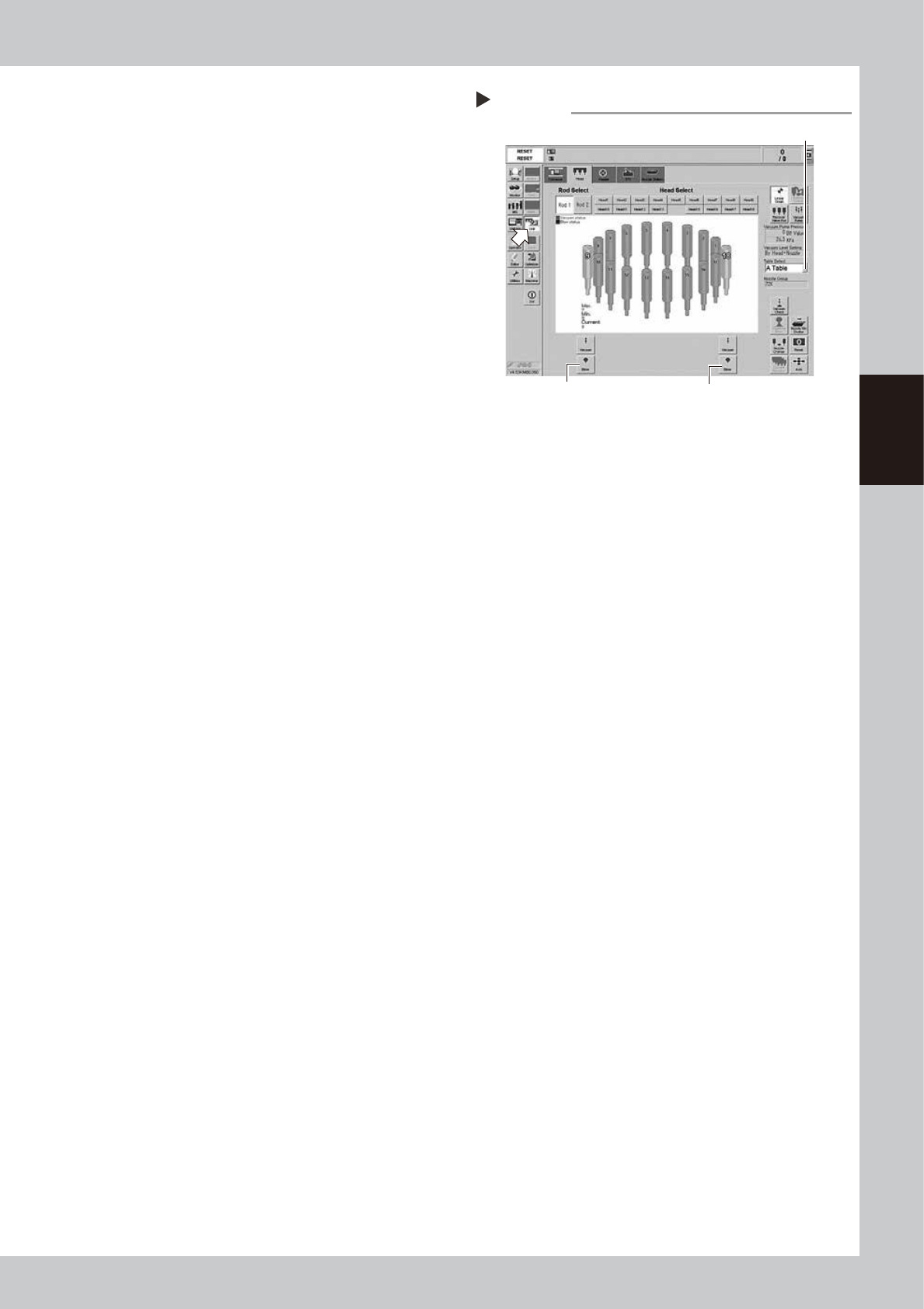
2. Open the [Unit]-[Head] tab.
3. Press the [Table select] button and select
the table (head unit) that the valve was
replaced.
4. The [Blow] buttons locate on the bottom
of the screen. Press the [Blow] button
that the rod was replaced (Rod 1: left
side, Rod 2: Right side of the screen).
e
5. Press the emergency stop button. Open
the machine cover and check that the
blow air is property flowing out from the
tip of the head.
54300-N9-00
RS head blow check
Step 6
Table select button
Rod1 [Blow] button Rod2 [Blow] button
3-74
3
Periodic maintenance items
7. 3-year maintenance
This section describes 3-year maintenance items.
7.1 X and Y axes
7.1.1 Replacing Y-axis cable carrier chain links
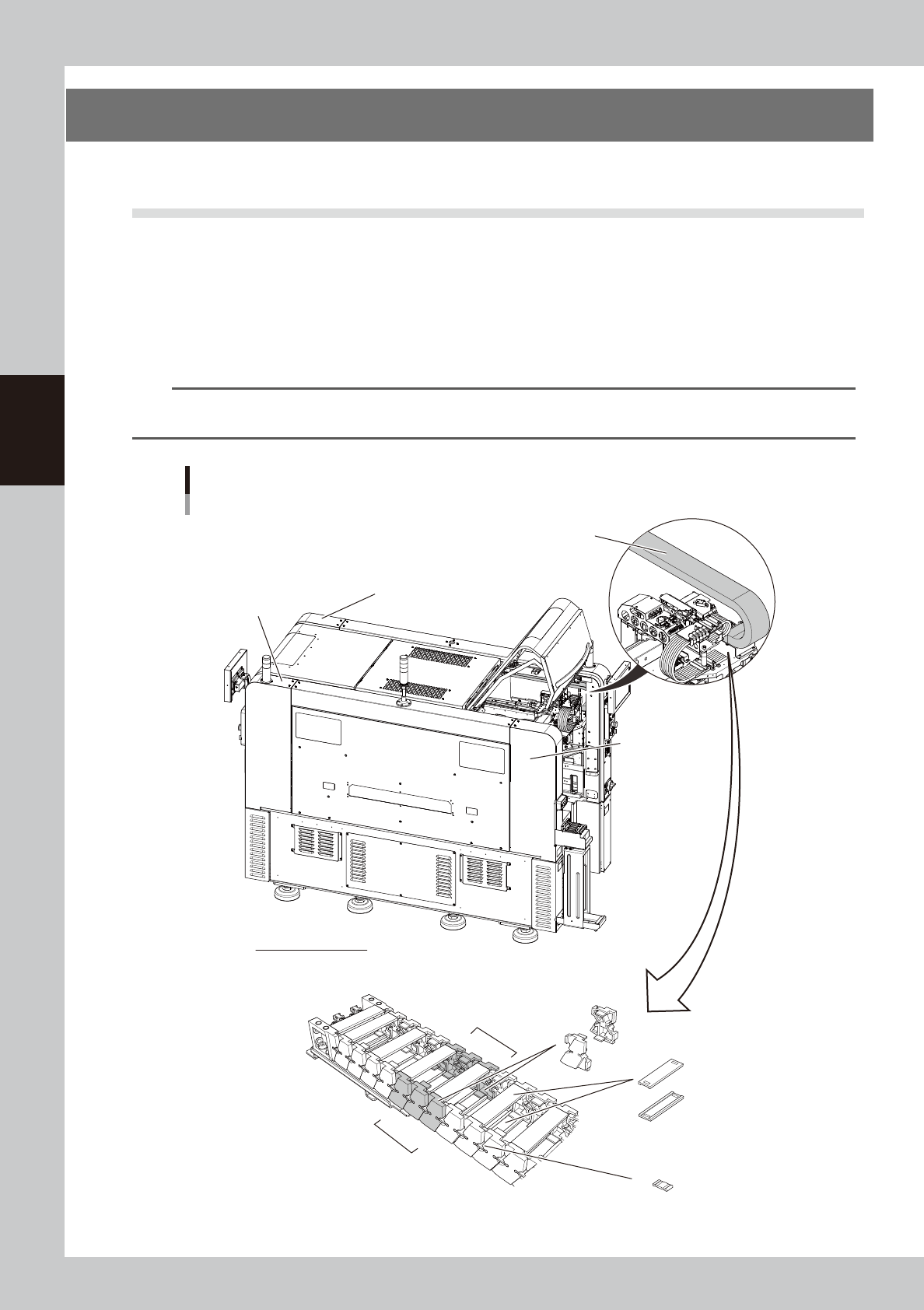
As a general guide, the Y-axis cable carrier parts (chain links) on each head should be replaced every 3 years.
The chain links to be replaced are the 3 pairs of the 5th through 7th chain links counting from the head side.
There are 4 Y-axis cable carriers (A-table to D-table) for 4-beam type machines, and 2 Y-axis cable carriers (front
left and rear left) for 2-beam type machines. So, to replace the chain links for a single machine, a total of 12
pairs are required for 4-beam types, and a total of 6 pairs for 2-beam type machines.
n
NOTE
The part set numbers to be replaced of the 4-beam type machine and 2-beam type machine of YSM40R differ. (the
width of the cable carriers are different.)
1
2
3
4
5
6
7
5
6
7
Y-axis cable carriers
4-beam type machine as seen from left side
Y-axis cable carrier (A-table)
Y-axis cable carrier
(C-table) inside
of machine
Y-axis cable carrier (B-table)
inside of machine
Y-axis cable carrier (D-table)
inside of machine
Head side
Y-axis cable carriers
Chain links to be replaced: 5th through 7th chain links counting from head side
Chain links
Joint parts
Crossbar
Chain links to
be replaced
533D1-N9-00