YSM40R_Mainte_E.pdf - 第163页
4-3 4 Maintenance of options 1.2 Replacing ionizer discharge needle (2-year) Replace the ionizer discharge needle (KHN-M83P1-00X: Needle Set/ 4 sets of disc harge needles) once every 2 years or if the LED (+/-PREC, +/-ER…
4-2
4
Maintenance of options
1.1 Cleaning ionizer discharge needle (Monthly)
Perform this work monthly or if the LED (+ PREC or - PREC) on the ionizer main unit is lit in green.
1
Power off the ionizer.
e
1. The power supply to ionizer is stopped by
pressing emergency stop button and
then open the machine safety cover.
2.
Check that all LEDs on ionizer is turned
off.
w
WARNING
A VOLTAGE REMAINS ON THE DISCHARGE NEEDLE
IMMEDIATELY AFTER TURNING OFF THE POWER. BE AWARE
THAT TOUCHING THE DISCHARGE NEEDLE IMMEDIATELY
AFTER TURNING OFF THE POWER IS HAZARDOUS.
2
Turn off the air supply.
Turn the air supply/exhaust switch (valve) on
the lower left of the machine clockwise (EXT)
to turn off the main air.
53401-N9-00
3
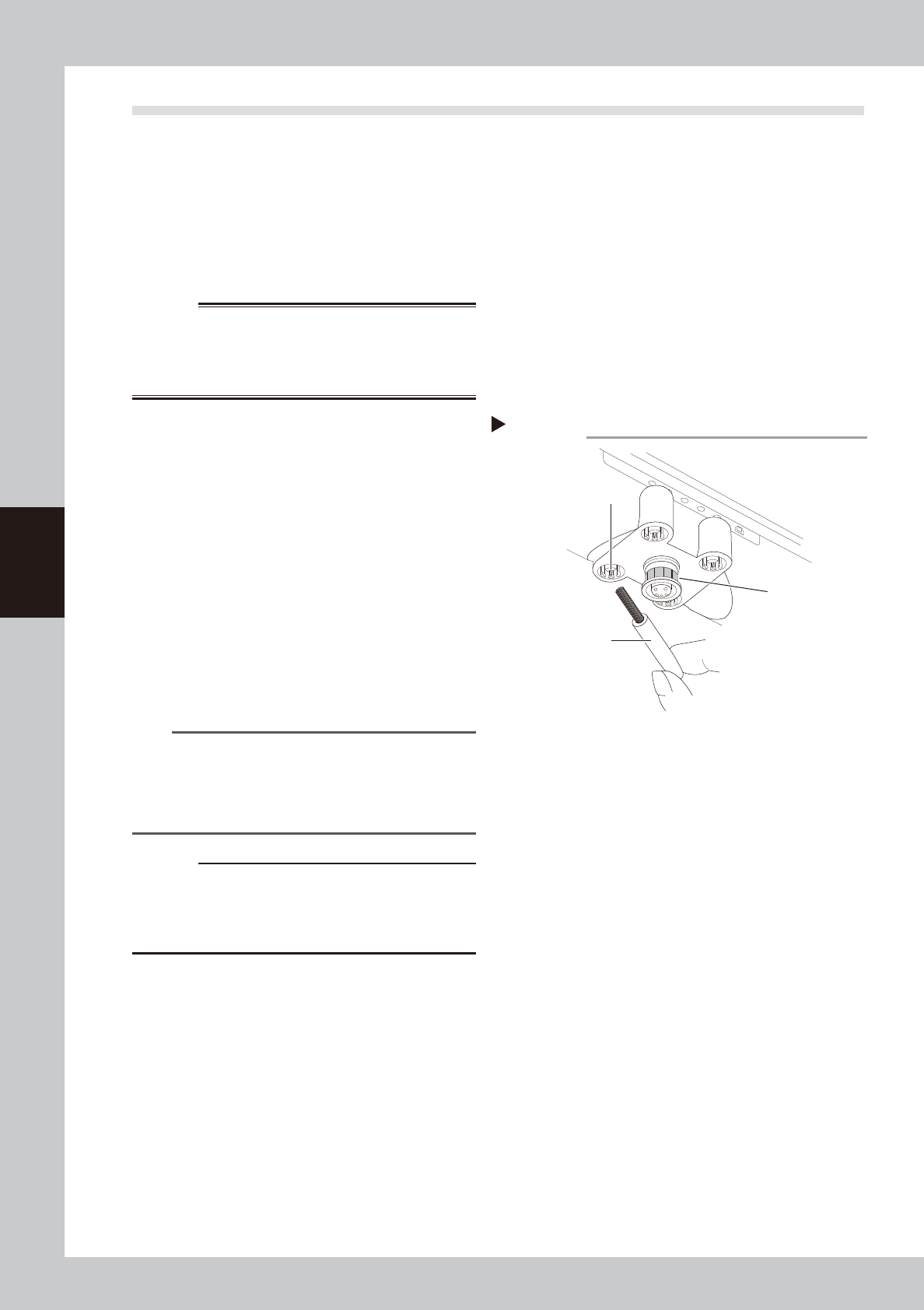
Clean the discharge needle.
1. Wipe off dirt on discharge needle and
sensor (gold sheet) with accessory brush
or cotton swab.
2. If the dirt cannot be removed, apply IPA
to a cotton swab slightly and clean the
discharge needle.
3. If IPA is used, leave discharge needle for
a while after cleaning to dry it out.
n
NOTE
It is also possible to clean the discharge needle by
detaching the discharge needle unit. See "1.2
Replacing ionizer discharge needle (2 year)" on next
page for attaching and detaching the discharge
needle unit.
c
CAUTION
Do not dip the discharge needle unit to the IPA when
cleaning the detached discharge needle unit. If
applying a high voltage while IPA remains in the unit,
the ionizer main unit may be damaged.
4
Supply the air and power on the
ionizer.
1. Turn the air supply/exhaust switch (valve)
and supply the air to the machine.
2. Close the machine safety cover and
press the [READY] button.
3.
Check that the green LED of "GOOD" on
ionizer is turned on. Make sure that no
error is occurring.
Cleaning the discharge needle
Accessory brush
Clean this area
of the sensor.
Discharge needle
Step 2
4-3
4
Maintenance of options
1.2 Replacing ionizer discharge needle (2-year)
Replace the ionizer discharge needle (KHN-M83P1-00X: Needle Set/ 4 sets of discharge needles) once every 2
years or if the LED (+/-PREC, +/-ERR) showing the ion balance error does not go off even after performing the
work steps in "1.1 Cleaning ionizer discharge needle (Monthly)". One ionizer contains 8 discharge needles.
Normally, one each of ionizer is installed on front and rear of the machine. Therefore, 4 discharge needle
packs are required for maintenance work of one machine.
1
Power off the ionizer.
e
1. The power supply to ionizer is stopped by
pressing emergency stop button and
then open the machine safety cover.
2.
Check that all LEDs on ionizer is turned
off.
w
WARNING
A VOLTAGE REMAINS ON THE DISCHARGE NEEDLE
IMMEDIATELY AFTER TURNING OFF THE POWER. BE AWARE
THAT TOUCHING THE DISCHARGE NEEDLE IMMEDIATELY
AFTER TURNING OFF THE POWER IS HAZARDOUS.
2
Turn off the air supply.
Turn the air supply/exhaust switch (valve) on
the lower left of the machine clockwise (EXT)
to turn off the main air.
3
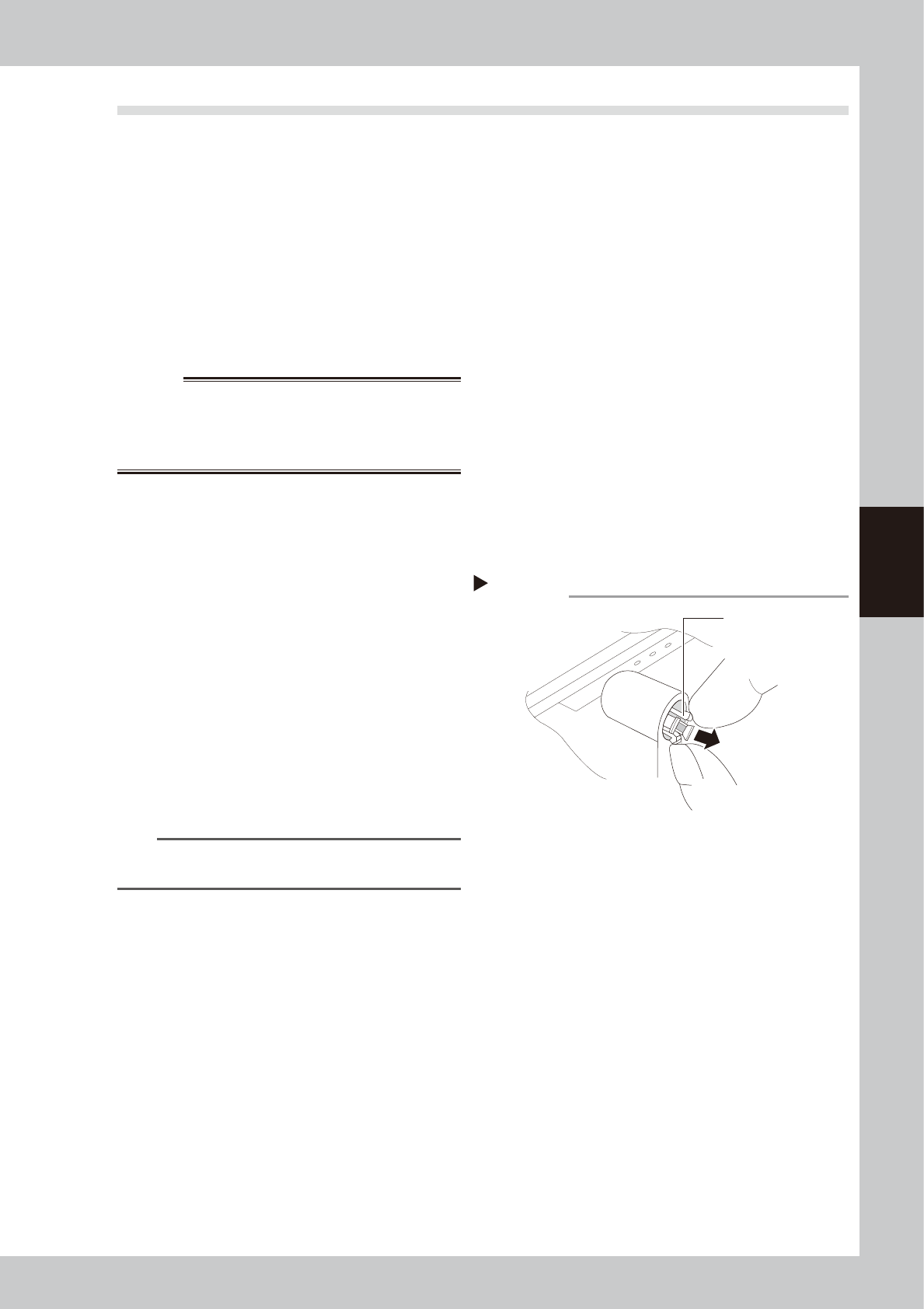
Remove the discharge needle.
As shown in the figure on the right, grasp
and squeeze the holder's opposing claws at
2 points and squeeze them toward each
other, then extract discharge needle.
53402-N9-00
4
Replace the discharge needle.
When installing the new discharge needle,
the notched area on the mounting side must
be aligned with the discharge needle unit's
protruding part. When correctly aligned,
press it in.
n
NOTE
See instruction manual issued by ionizer manufacturer
for detailed specification.
Removing discharge needle
Step 3
Holder claws
4-4
4
Maintenance of options
2. UPS (Uninterruptible Power Supply)
2.1 Replacing the UPS battery (3 year)
Even though the service life of the UPS may vary depending on the operating environment, such as ambient
temperature, it is recommended to replace the battery with a new one (KGA-M6566-30X) once every 3 years.
The following describes how to replace the battery that is incorporated into the UPS.
w
WARNING
BATTERY REPLACEMENTS SHOULD BE PERFORMED ONLY BY THOSE WITH ELECTRICAL WORK EXPERIENCE.
1
Power off the machine.
Powering off the machine turns off the UPS
power after several seconds.
w
WARNING
DO NOT ATTEMPT THIS BATTERY REPLACEMENT
PROCEDURE WHILE THE UPS FUNCTION IS RUNNING
(DURING AN EMERGENCY STOP, ETC.).
2
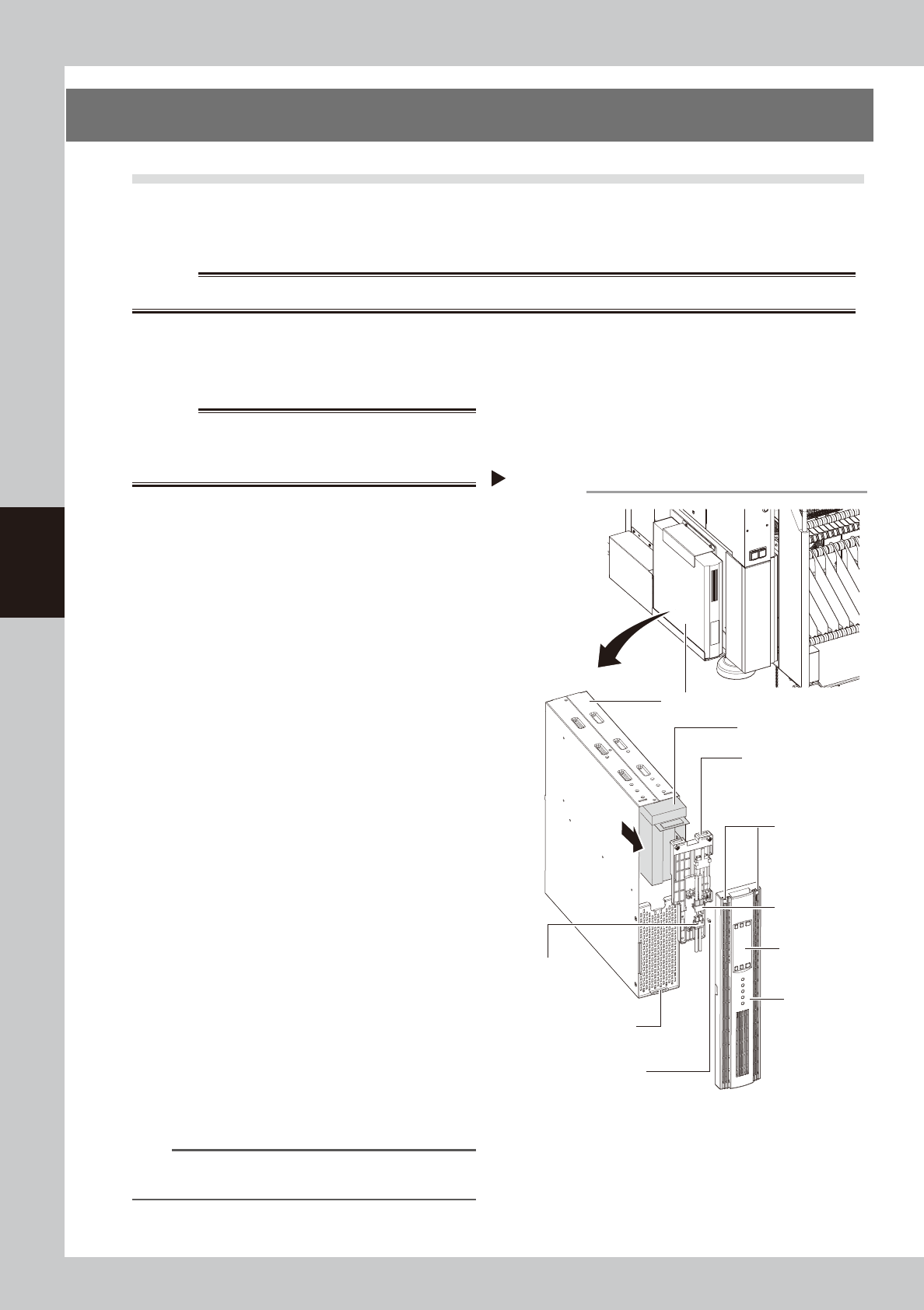
Detach the front panel.
Use a Phillips screwdriver to remove the
screws which mount the front panel, then
detach the front panel.
53403-N9-00
3
Disconnect the battery connector.
Disconnect the UPS side and internal battery
side connectors.
4
Remove the battery securing
fixture.
Remove the battery fixture mounting screws,
then remove the battery securing fixture.
5
Replace the detached battery with
a new one.
Extract the old battery and insert a new
battery in its place.
6
Attach the battery.
Reverse Steps 2 to 4 above to attach the
battery.
7
Check the UPS status.
1. Power on the machine.
2. Press the ON button on the UPS operation
panel to check that the BATTERY LED is
OFF.
8
Write the battery replacement date.
Write the battery replacement month/year
on UPS WARNING label (see "Safety
instructions" in this manual).
n
NOTE
For details about how to handle the UPS, see the user's
manual supplied with the UPS.
Replacing the internal battery
UPS unit
Bottom left,
as viewed when
facing the machine's
rear side
Internal battery
Internal battery
side connector
UPS side battery
connector
Battery mounting fixture
Front panel
Front panel hook
Battery mounting screw
Front panel
mounting screws
UPS operation
panel
Step 2-6