YSM40R_Mainte_E.pdf - 第82页
3-12 3 Periodic maintenance items T his section describes the procedure with "A/D T able F ront" as an example. 1 Set the tool on the nozzle station. e 1. Press the emergency stop button and then open the machi…
3-11
3
Periodic maintenance items
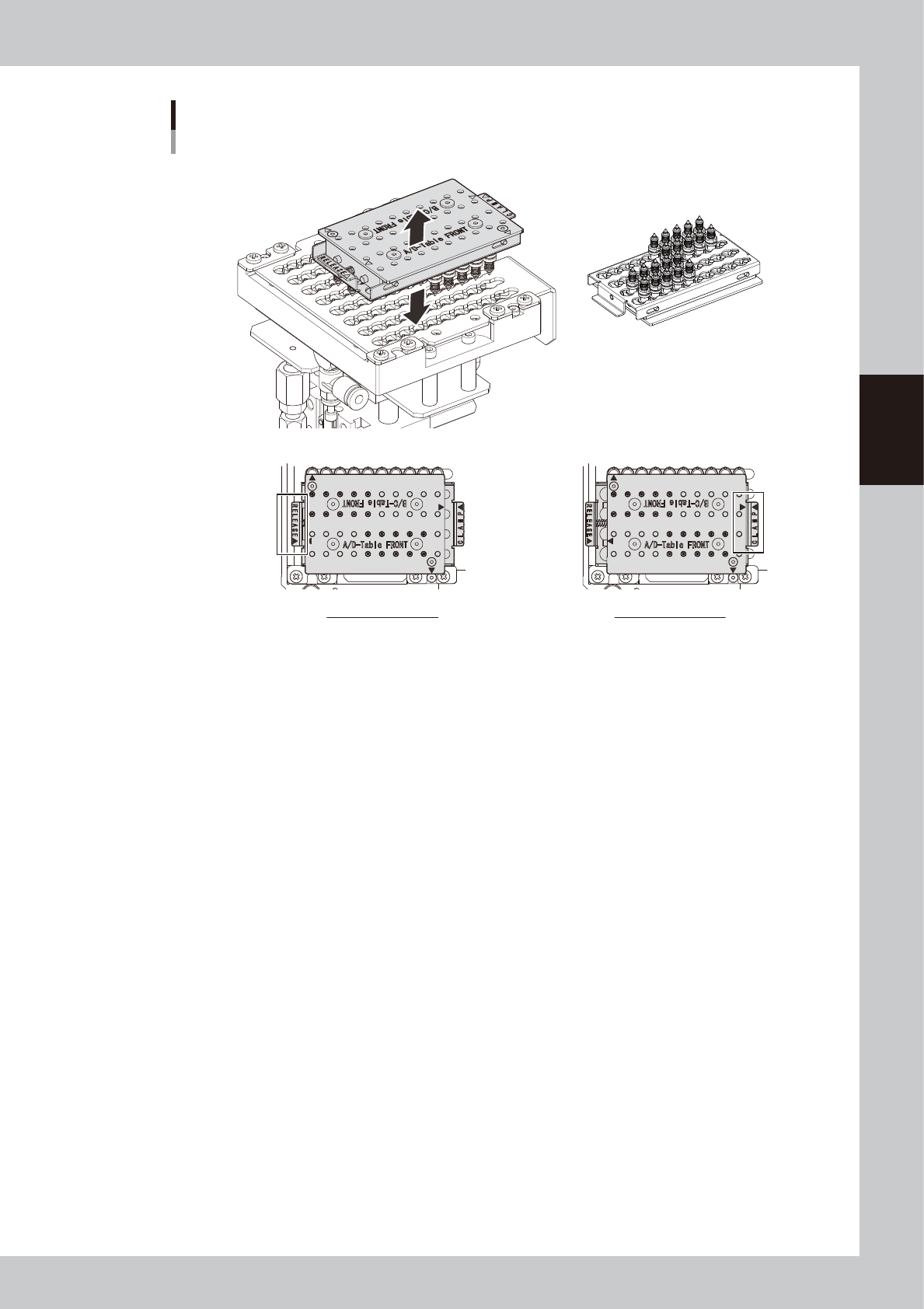
ANC nozzle attaching/detaching tool
For RS head
Nozzles are clampedNozzles are released
533E7-N9-00
n
Available nozzles
720X Series nozzles (7201A, 7202A nozzles, etc.)
n
How to detach all nozzles for RS head
3-12
3
Periodic maintenance items
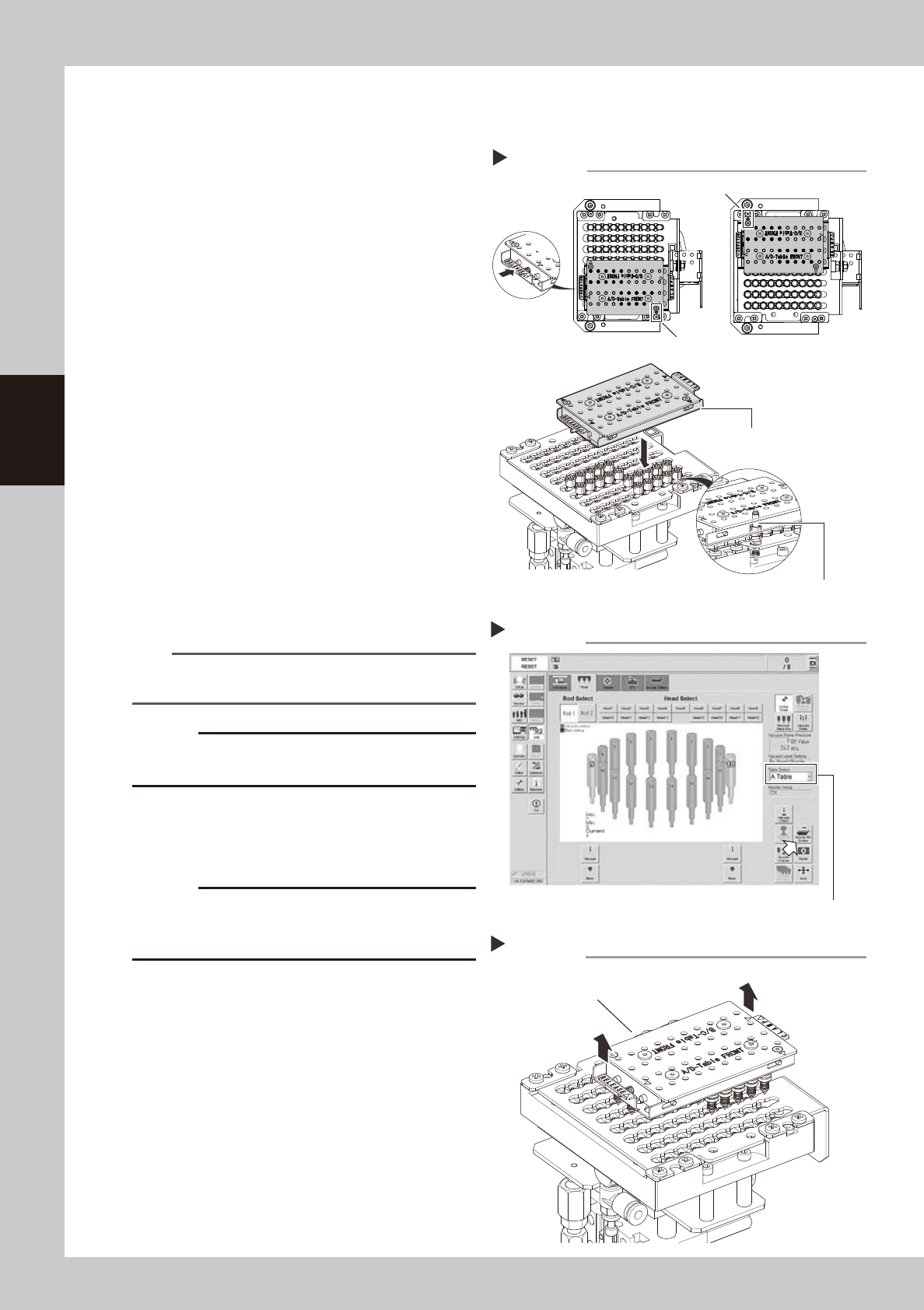
This section describes the procedure with "A/D Table Front" as an example.
1
Set the tool on the nozzle station.
e
1. Press the emergency stop button and
then open the machine safety cover.
2. Push the "RELEASE" side of tool to release
all nozzles.
3. Set the tool as the "A/D-Table Front" on
tool is not upside down. Insert the tool
into nozzle station aligning ANC mark
and tool mark.
4. Check that the tool is set to nozzles
securely.
5. Push the "CLAMP" side to clamp all
nozzles.
533E8-N9-00
2
Open the nozzle station shutter.
1. Open [Unit] - [Head] screen.
2. Select head unit from "Table Select".
3. Press [Nozzle. Stn Shutter] button to open
the nozzle station shutter.
54302-N9-00
3
Raise the tool up.
Raise the tool up vertically and slowly.
533E9-N9-00
n
NOTE
Raise the tool up vertically and slowly to avoid the
nozzle tip from hitting the shutter, etc.
c
CAUTION
If raising the tool up fast and forcibly, nozzles or the
nozzle station may be damaged.
4
Close the nozzle station shutter.
Press the [Nozzle. Stn Shutter] button again
and close the nozzle station shutter.
c
CAUTION
80 nozzles can be stored in nozzle station. The tool can
detach/attach 40 nozzles at once. When using 2 tools,
make sure to return nozzles to the original positions.
n
How to attach all nozzles for MU head
Step2
Nozzle station - Opening the shutter
Table Select
Setting tool
Step 1
Marks of ANC and tool
Marks of ANC and tool
Set the tool vertically aligning
nozzles to be detached.
Check that the tool is set to
nozzles securely.
Step 3
Raising tool up
Raise tool up vertically to avoid
nozzle tip from hitting shutter.
3-13
3
Periodic maintenance items
Attach nozzles at the nozzle station in the reverse order of detaching.
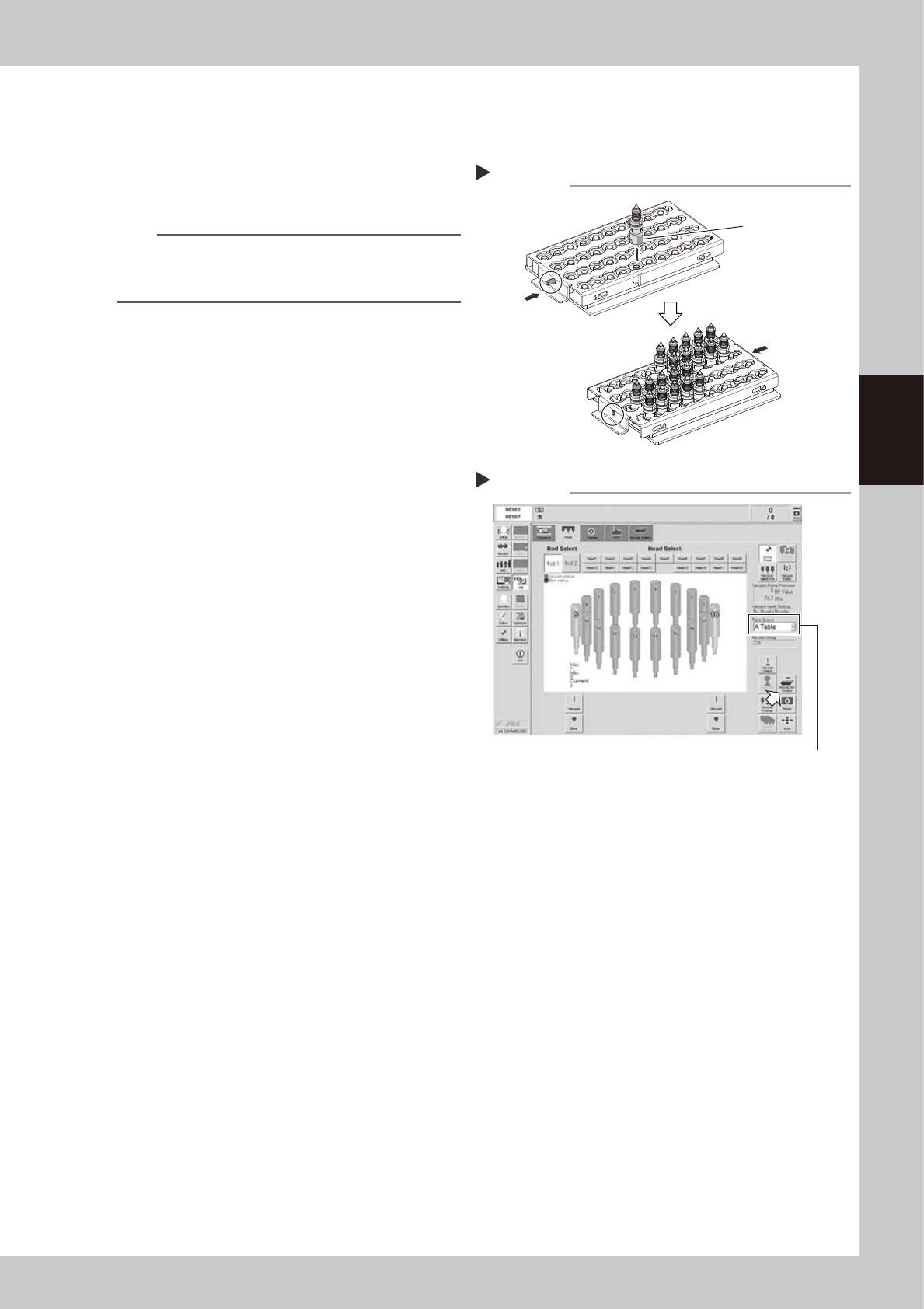
This section describes the procedure with "A/D Table Front" as an example.
1
Check the nozzle setting position.
Check that other nozzles are not set to the
nozzle storage positions and the setting
position is correct.
n
NOTE
See the nozzle placement position label attached in
the machine or the machine setting for the nozzle
setting position.
2
Set nozzles in the tool.
1. Push the "RELEASE" side to release all
nozzles.
2. Insert a nozzle facing the nozzle flat
surface to pin side.
3. After inserting all nozzles, push the
"CLAMP" side to clamp all nozzles.
543E0-N9-00
3
Open the nozzle station shutter.
1. Open [Unit] - [Head] screen
2. Select head unit from "Table Select".
3. Press [Nozzle. Stn Shutter] button to open
the nozzle station shutter.
54303-N9-00
4
Set the tool on the nozzle station.
Step3
Nozzle station - Opening the shutter
Table Select
Setting nozzles
Step 2
CLAMP
RELEASE
Nozzle flat surface