YSM40R_Mainte_E.pdf - 第145页
3-75 3 Periodic maintenance items 1 Pr epare for work. e 1. Remove all items sensitive to magnetic fields such as wristwatches and magnetic ID cards. 2. Press the emergency stop button and then open the machine safety co…
3-74
3
Periodic maintenance items
7. 3-year maintenance
This section describes 3-year maintenance items.
7.1 X and Y axes
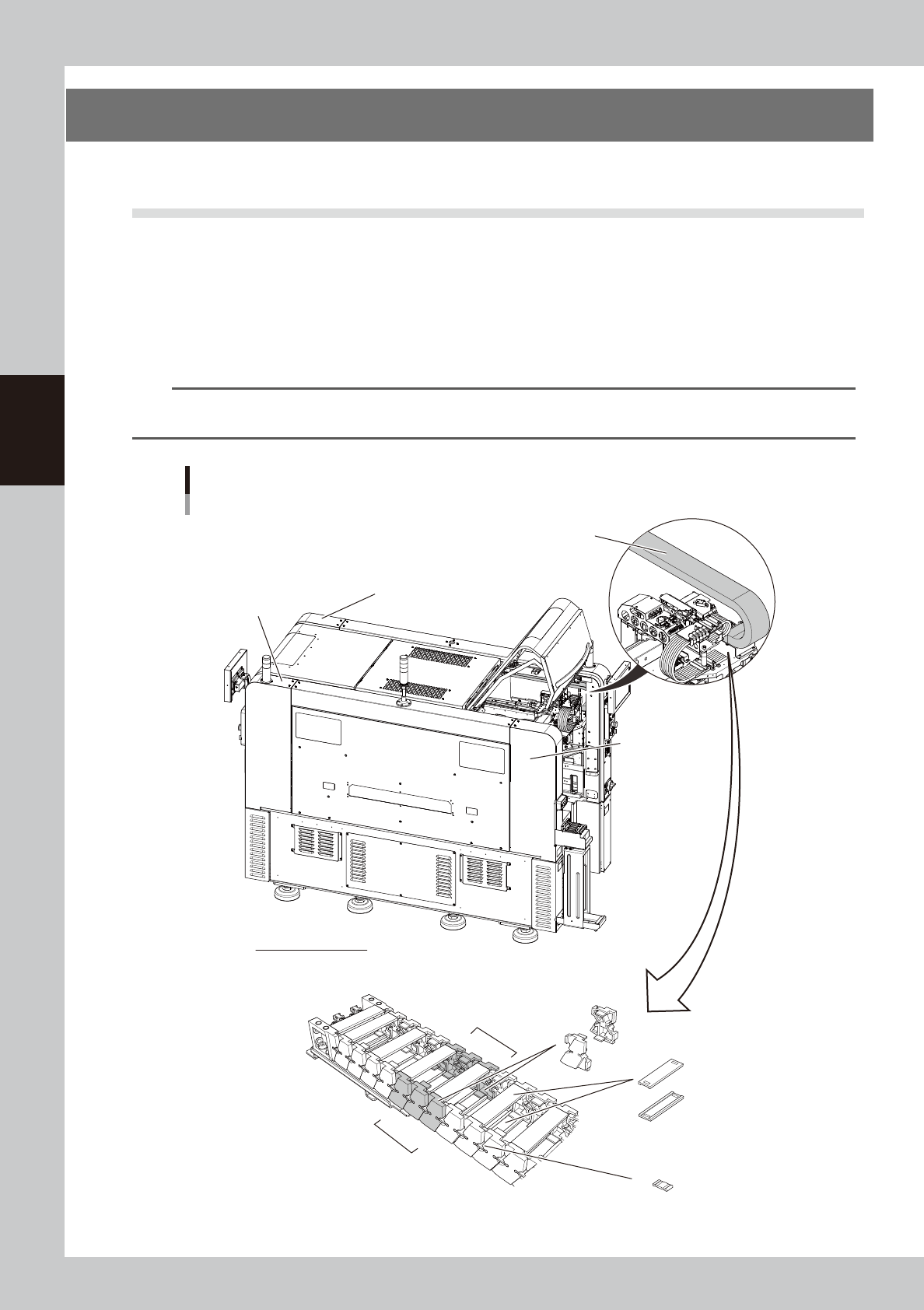
7.1.1 Replacing Y-axis cable carrier chain links
As a general guide, the Y-axis cable carrier parts (chain links) on each head should be replaced every 3 years.
The chain links to be replaced are the 3 pairs of the 5th through 7th chain links counting from the head side.
There are 4 Y-axis cable carriers (A-table to D-table) for 4-beam type machines, and 2 Y-axis cable carriers (front
left and rear left) for 2-beam type machines. So, to replace the chain links for a single machine, a total of 12
pairs are required for 4-beam types, and a total of 6 pairs for 2-beam type machines.
n
NOTE
The part set numbers to be replaced of the 4-beam type machine and 2-beam type machine of YSM40R differ. (the
width of the cable carriers are different.)
1
2
3
4
5
6
7
5
6
7
Y-axis cable carriers
4-beam type machine as seen from left side
Y-axis cable carrier (A-table)
Y-axis cable carrier
(C-table) inside
of machine
Y-axis cable carrier (B-table)
inside of machine
Y-axis cable carrier (D-table)
inside of machine
Head side
Y-axis cable carriers
Chain links to be replaced: 5th through 7th chain links counting from head side
Chain links
Joint parts
Crossbar
Chain links to
be replaced
533D1-N9-00
3-75
3
Periodic maintenance items
1
Prepare for work.
e
1. Remove all items sensitive to magnetic
fields such as wristwatches and magnetic
ID cards.
2. Press the emergency stop button and
then open the machine safety cover.
3. Use the CLAMP ON/OFF switch to lower
the feeder exchange carriage and
detach it.
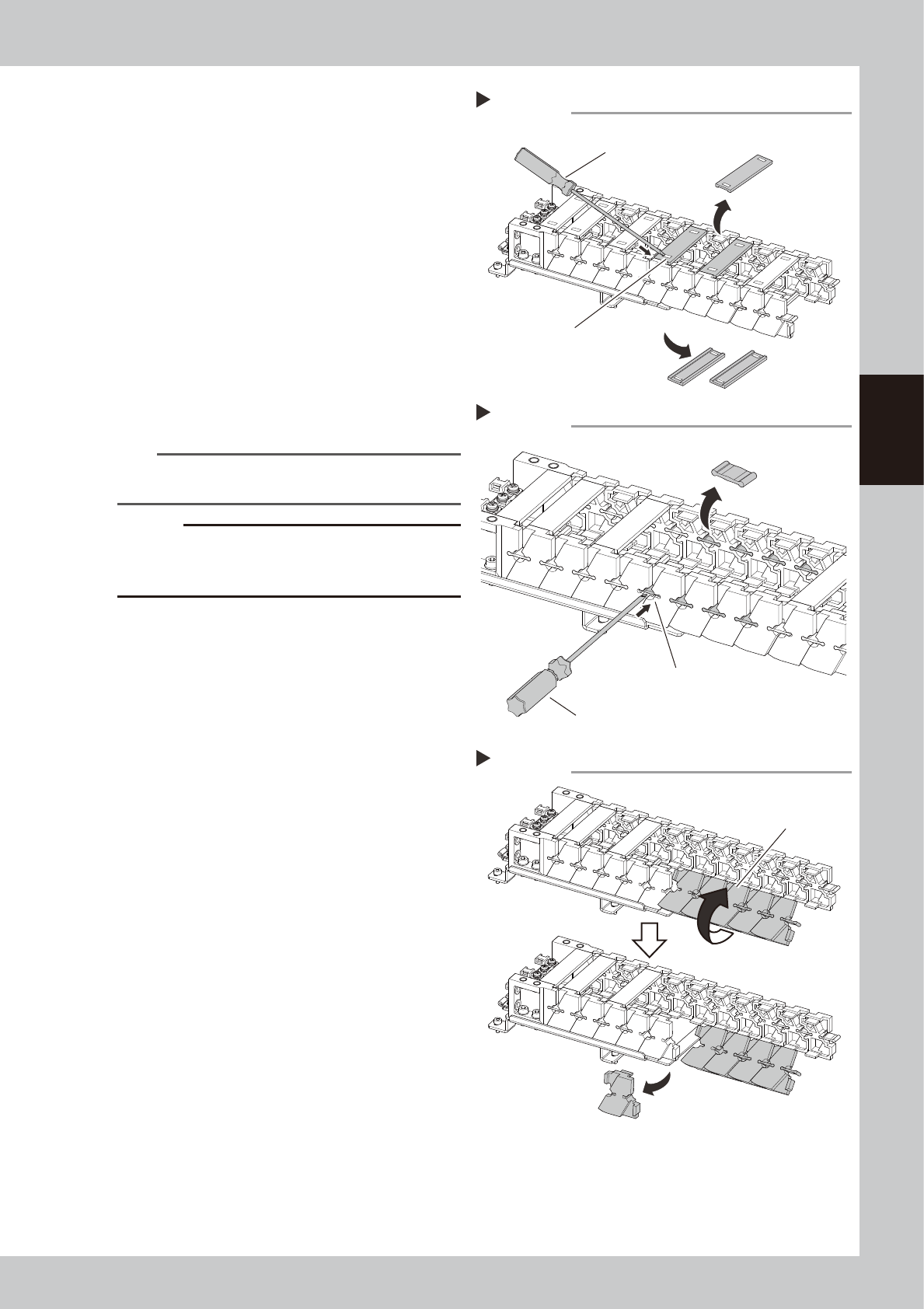
2
Detach the crossbars.
Press on the snap-fit (clip) on the crossbar of
the Y-axis cable carrier with a slotted
screwdriver to detach that crossbar. Detach
the crossbars joining the top and bottom
chain links No. 5 and No. 7 (a total of 4
crossbars).
533D2-N9-00
n
NOTE
Detaching the lower crossbars will be easier by moving
the head unit rearward along the Y-axis.
c
CAUTION
There are cables and air hoses inside the cable carrier,
so be careful not to damage or scratch them when
detaching the crossbar and joint parts.
3
Detach the joint parts.
Detach the joint parts of the Y-axis cable
carrier by pressing on with a slotted
screwdriver. Detach the joint parts on the
left and right of chain links No. 5, No. 6, No.
7 (a total of 8 joint parts).
533D3-N9-00
4
Detach the chain links.
Detach the chain links by twisting as shown
in the figure at right. Detach the chain links
(3 pairs) on the close side and far side of No.
5 to No. 7 as shown in the figure.
533D4-N9-00
5
Replace the chain links.
Replace with new chain links. Fit the chain
links on while twisting in the opposite
direction of Step 4. Replace them in order
one side at a time, from the near side, and
then the far side.
5
6
7
Detaching Y-axis cable carrier crossbars
Step2
Slotted screwdriver
Crossbar
Press on the snap-fit (clip) to
detach crossbar.
5
6
7
Detaching Y-axis cable carrier joint parts
Step 3
Push out the joint parts.
Flat-head screwdriver
Joint parts
5
6
7
6
7
5
6
7
Detaching chain links from Y-axis cable carrier
Step4
Twist the chain links.
3-76
3
Periodic maintenance items
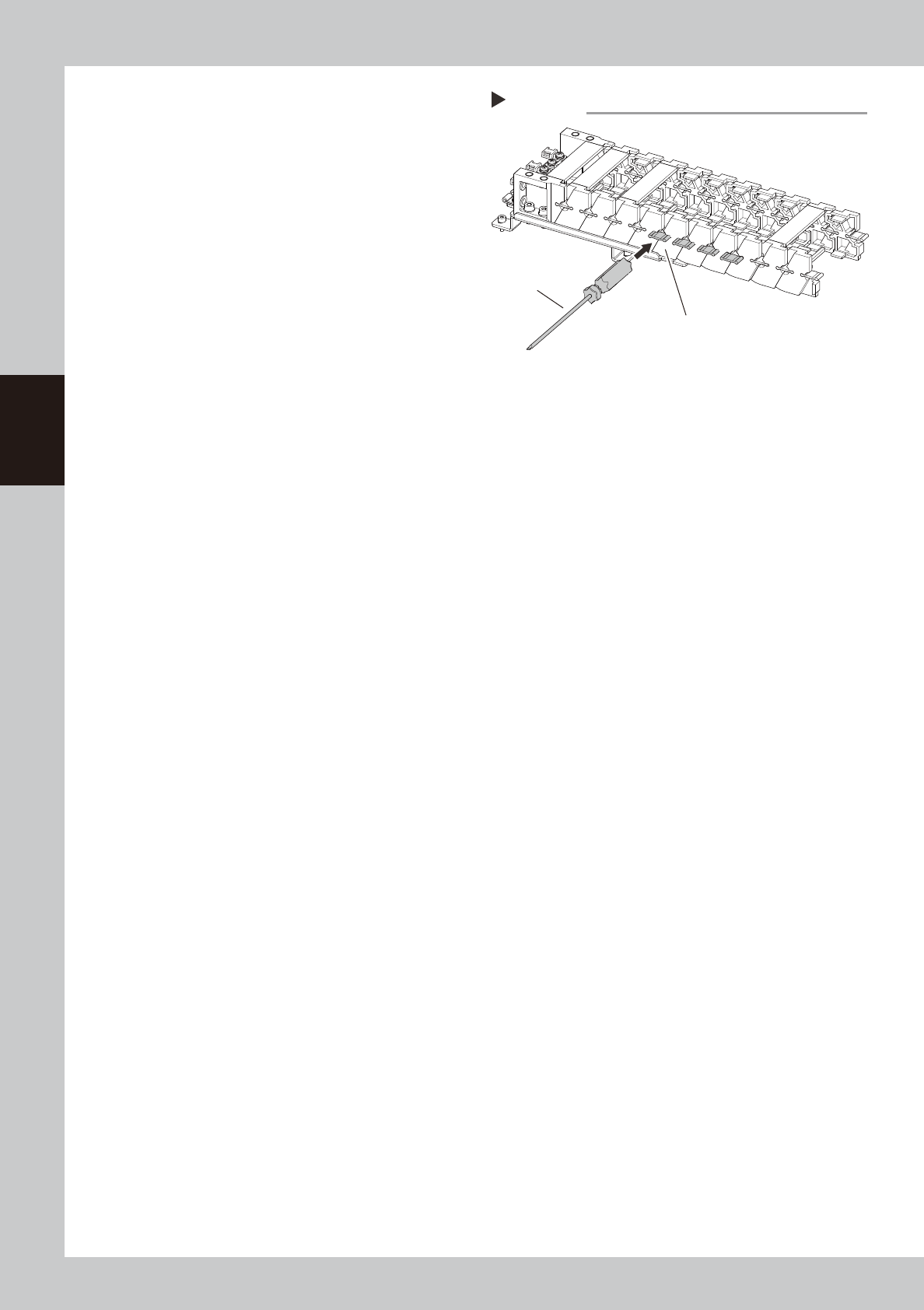
6
Attach the joint parts.
Insert the joint parts between the chain links.
After gently inserting, tapping them lightly
with a screwdriver handle or similar tool will
make it easier to fit them on.
533D5-N9-00
7
Attach the crossbars.
Align the crossbars with the snap-fit (clip)
and attach them in position.
Step 6
Fit on by tapping gently.
Use a screwdriver
handle, etc.
Attaching joint parts of Y-axis cable carrier