00197001-04_UM_Smart_Pin_Support_X-Series-S_SX12V2_DE_EN.pdf - 第104页
4 Working with Smart Pin Support at the Station 4.4 Testing Placement Head with Pin Picker Manually 104 User Manual / Bedienungsanleitung SIPLACE X-Series S, SX1/SX2 V2 Smart Pin Support Operation and Configura- tion 05/…
4 Working with Smart Pin Support at the Station
4.4 Testing Placement Head with Pin Picker Manually
User Manual / Bedienungsanleitung SIPLACE X-Series S, SX1/SX2 V2 Smart Pin Support Operation and Configura-
tion 05/2019
103
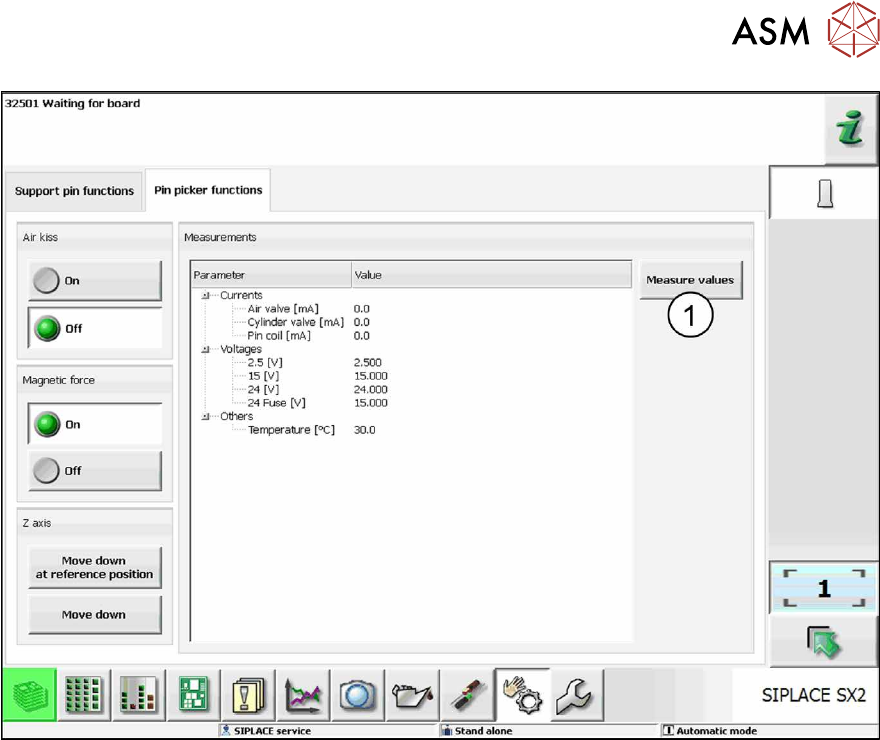
Fig.45: Pin picker functions tab
Under the Pin picker functions tab you can check and, if necessary, modify the following states:
●
Air kiss On / Off
The air kiss is switched on and off and the current state of the air kiss is displayed.
●
Magnetic force On / Off
The magnetic force is switched on and off and the current state of the magnetic force is dis-
played.
●
Z-axis Move down at reference position / Move down
The Z-axis is moved and the current state of the Z-axis is displayed.
The internal values for the placement head are displayed in a list.
► Click on the Measure values button (1) to update the list after you have made changes.

4 Working with Smart Pin Support at the Station
4.4 Testing Placement Head with Pin Picker Manually
104 User Manual / Bedienungsanleitung SIPLACE X-Series S, SX1/SX2 V2 Smart Pin Support Operation and Configura-
tion 05/2019
5 Sample Applications
5.1 Support pin placement
User Manual / Bedienungsanleitung SIPLACE X-Series S, SX1/SX2 V2 Smart Pin Support Operation and Configura-
tion 05/2019
105
5 Sample Applications
The following sample applications and workflows display how to use the Smart Pin Support func-
tion in practical cases.
5.1 Support pin placement
5.1.1 Not enough support pins
NOTICE
► No support pins were stored for later when the changeover table was changed.
► From SW 712.1 support pins can also be sorted between the gantries.
NOTICE
Not enough support pins
The following message could be shown in either of two cases:
► If too few support pins are available in the machine.
► From SW 712.1 more support pins can be defined in SIPLACE Pro than there are at
one time in the machine.
If too few support pins are available in the machine, the following notification will be displayed on
the GUI of the station software.
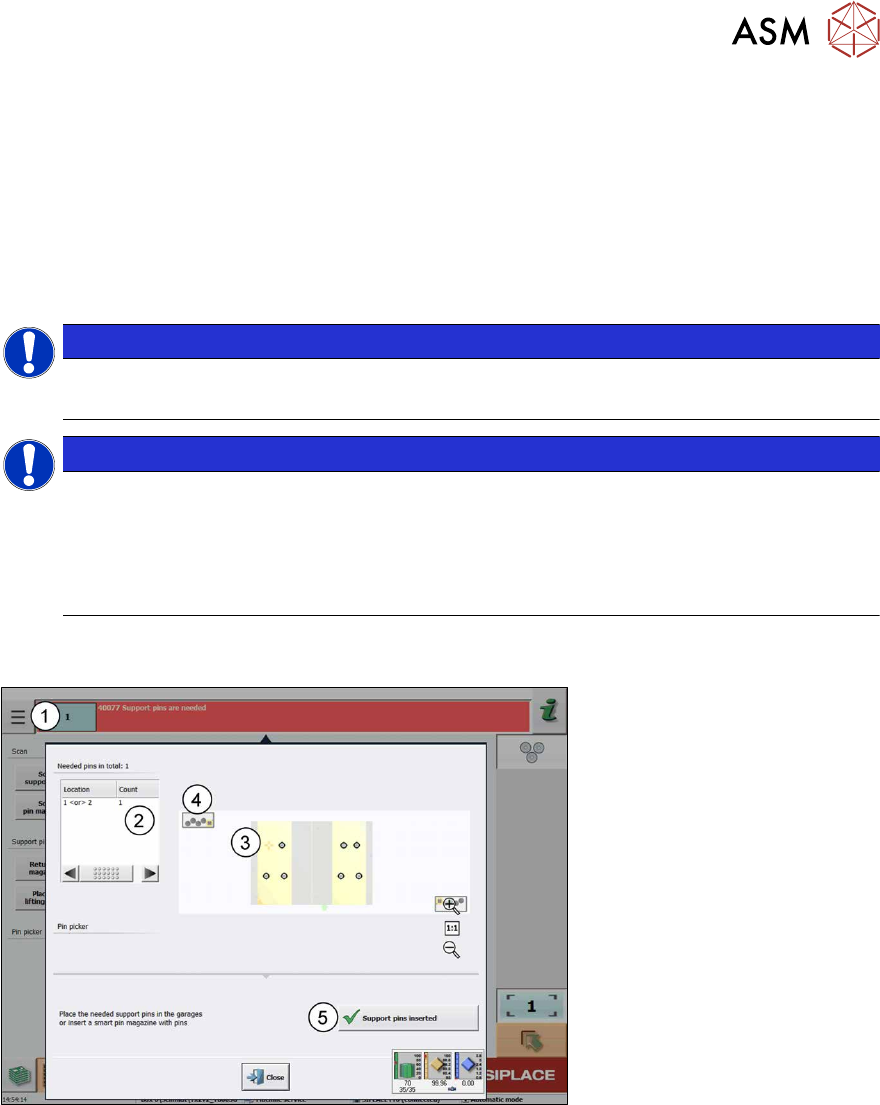
Fig.46: Not enough support pins are available in the machine.
► Click on the message(1) to see the details.
The number of missing support pins will be displayed (2). In this example, 4 support pin positions
are defined on the lifting table, of which one has not yet been set (3). However, there is no support
pin available any more in the machine(4).
You will be asked to make more support pins available and to confirm this with the Support pins
inserted(5) button.