00197001-04_UM_Smart_Pin_Support_X-Series-S_SX12V2_DE_EN.pdf - 第66页
1 Introduction 1.7 SIPLACE on the World Wide Web (WWW) 66 User Manual / Bedienungsanleitung SIPLACE X-Series S, SX1/SX2 V2 Smart Pin Support Operation and Configura- tion 05/2019 1.7 SIPLACE on the World Wide Web (WWW) L…
1 Introduction
1.3 System Requirements
User Manual / Bedienungsanleitung SIPLACE X-Series S, SX1/SX2 V2 Smart Pin Support Operation and Configura-
tion 05/2019
65
1.3 System Requirements
The necessary system requirements for the Smart Pin Support function can be found in the Smart
Pin Support Assembly Instructions, item no. [00197002-xx].
Support of the function:
●
For SX1/SX2 V2 as of SIPLACE Pro Version 10.0 and station software version 706.0.
●
For X-seriesS as of SIPLACE Pro Version 10.1 and station software version 706.1.
1.4 Release History
Document
Smart Pin Support
SIPLACE SX1/SX2 V2
SIPLACE X-Series S
Operation and configuration
User guide
Release Amendments
04/2012 Initial release
11/2012 Supplements
11/2013 Supplements
05/2019 Supplements
●
Section "Not enough support pins" revised
●
Restrictions supplemented
●
Update of the chapter "Calibrating the pin picker, lifting tables and pin
magazines"
1.5 Document Structure
This user manual is structured as follows:
Chapter 1 contains conventions for the safety instructions, a short description of Smart Pin Sup-
port, the necessary system requirements and information on the release history, the Online help
filesand SIPLACE in World Wide Web.
Chapter 2 describes how to start the hardware and software and calibrate the machine.
Chapter 3 describes how to define and configure Smart Pin Support in SIPLACE Pro.
Chapter 4 describes how to work with Smart Pin Support at the station.
Chapter 5 contains some sample applications and workflows with Smart Pin Support.
Chapter 6 contains restrictions for Smart Pin Support.
1.6 Online Help Files
Make use of the information provided in the Online help files for SIPLACE Pro and the station soft-
ware. These files contain additional, detailed information about Smart Pin Support.

1 Introduction
1.7 SIPLACE on the World Wide Web (WWW)
66 User Manual / Bedienungsanleitung SIPLACE X-Series S, SX1/SX2 V2 Smart Pin Support Operation and Configura-
tion 05/2019
1.7 SIPLACE on the World Wide Web (WWW)
Log into our SIPLACE
®
homepage at http://www.siplace.com.
► You can choose between the German and English versions.
The different sections contain information about our products, services and contact persons.
In addition, registered customers can also access the SIPLACE User Group. Here you can call up
special information about our placement systems e.g.
●
Technical documentation,
●
Technical information,
●
Spare parts lists etc.
Registration for the user group is very simple:
► Click on the Register link.
► Fill in the registration form and send it off to us.
Soon afterwards, you will receive your access authorization with USER ID and password.
2 Starting Hardware and Software
User Manual / Bedienungsanleitung SIPLACE X-Series S, SX1/SX2 V2 Smart Pin Support Operation and Configura-
tion 05/2019
67
2 Starting Hardware and Software
The following requirements must be met before the hardware and software can be started:
Requirements
●
The pin magazine has been installed and correctly adjusted at the designated location in the
placement machine.
●
The pin picker has been installed at the gantry and is connected to the head board.
Detailed information can be found in the Smart Pin Support Assembly Instructions, item no.
[00197002-xx].
► Ensure that the calibration garage is empty.
► Put a support pin into the pin picker.
► Switch the placement machine on.
These steps and what has to be considered are described in detail in the User Manual for the
placement machines.
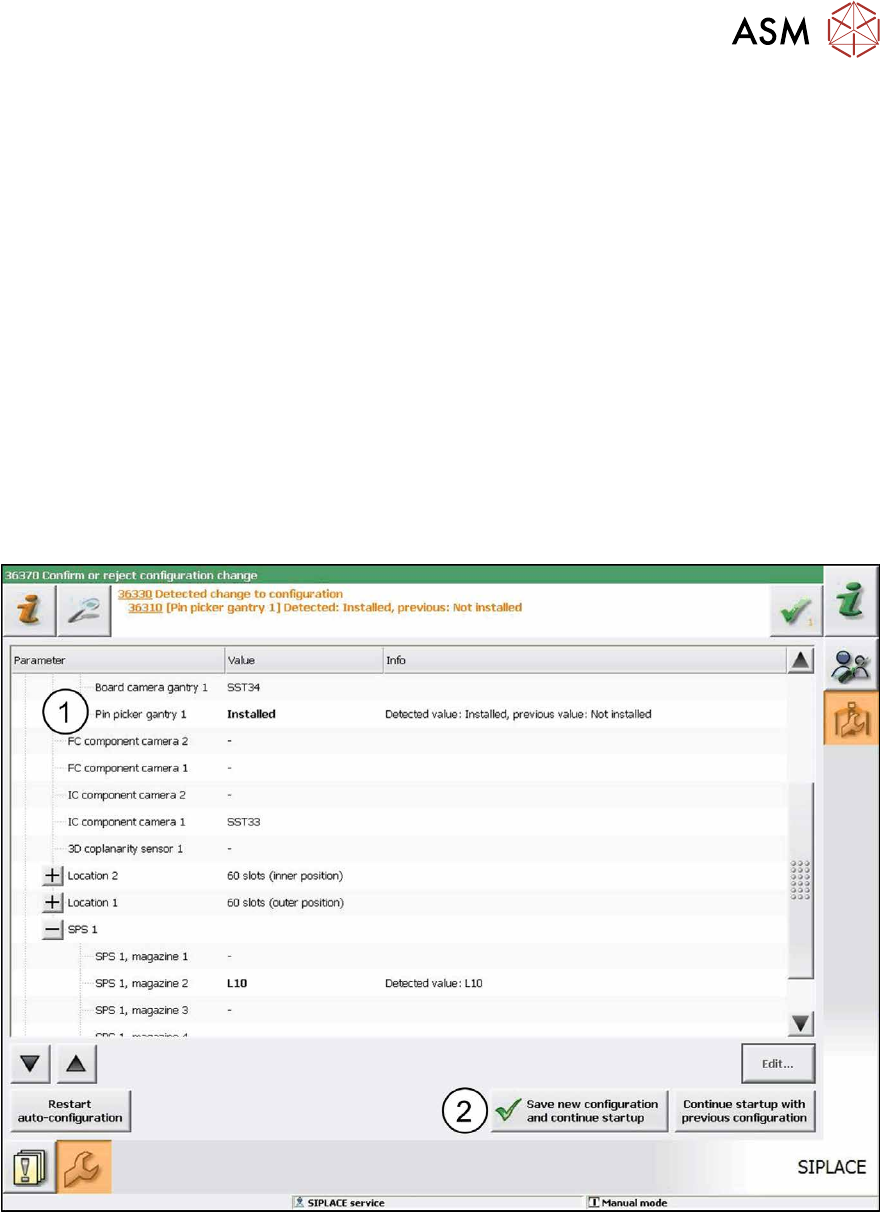
The pin picker is automatically detected in the Autoconfiguration (1). The reference run is being
executed. After the reference run has been completed the station is ready for operation.
Fig.6: Saving configuration
► Click on the Save new configuration and continue startup button (2) to save the new con-
figuration.
If the embedded software is not up-do-date a corresponding hint(1) informs you that the embed-
ded software has to be updated and downloaded.