00197001-04_UM_Smart_Pin_Support_X-Series-S_SX12V2_DE_EN.pdf - 第74页
3 Configuring Smart Pin Support in SIPLACE Pro 3.1 Configuring Smart Pin Support in the Setup Editor 74 User Manual / Bedienungsanleitung SIPLACE X-Series S, SX1/SX2 V2 Smart Pin Support Operation and Configura- tion 05/…
3 Configuring Smart Pin Support in SIPLACE Pro
User Manual / Bedienungsanleitung SIPLACE X-Series S, SX1/SX2 V2 Smart Pin Support Operation and Configura-
tion 05/2019
73
3 Configuring Smart Pin Support in SIPLACE
Pro
If a pin picker is installed at the station, it must be configured in the Setup Editor in SIPLACE Pro,
due to the fact that restrictions of the travel range are included in the calculation. An installed pin
picker can be deactivated for a station in SIPLACE Pro.
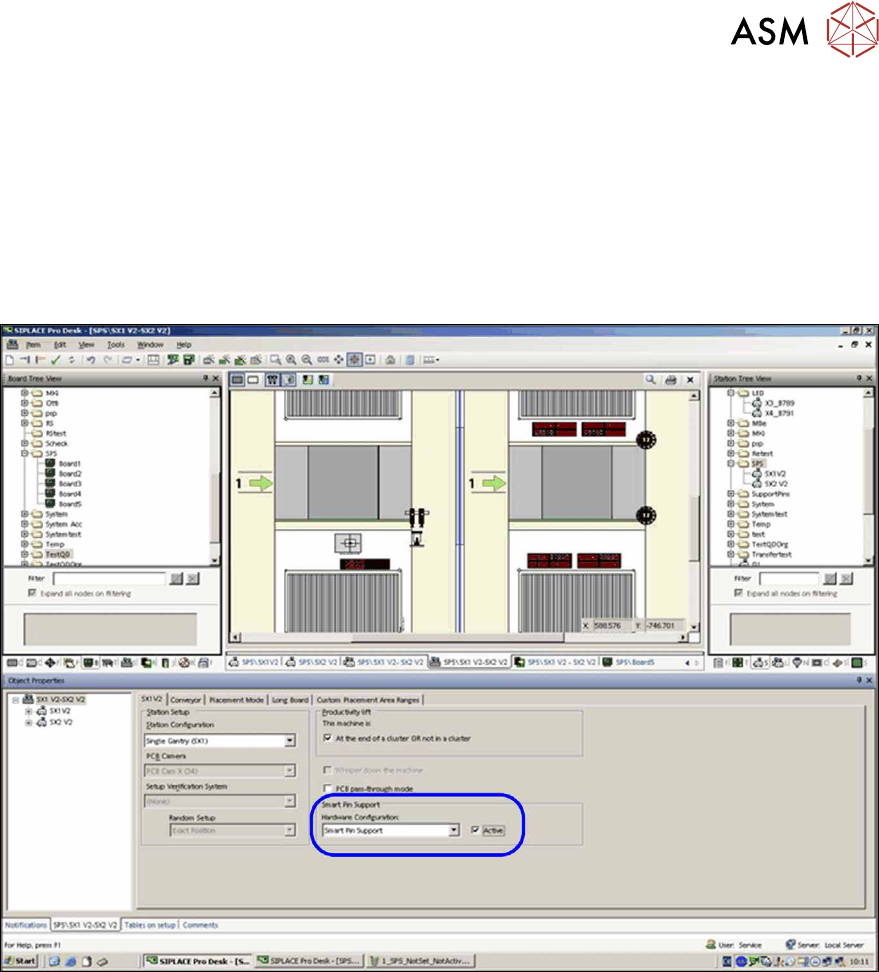
In order to use the Smart Pin Support function, the Smart Pin Support hardware option must be
activated in the Setup Editor.
Fig.12: Setup Editor – Smart Pin Support active
The pin positions must be defined in the Board Editor in SIPLACE Pro. Properties such as pin
name, pin type, X-/Y-position and tolerance radius are defined for these pin positions. By means of
a 3D and 2D view, the position of the support pins can be checked on both board sides (if top side
and underside are specified for the board) with respect to a potential collision with the components.
The pin positions are saved in a separate pin list. This pin list can also be used for other boards.
In the Recipe Editor the settings of the pin positions will then be displayed for each placement area
in the setup. The operator can switch between the top side and underside of the board. If required,
the Omit property can be set for each pin position.
The saved pin lists are displayed in a separate tree view in which they may be moved, copied or
deleted. Switch to the Board Editor to open a pin list.
The defined pin positions and their properties will be sent to the station via the GUI Converter of
Line Control when the corresponding recipe is downloaded at the station.
3 Configuring Smart Pin Support in SIPLACE Pro
3.1 Configuring Smart Pin Support in the Setup Editor
74 User Manual / Bedienungsanleitung SIPLACE X-Series S, SX1/SX2 V2 Smart Pin Support Operation and Configura-
tion 05/2019
3.1 Configuring Smart Pin Support in the Setup Editor
You can configure the Smart Pin Support function for each station in the Setup Editor.
It is necessary to configure the function, because the limited travel range is considered even if the
function is not used when the pin picker is installed.
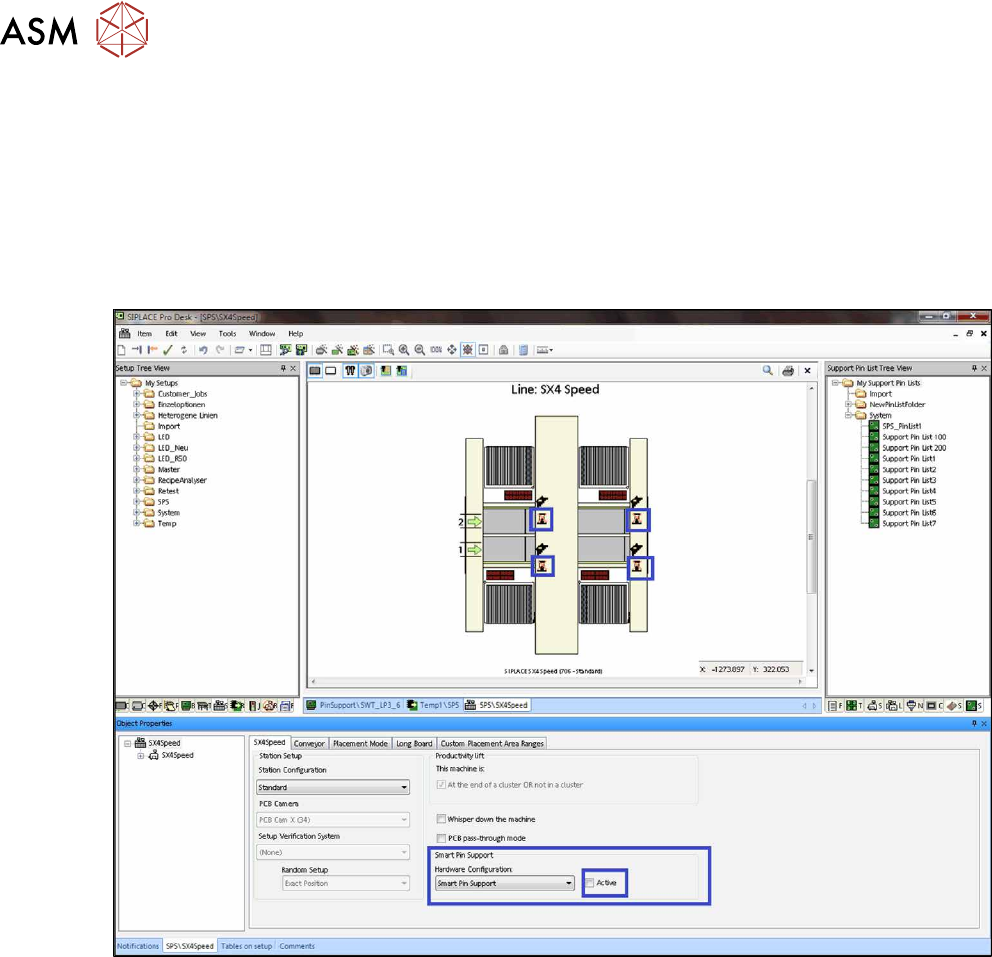
An icon in the graphic displays if the function is installed and active or installed and inactive at the
station.
► Set the Smart Pin Support function to active or inactive for the selected station.
Fig.13: Setup Editor – Sample Smart Pin Support inactive (X4iS)
3 Configuring Smart Pin Support in SIPLACE Pro
3.1 Configuring Smart Pin Support in the Setup Editor
User Manual / Bedienungsanleitung SIPLACE X-Series S, SX1/SX2 V2 Smart Pin Support Operation and Configura-
tion 05/2019
75
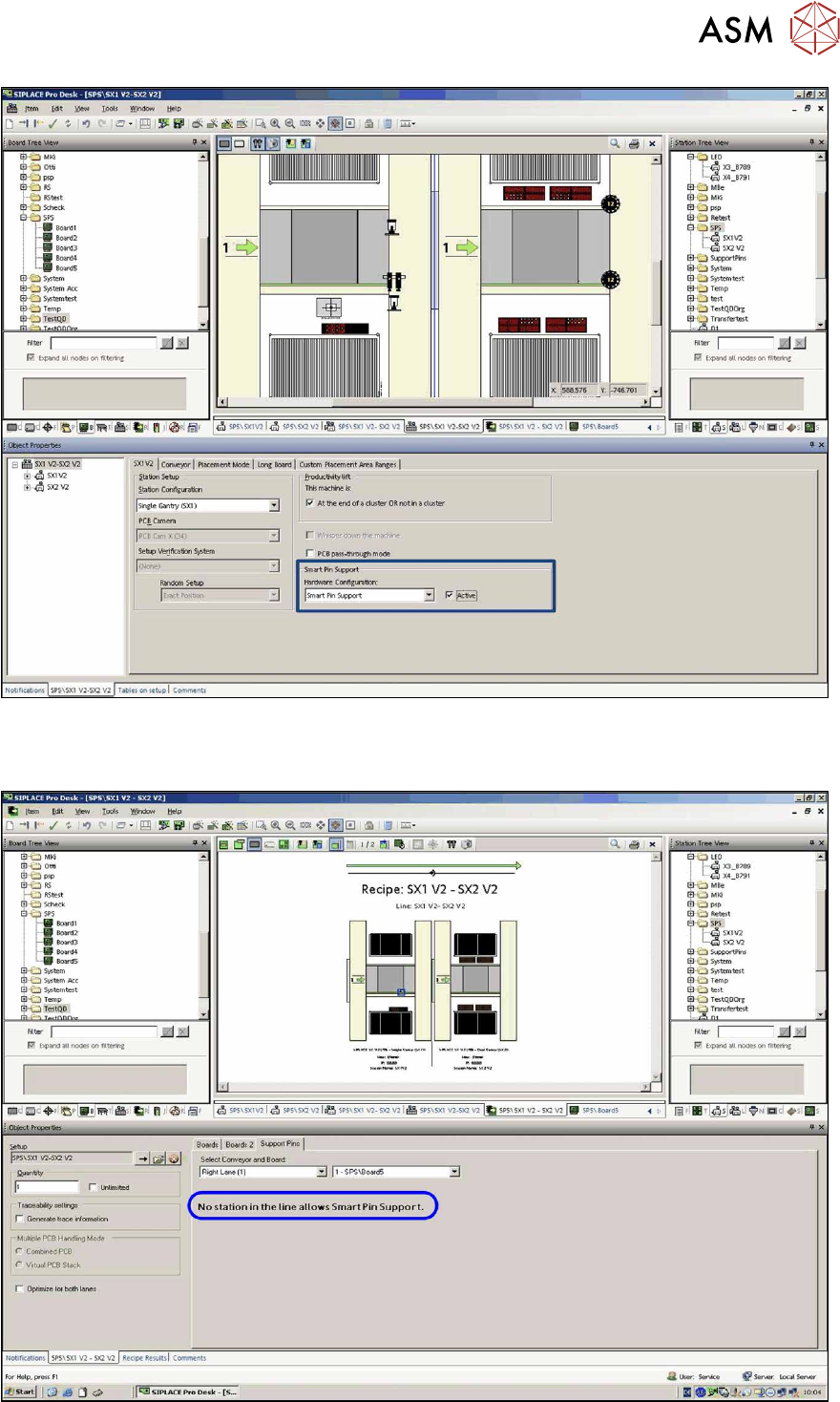
Fig.14: Setup Editor – Sample Smart Pin Support active (SX1)
In the Support Pins tab in the Recipe Editor it is then displayed whether the function is active or
inactive at the selected station.
Fig.15: Recipe Editor – Sample Smart Pin Support inactive (SX1 / SX2)