00191369-01.pdf - 第115页
User’s Manual SIPLACE HS-50 3 Introduction and Basic Concepts Software Version S R.501.xx Edition 01/99 3.3 User Interface - Views and M enus 113 2SWLRQV0HQX The "Options " menu i s only a vailabl e…

3 Introduction and Basic Concepts User’s Manual SIPLACE HS-50
3.3 User Interface - Views and Menus Software Version SR.501.xx Edition 01/99
112
NOTE
The next two menu options belong to the group of vision functions.
These functions are used to teach and test fiducials, measure components and change
package form data.
The vision functions cannot be executed at the "Operator" access level.
7HDFKILGXFLDO)
This menu item is used to call the functions for the processing of fiducials for PCB position
detection.
For a more extensive description of the procedure refer to Chapter 6 "Vision Functions".
7HVWFRPSRQHQW)
This menu item is used to call the functions for the processing of package forms for component
centering.
For a more extensive description of the procedure refer to Chapter 6 "Vision Functions".
6WDUW6,7(67)
This automatically starts the SITEST test program for machine set-up and calibration.
The user interface, together with the procedure for the execution of the functions, is described
in the separate User’s Manual for the SITEST test program.
NOTE
The SITEST test program cannot be started from the "Operator" access level.
*(0 )
This menu item is used to call the GEM interface functions.
For a more extensive description of the procedure refer to Chapter 13.
NOTE
The GEM interface functions cannot be called unless the GEM interface has been configured.
At the "Operator" access level, only the function "Send and receive messages" is available.
The GEM interface functions are not available in the current software version.
User’s Manual SIPLACE HS-50 3 Introduction and Basic Concepts
Software Version SR.501.xx Edition 01/99 3.3 User Interface - Views and Menus
113
2SWLRQV0HQX
The "Options" menu is only available in the main view. This menu contains all the supple-
mentary functions.
Å Click the required menu item and then make the appropriate settings or selections in the
corresponding windows or dialog boxes.
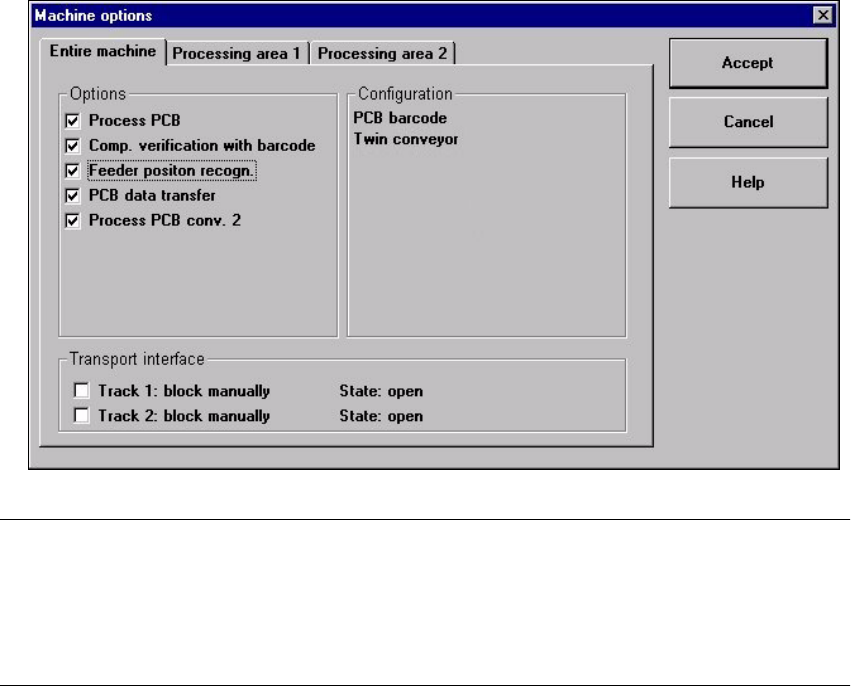
0DFKLQHRSWLRQV
Depending on access level, you can obtain information about the station configuration
("Operator") or activate or deactivate the displayed machine options ("Line engineer",
"Service").
Å Click the menu item 0DFKLQHRSWLRQV
The following window is displayed.
NOTE
Only those machine options are displayed which are configured at the current station.
The different machine options and the associated functions are described in Chapter 4
"Placement Functions", Chapter 6 "Vision Functions" and chapter 13 "Station Extensions/
Software“.
Å Click the checkboxes corresponding to the machine options which you want to activate or
deactivate.
3 Introduction and Basic Concepts User’s Manual SIPLACE HS-50
3.3 User Interface - Views and Menus Software Version SR.501.xx Edition 01/99
114
NOTE
At "Operator" access level, it is only possible to activate and deactivate the conveyor interface
options.
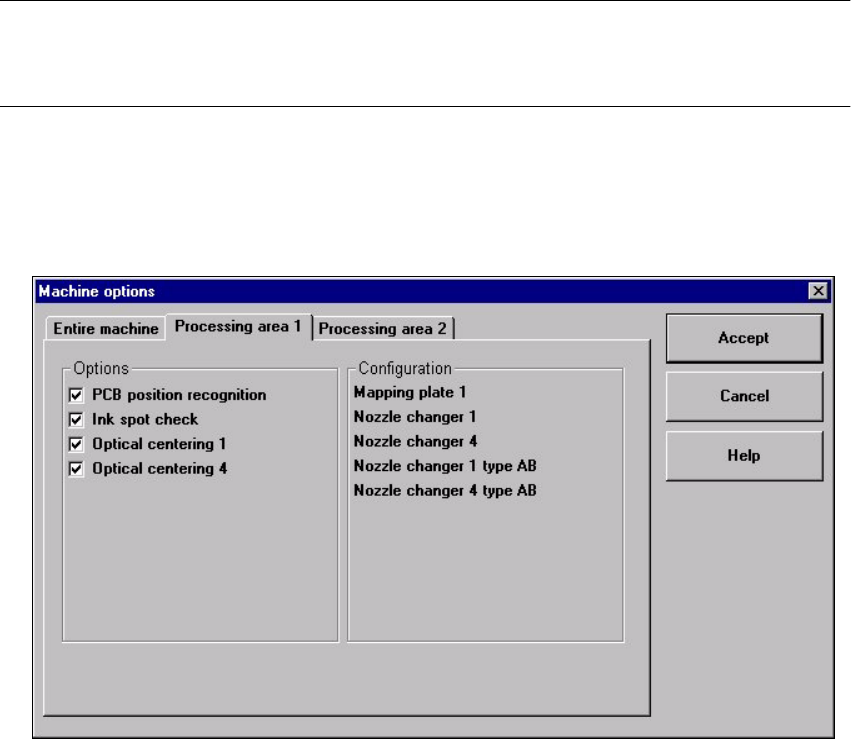
Å If you want to activate or deactivate the options for a processing area or view its configu-
ration, click the 3URFHVVLQJDUHD or 3URFHVVLQJDUHD tab to select the required area.
The display switches to the selected processing area (see example below for PA1).
Å Check/uncheck the boxes corresponding to the required machine options.
Å Click $FFHSW to save the settings.
$ FFHVVOHYHO
It is possible to protect some user interface functions against unauthorized use by setting an
access level and allocating a password. Functions which are not accessible from a given
access level cannot be executed since the associated pushbuttons, radio buttons and menu
commands are either inactive or not displayed.
You can choose between the access levels "Operator", "Line engineer" and "Service".
Passwords can be allocated for the access levels "Line engineer" and "Service".