00191369-01.pdf - 第305页
User Manual HS-50 6 Vision functions Software-Version 5.01Edition 01/99 6.7 Guidelines for Describing Package Form s 303 3DUDPHWH UVIRUWKH0H DVXULQJ0HWKRGV Possib le se quenc es of meas urin g method s It is al…
6 Vision functions User Manual HS-50
6.7 Guidelines for Describing Package Forms Software-Version 5.01 Edition 01/99
302
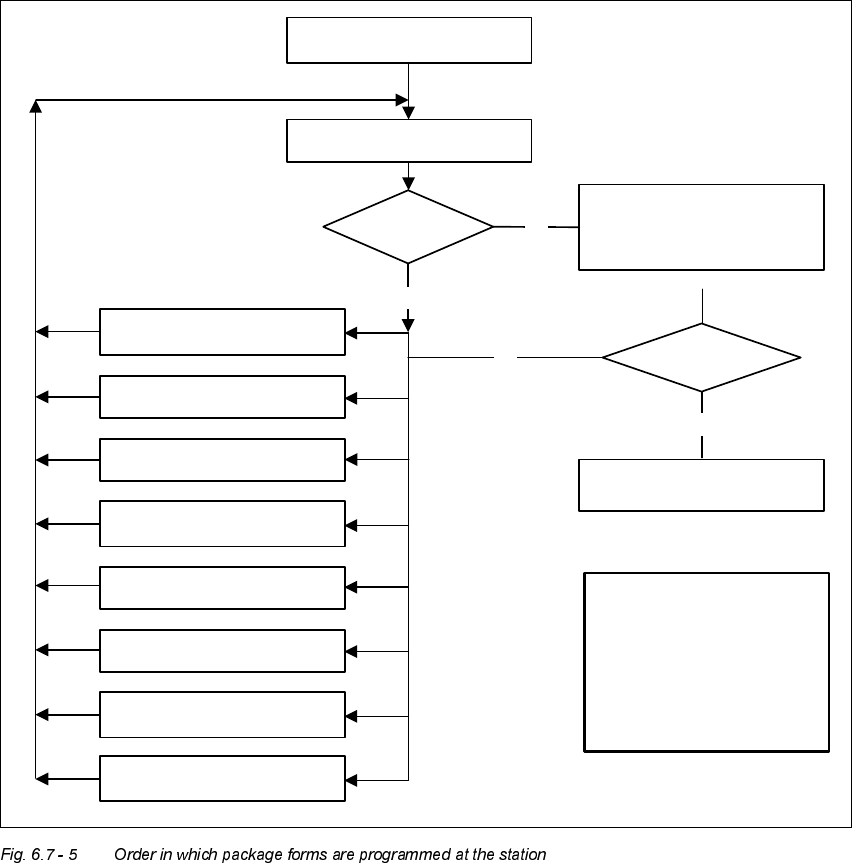
7HVW3DFNDJH)RUP9LVXDO5HSUHVHQWDWLRQ3URJUDPPLQJ0HDVXUHPHQW
7\SHV
In the ’Test component’ menu, a component is picked up and then moved to the camera and
mapped in its 0° position. The component is displayed with respect to its placement angle at the
revolver head.
No
No
Yes
Error
1. Handling error: pick-up angle,
nozzle type, CO on nozzle etc.
2. Display component
3. Modify lighting
4. Modify measuring modes
and measuring parameters
5. Modify component dimension
6. Modify pin/ball contrast
7. Modify pin/ball
dimension
8. Program contrast
(program table)
Important note:
The manipulation of
components at the station must
remain the exception, rather
than the rule.
In general, only a few
components have to
be changed.
Assemble component
several times
Repeat measurement
and check the results
Measure component
Check component, press
Return for next meas. step
Are the results
constant?
Yes
User Manual HS-50 6 Vision functions
Software-Version 5.01Edition 01/99 6.7 Guidelines for Describing Package Forms
303
3DUDPHWHUVIRUWKH0HDVXULQJ0HWKRGV
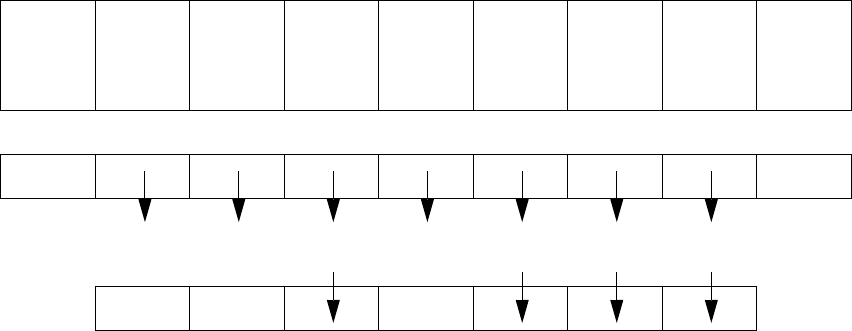
Possible sequences of measuring methods
It is also possible to program other sequences, such as corner followed by lead or lead only. Such
combinations are very unusual, however. If the component is defined in the package form editor,
then the measuring methods will be pre-assigned. However, in some cases it may be necessary
to modify the measuring methods at the station so that the component can also be optically cen-
tered.
The results from the last measurement are always saved. The previous measurement is used as
a rough centering step for the next measurement and thus helps to reduce the measuring window.
The more measuring methods are used, the longer the entire measuring procedure will be. A large
number of measuring methods for a component can delay the head cycle. This applies to the re-
volver head in SIPLACE automatic placement machines, in particular.
PDC/
FDC
FDC FDC FDC FDC FDC
Flip-
chips
HS50/
S20/F
Ball
grid ar-
ray
Bare
dies
Size Size Size Size Row Row Size Size Size
Lead Corner Corner Corner Corner Grid Grid
6 Vision functions User Manual HS-50
6.7 Guidelines for Describing Package Forms Software-Version 5.01 Edition 01/99
304
6HWWLQJWKH&RPSRQHQWV,OOXPLQDWLRQDWWKH[5HYROYHU+HDG&DPHUD
*HQHUDO,QIRUPDWLRQRQ,OOXPLQDWLRQ0HWKRGV
The idea of illumination setting is to obtain an image of the leads of a component which is as high-
contrast as possible. At the same time it is also important to suppress representation of the body
of the component.
These instructions are intended to help you find the best possible illumination parameters. This,
however, does not imply that you rigidly comply with the values specified in these instructions. The
way you should proceed is first to follow these instructions and then to adjust the parameters your-
self where necessary. It may well be that you come across a component where the leads are better
illuminated using values different than the ones suggested in these instructions.
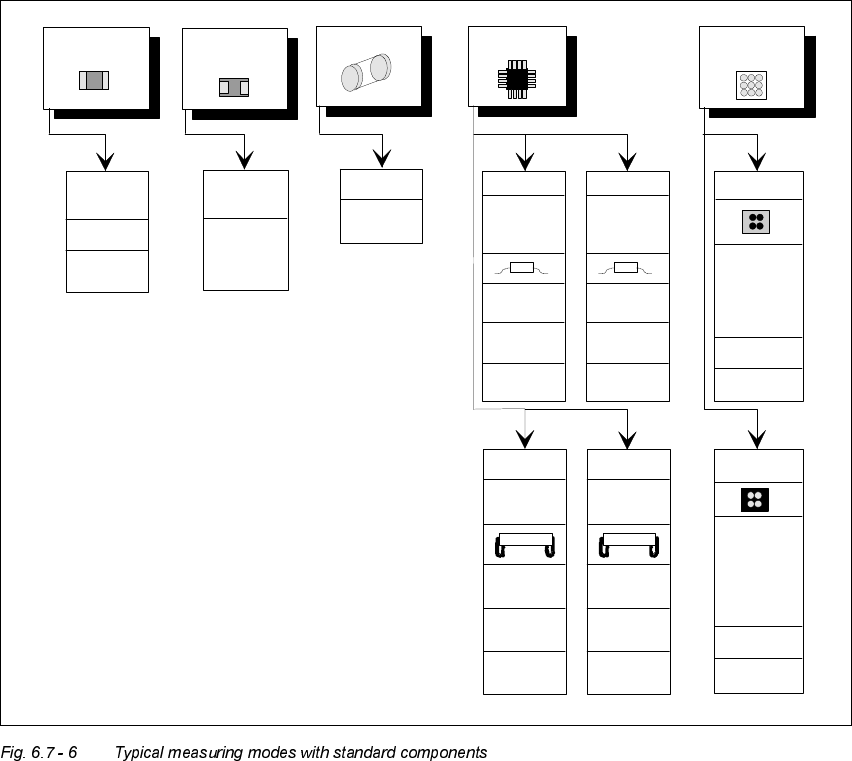
Flip Chip
Chip
General
SIZE
high
resolution
0402,
0603, etc.
SIZE
LEAD
outer tip
LEAD
outer tip
SIZE
Tantalum
capacitor
Melf IC
BGA, µBGA
Flipchip
SOJ,
PLCC
Small
SIZE
CORNER
outer tip
LEAD
outer tip
LEAD
outer tip
CORNER
outer tip
ROW
outer tip
SO,
QFP
Large
Small Large
BGA
GRID
BALL
PLCC
SIZE
CORNER
Beinmitte
CORNER
lead center
LEAD
lead center
ROW
lead center
LEAD
lead center
GRID
BALL
SIZE
(depend-
ing on
component
size)
SIZE
(depend.on
component
size)