00191369-01.pdf - 第169页
User’s Manual SIPLACE HS-50 5 Single Functions Software Version S R.501.xx Edition 01/99 5.2 Single functions, Gantry 167 *HQHUDOFRPPHQW V In the "Noz zle ch anger co nfigurati on revo lver he ad" scre…
5 Single Functions User’s Manual SIPLACE HS-50
5.2 Single functions, Gantry Software Version SR.501.xx Edition 01/99
166
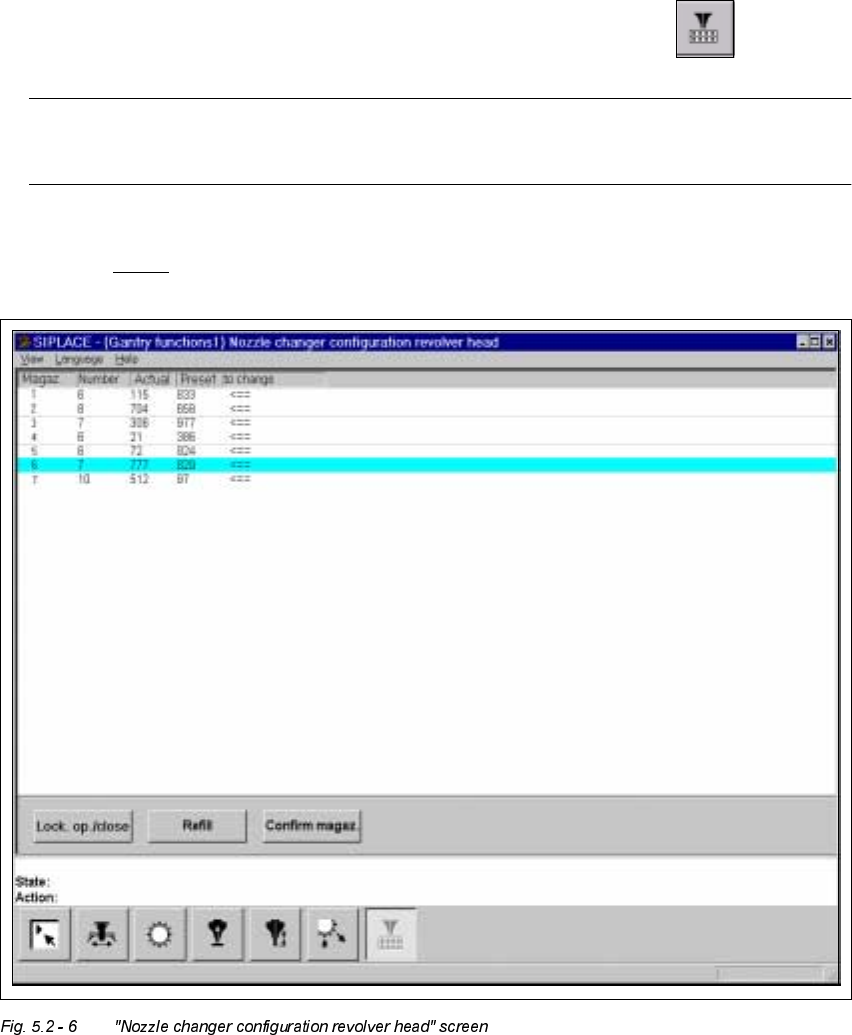
1R]]OHFKDQ JHUFRQILJXUDWLRQUHYROYHUKHDGVFUHHQ
Å In the current screen for the single function for Gantry x, click the symbol .
NOTE
The nozzle changer must be installed and configured in the machine options.
The user interface is switched to the "Nozzle changer configuration revolver head" screen
(see Fig. 5.2 - 6
).
User’s Manual SIPLACE HS-50 5 Single Functions
Software Version SR.501.xx Edition 01/99 5.2 Single functions, Gantry
167
*HQHUDOFRPPHQWV
In the "Nozzle changer configuration revolver head" screen there are functions which allow
you to adjust and confirm the nozzle configuration for the individual magazines in the nozzle
changer.
Click on the appropriate button to carry out the required function.
The nozzle changer configuration is displayed in the table in the display.
&RQGLWLRQVIRUFKDQJLQJWKHVHWXSRIWKHQR]]OHFKDQJHU
Remember the following points when changing the set-up:
– The magazines may only be filled when all nozzles on the revolver head have been re-
turned to their magazines.
– Magazines may only contain nozzles of one type.
– The maximum number of nozzles per magazine is 12.
– The maximum number of magazines on a nozzle changer is 7.
– The magazines must be filled outside the machine and must only ever be changed in their
entirety.
– To remove and load nozzles you must open the lock. Once you have finished, you must
then close the lock again.
0HDQLQJRI WKHHQWULHVLQ W KHWDEOHLQ WKHGLVSOD\
– 0DJD]LQH
Number of the magazine
– 1XPEHU
Number of nozzles in the magazine
– $FWXDO
Type of nozzles currently in the magazine
– 3UHVHW
If the type of nozzle currently in the magazine is not the same as shown in this column, then
it is to be changed
– 7RFKDQJH
An arrow ( <== ) in this column indicates that the nozzle type currently in the magazine
("Actual" column) must be changed for the nozzle type shown in the "Preset" column.

5 Single Functions User’s Manual SIPLACE HS-50
5.2 Single functions, Gantry Software Version SR.501.xx Edition 01/99
168
)XQFWLRQV
/RFNRSFORVH
To be able to fill the magazine manually, you must use this function to open the lock (locking
plate) on the nozzle changer and close it afterwards.
Å Click the /RFNRSFORVHbutton.
The magazine locking plate is opened.
Å Click the /RFNRSFORVHbutton.
The magazine locking plate is closed again.
5HILOO
This function allows you to refill the magazine with new nozzles of the type already in use (or
in other words, the set-up itself is not changed).
During placement operation it may be necessary to refill individual magazines with nozzles.
You must fill the magazine with 12 nozzles and these must be of the same type that were orig-
inally contained in the magazine.
The nozzle types shown in the columns "Actual" and "Preset" of the table will agree.
The number of nozzles in the magazine is shown in the "Number" column.
Å Select the entry corresponding to the magazine you want to fill with nozzles. This line is
then highlighted in light blue.
Å Click the /RFNRSFORVHbutton.
Å Fill the magazine with the same type of nozzle it originally contained.
NOTE
The magazines must always be completely refilled (12 nozzles of the same type for each
magazine).
Å Click the /RFNRSFORVHbutton again.
Å Click the 5HILOO button.
The entry in the "Number" column is updated and now shows the new number of nozzles
in the magazine.