00191369-01.pdf - 第158页
5 Single Functions User’s Manual SIPLACE HS-50 5.2 Single functions, G antry Software Version SR.501.xx Edi tion 01/99 156 NOTE All tr avel fu nctions of the ma in axes (x and y) must be started usin g the s tart button.…
User’s Manual SIPLACE HS-50 5 Single Functions
Software Version SR.501.xx Edition 01/99 5.2 Single functions, Gantry
155
$FWXDWH'3D[LV
When this function is activated, the nozzle in the dp1 axis is rotated by 90
0
.
Å Click the $FWXDWH'3D[LVbutton.
The nozzle in the dp1 axis is rotated by 90
0
once.
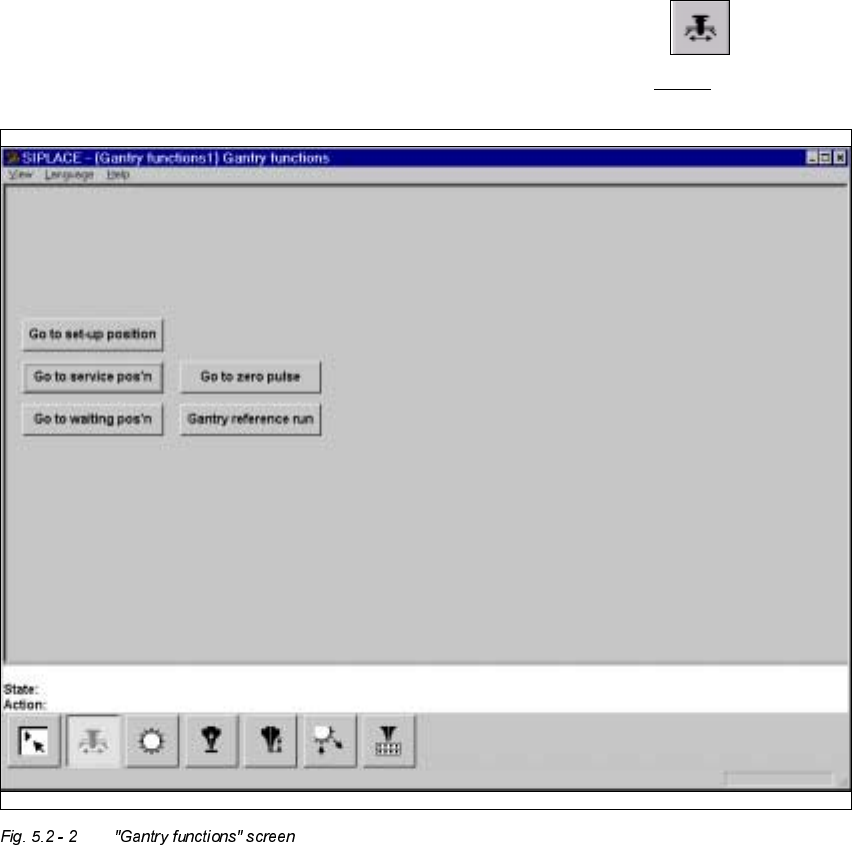
*DQWU\IXQFWLRQVVFUHHQ
Å In the current screen for the single functions for Gantry x, click the symbol .
The user interface is switched to the "Gantry functions" screen (see Fig. 5.2 - 2
).

5 Single Functions User’s Manual SIPLACE HS-50
5.2 Single functions, Gantry Software Version SR.501.xx Edition 01/99
156
NOTE
All travel functions of the main axes (x and y) must be started using the start button.
A message appears in the status field on the screen which asks you to "Please press the start
button".
If the machine covers are not closed, the message "Close cover" will appear in the status
field.
)XQFWLRQV
In the "Gantry functions" screen the following functions are available to test the currently se-
lected gantry. The required function is triggered by clicking on the corresponding button.
*RWRVHWXSSRVLWLRQ
This function is used to check the set-up position of the gantry.
When the gantry is in the set-up position, it is possible to unload and retool the feeders.
Å Click the *RWRVHWXSSRVLWLRQbutton and press the start button as often as you are asked
to.
The gantry moves (from the feeder area) into the set-up position.
*RWRVHUYLFHSRVLWLRQ
This function is used to check the service position of the gantry.
When the gantry is in the service position, it is possible to carry out work on the placement
head and on other parts of the gantry.
Å Click the *RWRVHUYLFHSRV¶Qbutton and press the start button as often as you are asked
to. The gantry moves into the service position.
*RWRZDLWLQJSRVLWLRQ
This function is used to check the waiting position of the gantry.
When the gantry is not required for placement, it moves to the waiting position.
Å Click the *RWRZDLWLQJSRV¶Qbutton and press the start button as often as you are asked
to. The gantry moves into the waiting position.
User’s Manual SIPLACE HS-50 5 Single Functions
Software Version SR.501.xx Edition 01/99 5.2 Single functions, Gantry
157
*RWR]HURSXOVH
This function is used to check the zero pulse of the gantry.
The zero pulse is the origin of the gantry to which the counting procedures of the incremental
encoder refer. For a reference run, the gantry moves to this origin.
Å Click the *RWR]HURSXOVHbutton and press the start button as often as you are asked to.
The gantry moves to the origin of the x and y axes.
*DQWU\UHIHUHQFHUXQ
This function is used to perform a reference run with the x and y axes of the active gantry.
The axes move to the origin to determine their position in the machine.
Å Click the *DQWU\UHIHUHQFHUXQbutton and press the start button as often as you are asked
to. The gantry performs a reference run.