00191369-01.pdf - 第378页
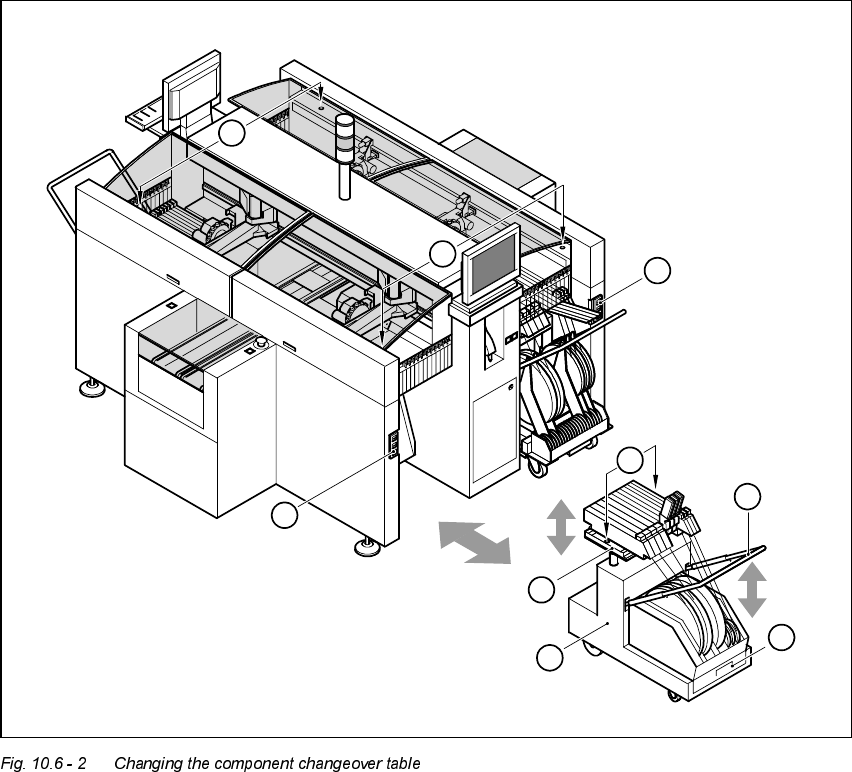
10 Component handling User M anual HS-50 10.6 Component changeover tables Software-Version 5.01 01/99 Issue 376 (1) Bu tton for rai sing and lowering the co mponent table p late (2) Plug for conne cting the co mponent…
User Manual HS-50 10 Component handling
Software-Version 5.0101/99 Issue 10.6 Component changeover tables
375
8QGRFNLQJWKHFRPSRQHQWFKDQJHRYHUWDEOH
Å Click on the STOP PROCESSING icon in the MAIN VIEW menu.
The PCB in progress will be completed. The icons of the SINGLE FUNCTIONS menu will then
be activated.
Å Click on the SINGLE FUNCTIONS GANTRY X icon (gantry 1, 2, 3 or 4).
Å Click on the GANTRY FUNCTIONS icon.
Å From this menu, click on the APPROACH SET-UP POSITION button.
The selected placement head will move across the PCB transport to prevent it being damaged
when the component table is changed.
Å Fold up the protective cover of the selected gantry.
Å Lift up the clip (item 5) to lock the raised component table bed in its top end position.
Å Lift the flap over the button (item 1).
Å Hold down the button (item 1) for raising the component table bed (item 3) until the component
table bed reaches its top end position.
Å Unplug the component changeover table (item 2) from the placement system.
Å Remove the component changeover table.
10 Component handling User Manual HS-50
10.6 Component changeover tables Software-Version 5.01 01/99 Issue
376
(1) Button for raising and lowering the component table plate
(2) Plug for connecting the component changeover table cable
(3) Component table bed, can be raised and lowered
(4) Component changeover table
(5) Bracket
(6) Used tape container
(7) Centering holes for the centering pins
6
5
4
3
2
1
7
2
1
User Manual HS-50 10 Component handling
Software-Version 5.0101/99 Issue 10.6 Component changeover tables
377
'RFNLQJWKHFRPSRQHQWFKDQJHRYHUW DEOH
WARNING
Check that the placement head is outside the range of the component changeover table.
CAUTION
When docking the component table, ensure that the table bed is in its top end position and the clip
(item 5) is folded up.
Å Carefully push the component changeover table into the placement system.
Å Plug the connecting cable for the component changeover table into the socket (item 2) in the
placement system.
Å Open the flap over the push-button for raising the component changeover table.
Å Hold down the button (item 1) until the component table bed reaches its top end position.
Å Check that the centering holes in the component table bed are exactly over the centering pins
on the placement system.
Å Then fold down the clip (item 5) of the component changeover table to lower the component
table bed.
Å Ensure that the centering pins engage in the centering holes in the component table bed and
that the component table bed is fully lowered.
Å Close the flap over the push-button (item 1).
Å Close the protective cover.