00191369-01.pdf - 第414页
12 Station Extensions - Software User’s Manual S IPLACE HS-50 12.2 GEM Interface Software Version SR.501.xx Edition 01/99 412 *(0 &RQQHFWLRQ6 W DWXVHV The status wind ow of the user in terface keeps the op…
User’s Manual SIPLACE HS-50 12 Station Extensions - Software
Software Version SR.501.xx Edition 01/99 12.2 GEM Interface
411
&$ &LUFXLW$VVXUDQFH
This parameter determines the waiting time between sending successive "Linktest.req" mes-
sages. These messages check that the HSMS connection is working correctly. If the value 0
has been entered for CA, no "Linktest.req" messages are sent.
7* *UDFHSHULRG
While a SECS-II connection is being established, the SDR component of the GEM interface
buffers all the messages to be sent to the host computer. If the SECS-II connection cannot be
established within the number of seconds specified for TG, these buffered messages will be
sent to the host computer. Otherwise they are rejected by the SDR component and have the
status F_DELV.
06 0HPRU\6WDOO
The SDR component of the GEM interface tolerates the status that all internal buffers are full
and that the host is attempting to send further data packets for up to the number of seconds
specified for MS. The TCP/IP connection is then ended to prevent the network becoming over-
loaded.
:6 :ULWH6WDOO
The SDR component of the GEM interface tolerates the status that data packets to be sent
are not received by the TCP/IP connection for up to the number of seconds specified for WS
seconds. The TCP/IP connection is then ended.
,3DGGUHVV
IP address for the connection to the customer’s LAN
,3VFUHHQ
IP screen address for the connection to the customer’s LAN
3RUW
TCP/IP port number for the GEM connection to the host computer

12 Station Extensions - Software User’s Manual SIPLACE HS-50
12.2 GEM Interface Software Version SR.501.xx Edition 01/99
412
*(0&RQQHFWLRQ6WDWXVHV
The status window of the user interface keeps the operator informed of the status of the con-
nection to the host computer. The various statuses are indicated by the changing background
color of the GEM icon.
6WDWXVRIWKH+RVW&RPSXWHU&RQQHFWLRQ
(GEM icon red, yellow or green)
0HDQLQJRIWKHFRORUV
– 5HG No connection
– <HOORZ Setting up connection
– *UHHQ Connection established
In addition to displaying the status of the host computer connection, the status window also
shows whether messages have been received from the host computer. The current status is
indicated by the changing background color of the envelope part of the GEM icon.
6WDWXVHV
QRPHVVDJHVSUHVHQW
(envelope icon light)
PHVVDJHVSUHVHQW
(envelope icon dark)
User’s Manual SIPLACE HS-50 12 Station Extensions - Software
Software Version SR.501.xx Edition 01/99 12.2 GEM Interface
413
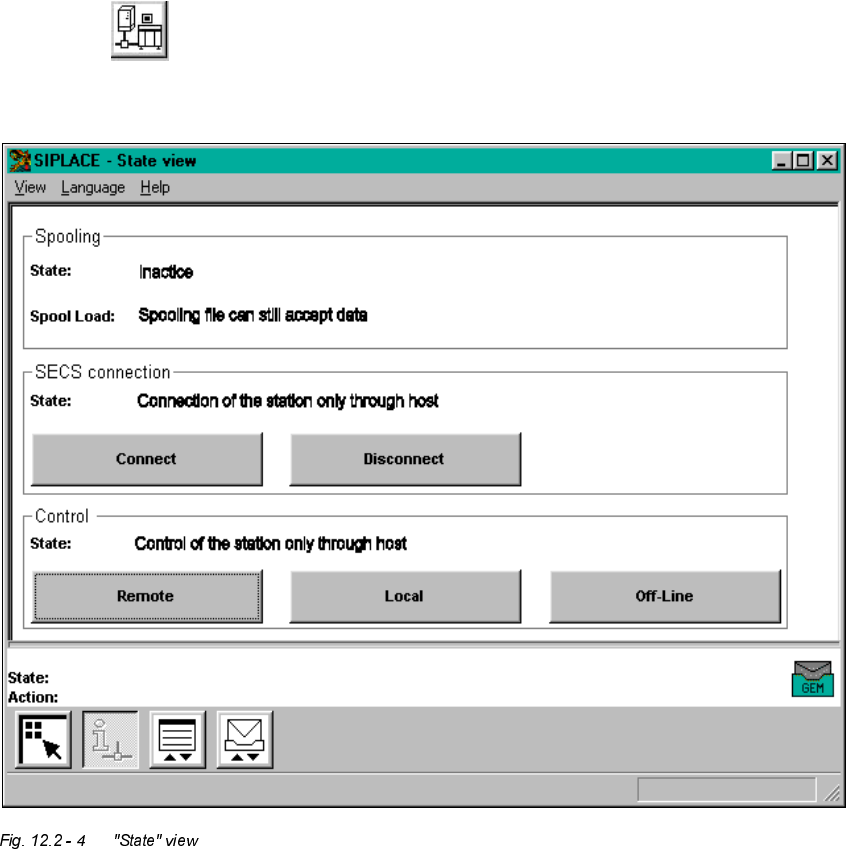
*(0 6WDWH9 LHZ
Å Click the button in the main view.
The user interface switches to "State view"
The window’s display area is subdivided into a number of display fields containing the corre-
sponding buttons for executing the functions for the GEM connection.
The meaning and function of the individual display fields and the toolbar buttons are described
below.