00191369-01.pdf - 第278页
6 Vision functions User Manual HS-50 6.6 Test Component Software-Version 5.01 Edition 01/99 276 %DO O ,PDJH2S WL RQ With this option y ou can change th e ball model de script ion. Å Use the tabulator k ey…
User Manual HS-50 6 Vision functions
Software-Version 5.01Edition 01/99 6.6 Test Component
275
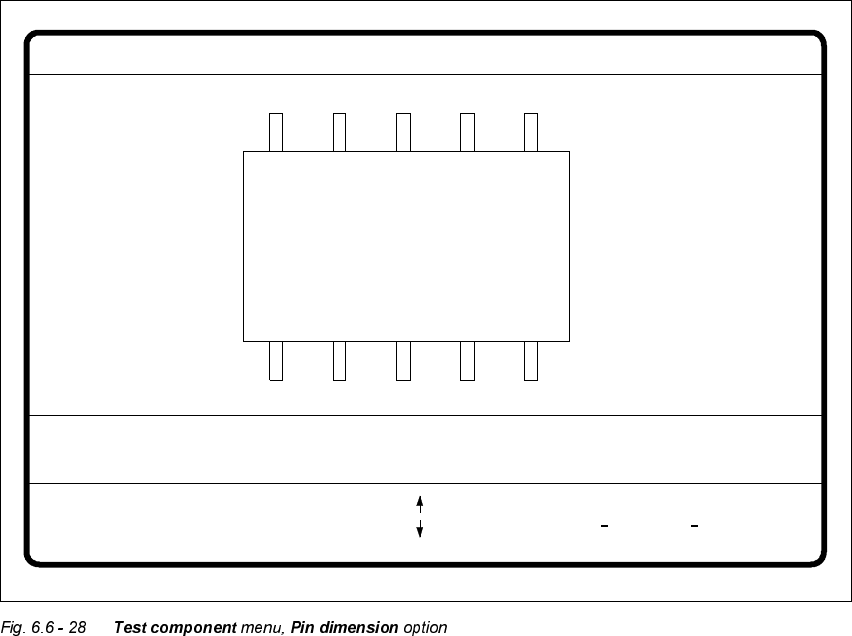
3LQ'LPHQVLRQ2SWLRQ
Use this option to change the optical pin width and length. In addition, the pin contrast can be
changed if imaging reduction results in the pins not being dependably recognized.
Å Use the tabulator key to select the pin model.
Å With the spacebar select the side of the pin.
Å Use the and keys to raise or lower the pin contrast.
Å The arrow keys are used for changing the pin width and length. The component will appear as
a silhouette on the screen together with the updated geometric pin data.
Å With the 5HWXUQkey you can trigger the individual measurement steps which are specified in
the measurement conditions for the specified component.
Press (VFto cancel the option, even if not all measurement steps have been carried out. You will
then be returned to the 7HVWFRPSRQHQW menu.
GF No. = 5Pin dimension
+ : contrast +
opt. l. [mm] = ... opt. w. [mm] = ...
Pin side =
Pin definition = 1..n
RET: Test component
Tab: Pin model
Blank: pin side
Pin contrast =
: larger
: smaller
: contrast
6 Vision functions User Manual HS-50
6.6 Test Component Software-Version 5.01 Edition 01/99
276
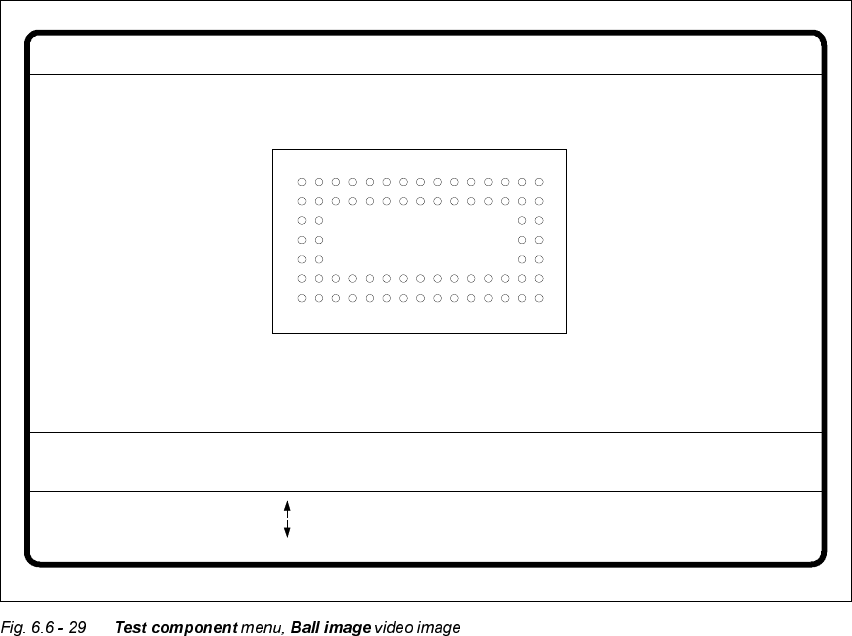
%DO O,PDJH2S WLRQ
With this option you can change the ball model description.
Å Use the tabulator key to select the ball model.
Å With the spacebar select the radius type - inner or outer radius.
Å Use the arrow keys to enlarge or reduce the internal or external radius of the ball. The balls will
be displayed in their geometric dimensions as a pixel image on the lefthand edge of the video
image.
The value of the inner radius the ball shape:
– If the inner radius is equal to 0, the ball will take the form of a circle.
– If the inner radius is greater than 0, the ball will take the form of a doughnut.
Å Use the or keys to increase or reduce the ball contrast.
Select ball contrast > 0, if the ball is lighter than the background.
Select ball contrast < 0, if the ball is darker than the background.
Å With the 5HWXUQkey you can trigger the individual measurement steps which are specified in
the measurement conditions for the specified component.
Å Press (VFto cancel the option, even if not all measurement steps have been carried out. You
will then be returned to the 7HVWFRPSRQHQW menu.
GF no. = 5Ball image
RET: Test comp.
Tab: Ball model
Rad. i.[mm]
Ball model = 1
Rad. e.[mm]
Rad. type: intern./extern.
= 0.500
= 1.500
+ : Contrast +
- : Contrast -
Contrast a.
Contrast i.
= 10
= 20
: larger
: smaller
Blank: Radius type
User Manual HS-50 6 Vision functions
Software-Version 5.01Edition 01/99 6.6 Test Component
277
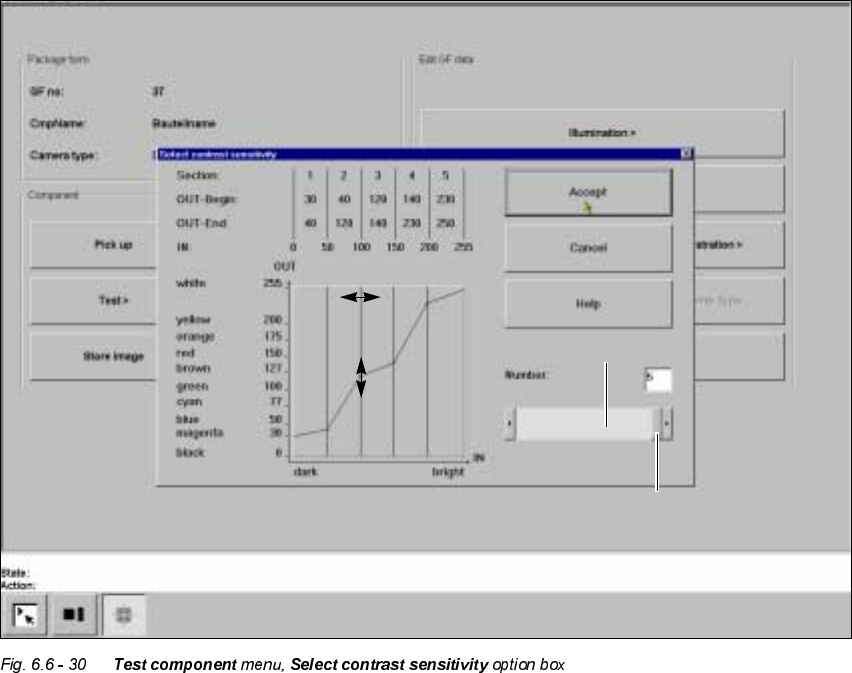
7UDQVIRUP2SWLRQ
When you activate this option, the 6HOHFWFRQWUDVWVHQVLWLYLW\option box will open.
You can select the following parameters:
– Number of sections which contain the transformation table: number between 1 and 5
– Selection of value pairs: with 5 sections 10 pairs of values are permitted.
/D\RXWRIWKH6HOHFWFRQWUDVWVHQVLWLYLW\RSWLRQER[
1XPHULFDOSUHVHQWDWLRQRIWKHWDEOH
The numerical values are indicated in the upper part of the option box. These are:
Section: Number of sections
OUT Begin: OUT End: Ranges of values for the transformation of the individual sections
IN: Range limits of the individual sections
Scroll bar
Scroll field