00191369-01.pdf - 第390页
11 Station extensions / options User Manual HS -50 11.2 Component barcode Software Version 5.01 01/99 I ssue 388 2SWLRQV LQWKHHYHQWRI DQLOO HJLEOHE DUFRGH Å Deacti vate th e refill c heck fr om the M achine o p…
User Manual HS-50 11 Station extensions / options
Software Version 5.0101/99 Issue 11.2 Component barcode
387
1RWHVRQRSHUDWLRQ
– The barcode reader must connected.
– The barcode for each component must entered on the line computer.
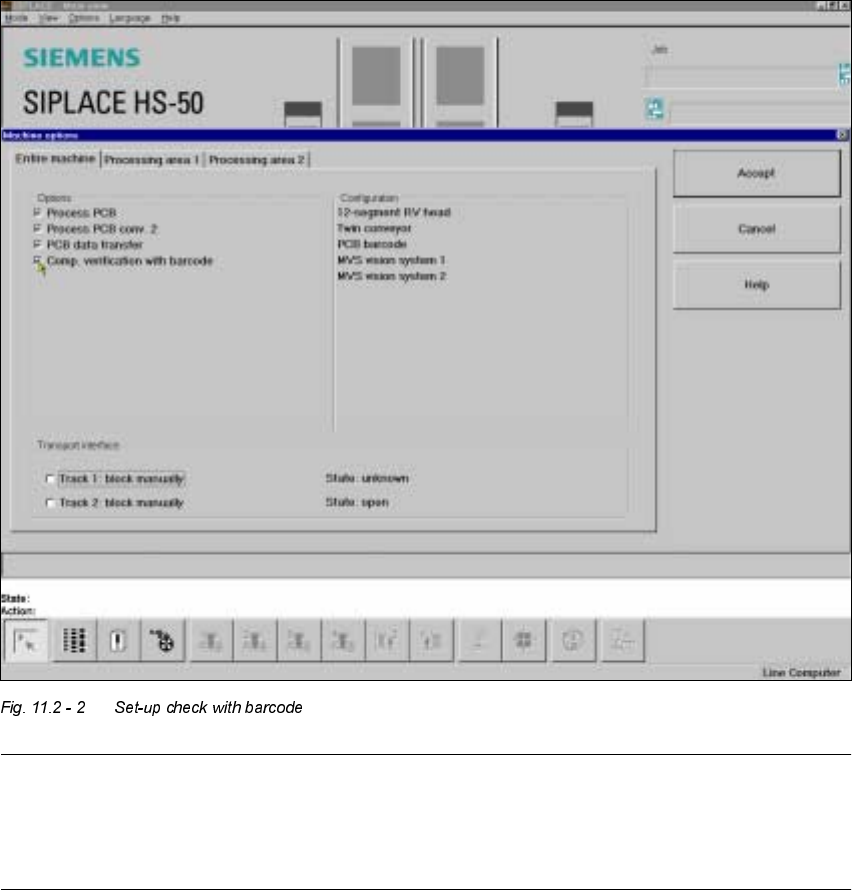
Å To do this, select the "Set-up check with barcode" function from the 0DFKLQHRSWLRQV menu.
PLEASE NOTE:
If one of the digits of the barcode has been assigned to a filter (i.e. a star *), this digit will not be
evaluated. This enables data contained in the barcode, such as the date or company name, to be
skipped.
– If the component barcode has been activated on the line computer and "Set-up check with bar-
code" has been selected from the machine options on the station, the "Fill location" and "Fill
track with barcode" functions cannot be used manually.
– If there are tracks with components without a barcode, then a manual "Fill" is possible, even if
the refill check has been activated.
11 Station extensions / options User Manual HS-50
11.2 Component barcode Software Version 5.01 01/99 Issue
388
2SWLRQVLQWKHHYHQWRIDQLOOHJLEOHEDUFRGH
Å Deactivate the refill check from the Machine options menu.
Å Enter the Barcode manually.
2SHUDWLRQ
Å Select the "Empty tracks" view from the Set-up menu.
Å Use the barcode reader to scan the desired track barcode.
If the track is contained in the set-up and the component has a barcode, the "Set-up check with
barcode" dialog will appear, specifying the corresponding track.
PLEASE NOTE
You can open the dialog by clicking on the desired track or by clicking on the "Set-up check
with barcode" button.
The track can be filled once the comparison has been carried out and the return barcode has been
scanned.
7 HFKQLFDOGDWD
&RPSRQHQWEDUFRGH
Max. resolution 0.13 mm
Scanning speed 36 scans/sec.
Laser class IEC class 2
Degree of protection IP 64
Compatible barcode types
Code 39 (normal / FULL ASCII)
EAN/UPC (family with/without ADD ON
CODABAR
INTERLEAVED 2/5
NORMAL 2/5 (5 bars)
(others available upon request)
User Manual HS-50 11 Station extensions / options
Software Version 5.0101/99 Issue 11.3 Dual conveyor
389
'XDOFRQYH\RU
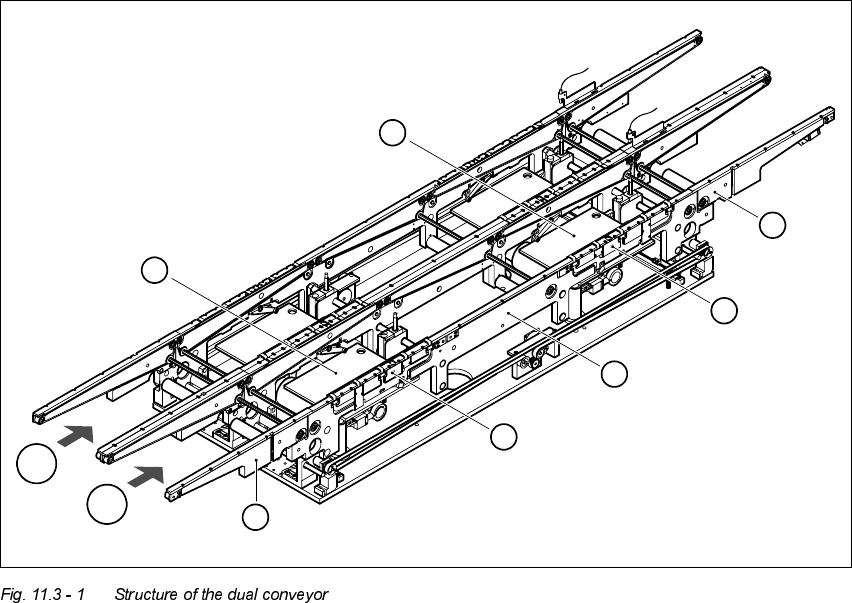
6WUXFWXUHRIWKHGXDOFRQYH\RU
The conveyor belts are driven by DC motors. There is a lifting table for holding the PCBs in each
processing area. The width of the PCB conveyor can be adjusted either via the menu or using the
line computer.
(1) Feeding area (2) Processing area 1
(3) Intermediate area (4) Processing area 2
(5) Output area (6) Lifting table, processing area 1
(7) Lifting table, processing area 2 T1 Transport track 1
T2 Transport track 2
6
7
5
4
3
2
1
T2
T1