00191369-01.pdf - 第403页
User’s Manual SIPLACE HS-50 12 Station Extensions - Software Software Vers ion SR.501.xx E dition 01/99 12.1 Remote Suppo rt 401 2Y HUYLHZ The followi ng co nfigurations are pos sible f or the cu stomer ’s placeme…
12 Station Extensions - Software User’s Manual SIPLACE HS-50
12.1 Remote Support Software Version SR.501.xx Edition 01/99
400
)XQFWL RQV
The following components can be accessed remotely from the service centers in Munich, Sin-
gapore and Norcross. When this is done, the corresponding functions are operated and mon-
itored.
/LQHFRPSXWHU6&281,;
– "Remote" log-in
–Chat
– Sending commands to the customer’s line computer
– Starting and stopping programs at the customer’s line computer
– "Remote" editing
– File transfer
6WDWLRQFRPSXWHU
– "Remote" log-in
– "Remote" operation of programs (user interface, SITEST, diagnostics)
– Sending messages to the customer’s station computer ("chat mode“)
– File transfer
– "Remote" editing
0DFKLQHFRQWUROOHU
– "Remote" log-in
– File transfer
User’s Manual SIPLACE HS-50 12 Station Extensions - Software
Software Version SR.501.xx Edition 01/99 12.1 Remote Support
401
2YHUYLHZ
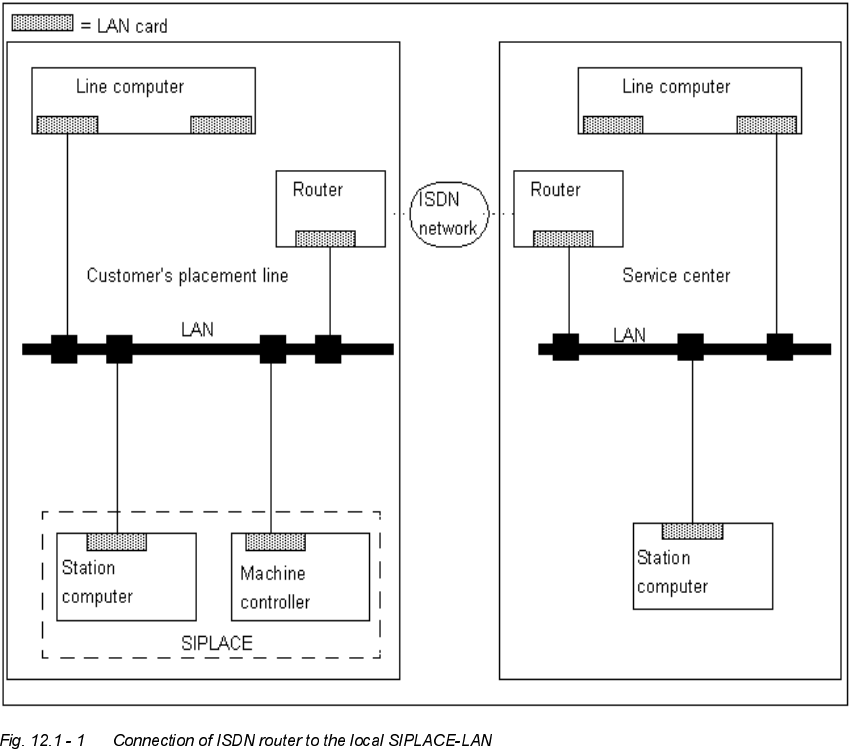
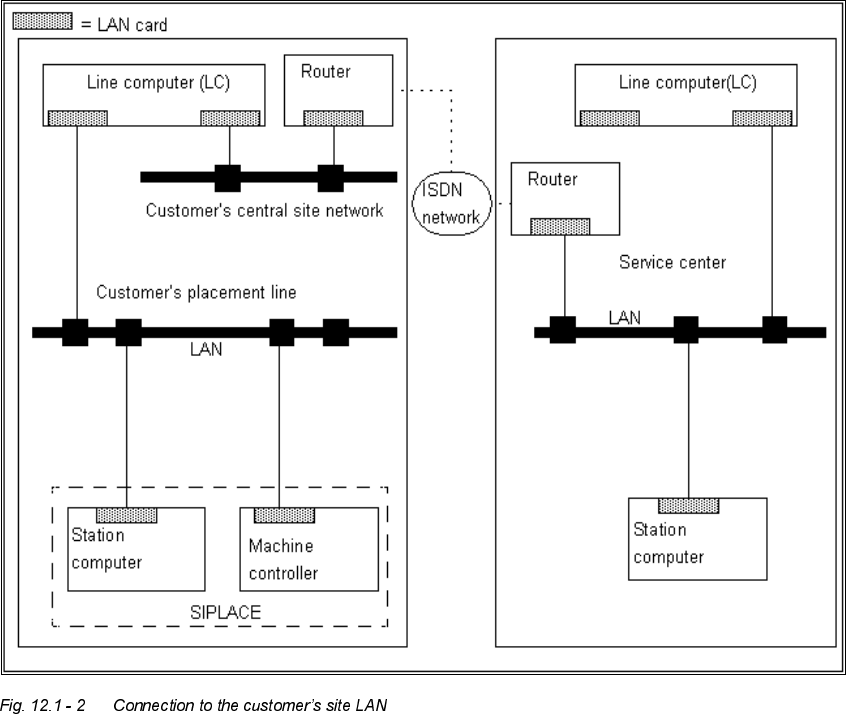
The following configurations are possible for the customer’s placement line:
– Connection of the ISDN router to the local SIPLACE-LAN
– Connection of the ISDN router to the customer’s site LAN
&RQQHFWLQJWKH,6'1URXWHUWRWKHORFDO6,3/$&(/$1
This possibility is used when there is no site LAN available at the customer’s premises.
The customer will not need to implement any additional data security measures.
12 Station Extensions - Software User’s Manual SIPLACE HS-50
12.1 Remote Support Software Version SR.501.xx Edition 01/99
402
&RQQHFWLQJWKH ,6' 1URXWHU WRWKHFXVWRPHU¶VVLWH/$1
The advantage of this alternative is that several placement lines can be addressed via a single
router.
3URFHGXUHDQG2SHUDWLRQ
Å Contact our service center (Munich, Norcross or Singapore).
Å Follow the instructions given by the engineer.