00191369-01.pdf - 第416页
12 Station Extensions - Software User’s Manual S IPLACE HS-50 12.2 GEM Interface Software Version SR.501.xx Edition 01/99 414 'LVSOD\ILHOG V 6SRROLQJ In this di splay s ection, t he current spool ing status …
User’s Manual SIPLACE HS-50 12 Station Extensions - Software
Software Version SR.501.xx Edition 01/99 12.2 GEM Interface
413
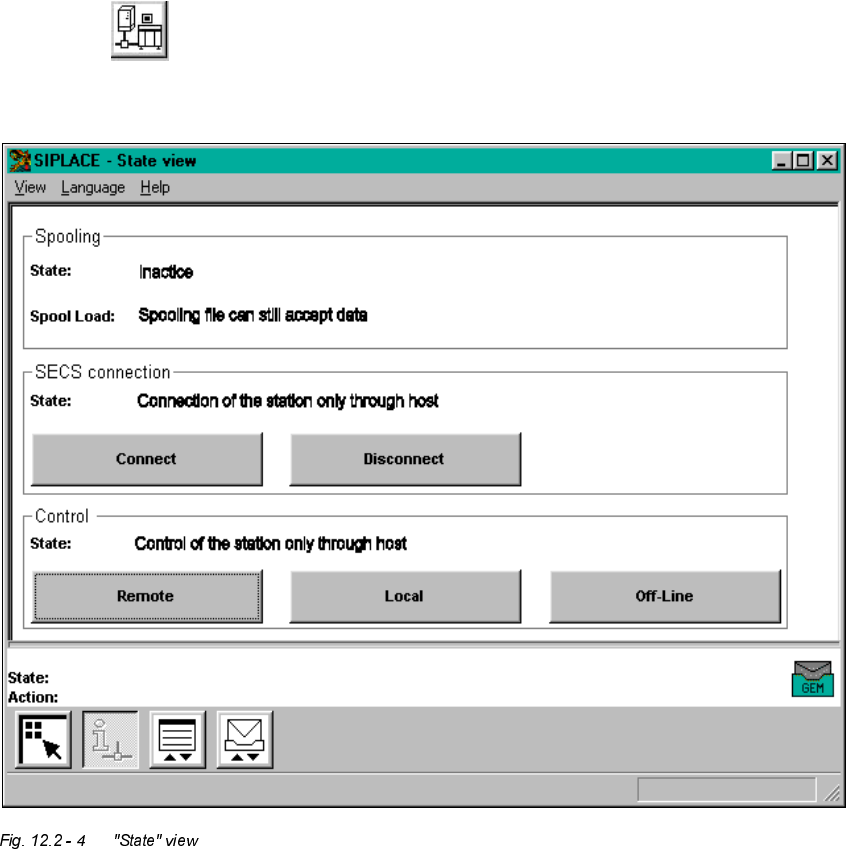
*(0 6WDWH9 LHZ
Å Click the button in the main view.
The user interface switches to "State view"
The window’s display area is subdivided into a number of display fields containing the corre-
sponding buttons for executing the functions for the GEM connection.
The meaning and function of the individual display fields and the toolbar buttons are described
below.

12 Station Extensions - Software User’s Manual SIPLACE HS-50
12.2 GEM Interface Software Version SR.501.xx Edition 01/99
414
'LVSOD\ILHOGV
6SRROLQJ
In this display section, the current spooling status is displayed to the right of the "State:" item.
– Active: The connection to the host computer has been interrupted.
Messages are being collected.
– Inactive: The connection to the host computer is OK.
Messages are being sent to the host computer.
The "Spool Load:" item indicates whether the spooling file storage area is full or whether there
is still capacity in the spooling file.
6(&6FRQQHFWLRQ
This display field contains the buttons described below. The current status of the connection
is displayed above the buttons.
– &RQQHFW
The connection between the station computer and the host computer will be set up.
– 'LVFRQQHFW
The connection between the station computer and the host computer will be terminated.
&RQWURO
This display field contains the buttons described below. The current status of the connection
is displayed above the buttons.
– /RFDO
Placement programs can be uploaded from the station computer to the host computer or
downloaded from the host computer to the station computer.
– 5HPRWH
Placement programs can be uploaded from the station computer to the host computer.
No placement programs can be downloaded from the host computer to the station com-
puter.
– 2IIOLQH
It is not possible to send or receive messages. However, the connection is retained.
NOTE
If the host computer drops the control connection, the connection goes into the status 2IIOLQH.
Only the host computer can re-establish the connection. At the station, this status can only be
quit by clicking the 2IIOLQH button. Only then are the functions 5HPRWH and /RFDO available
again.
User’s Manual SIPLACE HS-50 12 Station Extensions - Software
Software Version SR.501.xx Edition 01/99 12.2 GEM Interface
415
Å Click the button corresponding to the required function.
7RROEDU
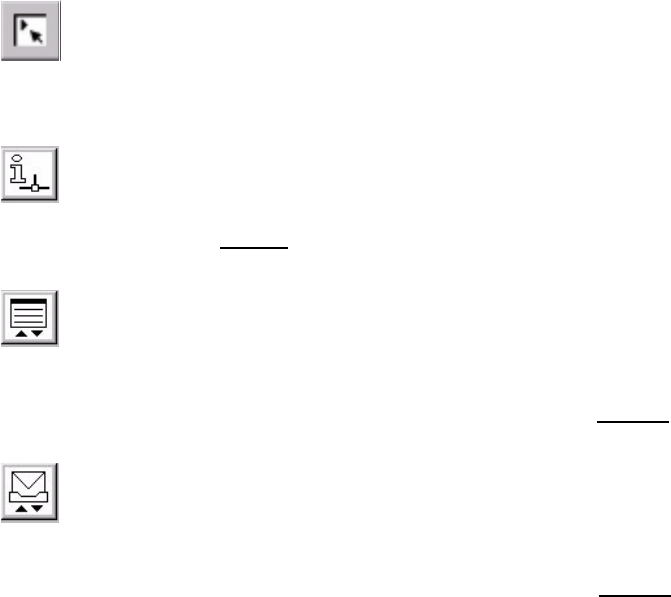
You can use the buttons in the toolbar to switch the user interface between the following
views:
0DLQYLHZ
(see Chapter 3)
6WDWHYLHZ
(see Figure 12.2 - 4)
3ODFHPHQWSURJUDPYLHZ
You can use the functions available in this view to load a placement program which is present
on the host computer or station computer (see section 12.2.2.6
).
0HVVDJHV
You can use the functions available in this view to read messages sent by the host computer
and send messages to the host computer (see section 12.2.2.7
).
Å Click the required button in order to switch to the required view.