00191369-01.pdf - 第150页
4 Placement Functions User’s Manual SIPLACE HS -50 4.3 Feeders Software Version SR.501.xx E dition 01/99 148 0HDQLQJRI WKH(QWULHV LQWK H7 DEOH IRUW KH/LQHDU)HHGH U – /RF Number of the locati on – 7U D…
User’s Manual SIPLACE HS-50 4 Placement Functions
Software Version SR.501.xx Edition 01/99 4.3 Feeders
147
/LQHDU)HHGHU9LHZ
When refilling the linear feeders with components, the operator must select the correct com-
ponent in the Setup view to refill an empty track (see Section 4.1.1
). The track with the corre-
sponding linear feeder must be vibrated so that the new components move to the front after
the tray has been inserted.
Å Click on the icon.
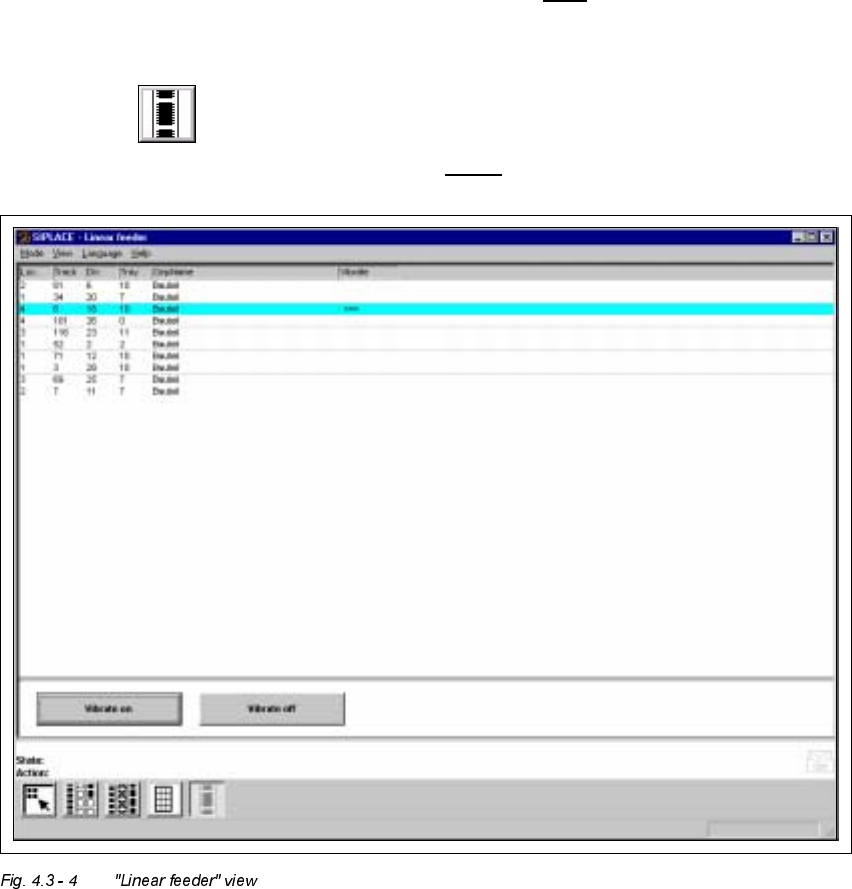
The "Linear feeder" view is displayed (see Fig. 4.3 - 4
).

4 Placement Functions User’s Manual SIPLACE HS-50
4.3 Feeders Software Version SR.501.xx Edition 01/99
148
0HDQLQJRIWKH(QWULHVLQWK H7DEOH IRUWKH/LQHDU)HHGH U
– /RF
Number of the location
– 7UDFN
Number of the track
– 'LY
Number of the feeder division
– 7UD\
This column is irrelevant when setting up the locations of a SIPLACE HS-50.
(Only valid for automatic machines with wafflepack changers)
– &PS1DPH
Name of the component
– 9LEUDWH
If the "<==" symbol is displayed in this column, then this means that the linear feeder on
the corresponding track is currently being vibrated.
9LEUDWH7UDFN:LWK/LQHDU)HHGHU
Å Select the entry in the table for the track with the linear feeder that has been refilled and
that is to be vibrated now.
The selected line is highlighted in light blue in the table. The "Vibrate on" button is active.
Å Click on the 9LEUDWHRQbutton.
The components used to refill the track are vibrated to the front.
The "Vibrate off" button is active.
Å Click on the 9LEUDWHRIIbutton when the vibrating is to be switched off.
Vibration stops.
NOTE
If the user interface is switched to a different view, then vibration will also stop.
r
User’s Manual SIPLACE HS-50 5 Single Functions
Software Version SR.501.xx Edition 01/99
149
6LQJOH)XQFWLRQV