00193922-03.pdf - 第335页
User manual SIPLAC E HF series 7 Station extensions Software Vers ion SR.50x.xx 01/2006 US Edition 7.8 PCB alignment 335 7.8.2 Description of the functions The PCB i s transport ed into the placement area until the lase …
7 Station extensions User manual SIPLACE HF series
7.8 PCB alignment Software Version SR.50x.xx 01/2006 US Edition
334
7.8 PCB alignment
Item no. 00119677-xx PCB alignment for single conveyor
Item no. 00119678-xx PCB alignment for dual conveyor
7.8.1 General
PCBs to be processed sometimes have a length to width ratio of 1:2 or worse. This means that
the shorter side of the PCB points in the direction of travel. During travel, such PCBs may twist
slightly and, as a result, the fiducials no longer lie within the PCB vision camera's search window.
In this case, the "PCB alignment" option ensures that these PCBs are realigned precisely at the
stopping position.
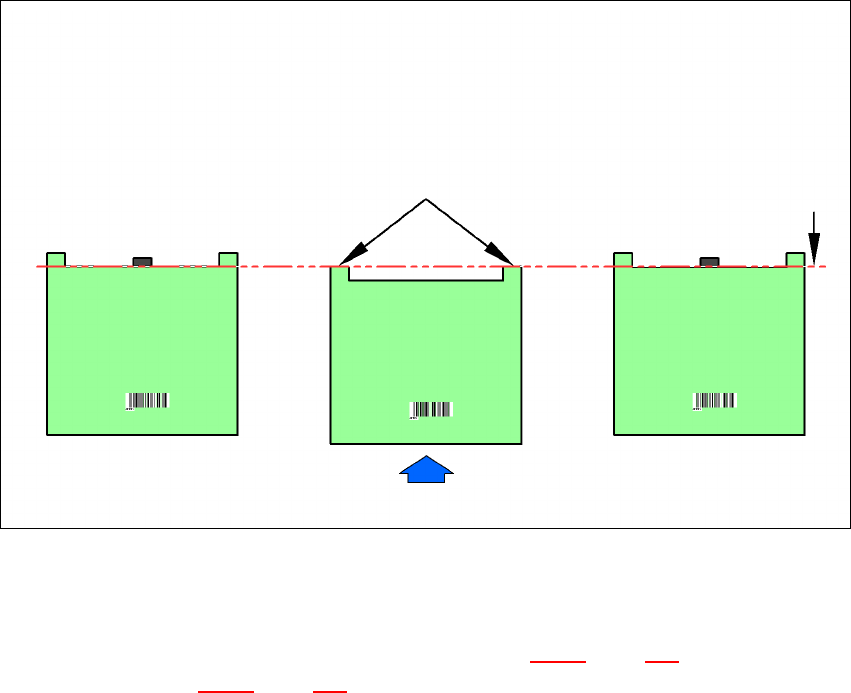
If PCBs with recesses in the direction of travel are processed, this may result in different process-
ing positions on machines with mechanical stoppers (HS-50, S-25 HM, F5 HM) and on machines
that monitor this position with laser light barriers (HF, HS-60, S-27 HM). The "PCB alignment" op-
tion ensures that the PCBs are stopped at the same position on all PCB conveyors. The "PCB
alignment" option is available for both single and dual conveyors.
7
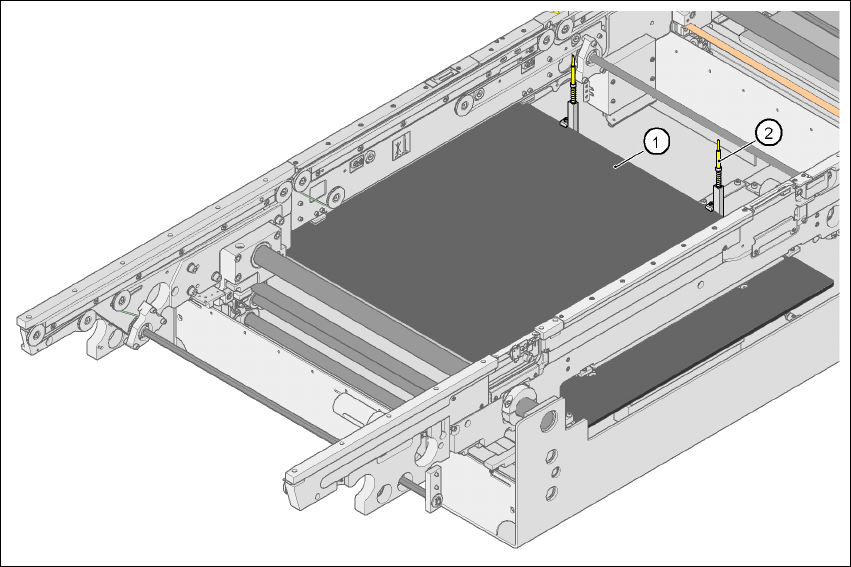
Fig. 7.8 - 1 PCB alignment
(1) Lifting table
(2) PCB stop
User manual SIPLACE HF series 7 Station extensions
Software Version SR.50x.xx 01/2006 US Edition 7.8 PCB alignment
335
7.8.2 Description of the functions
The PCB is transported into the placement area until the laser light barrier triggers the stop signal
for the PCB conveyor. The lifting table with the PCB stops then moves up into a position in which
the PCB is not yet clamped and can still be moved by the conveyor belts. The two PCB stops are
level with the PCB, and the PCB supports (magnetic pins) are already in contact with the PCB.
The two conveyor belts move the PCB against the PCB stops and align them at the same time.
The lifting table then moves into its top end position, clamps the PCB and releases it from the PCB
stops so as not to affect the placement process. After the placement process, the lifting table and
PCB alignment are lowered and the PCB is moved on.
7
7 Station extensions User manual SIPLACE HF series
7.9 Optional mechanical stopper Software Version SR.50x.xx 01/2006 US Edition
336
7.9 Optional mechanical stopper
Item no. 00119657-xx Optional mechanical stopper HF/X series, single conveyor
Item no. 00119658-xx Optional mechanical stopper HF/X series, dual conveyor
7.9.1 General
The optional mechanical stopper was developed for the X-series, HF series, HS-60 and S-27 HM
placement machines. These are equipped as standard with the modular PCB conveyor and
elec-
tronically-controlled
PCB stoppers with laser light barriers.
The HS-50, F5 HM and S-25 HM placement machine models, on the other hand, have a PCB con-
veyor with
mechanical
stopper.
Install the optional mechanical stopper on placement machines with modular PCB conveyor if you
want to run the machines in a mixed line. This will make it possible to define a standardized stop-
per position for the PCBs on both PCB conveyor variants.
7
Fig. 7.9 - 1 PCB stop positions on HS-50, F5 HM, S-25 HM and HF series machines
7.9.2 Technical data
The technical data for the PCB single conveyor (see section 3.12.2, page 151) and the PCB dual
conveyor (see section 3.13.2
, page 154). Only the value for the minimum PCB width is increased
from 50 mm to 56 mm due to the design.
Software version SW 505.03 is needed in order to use this option.
PCB transport direction
PCB PCB PCB
HS-50/F5-HM/S25 HM
with mechanical stopper
(standard)
HF series
with electronically-
controlled stopper
(laser light barrier)
HF series
with optional
mechanical stopper
Laser light barrier Stop position for the PCB