Oxford-100-Manual.pdf - 第105页
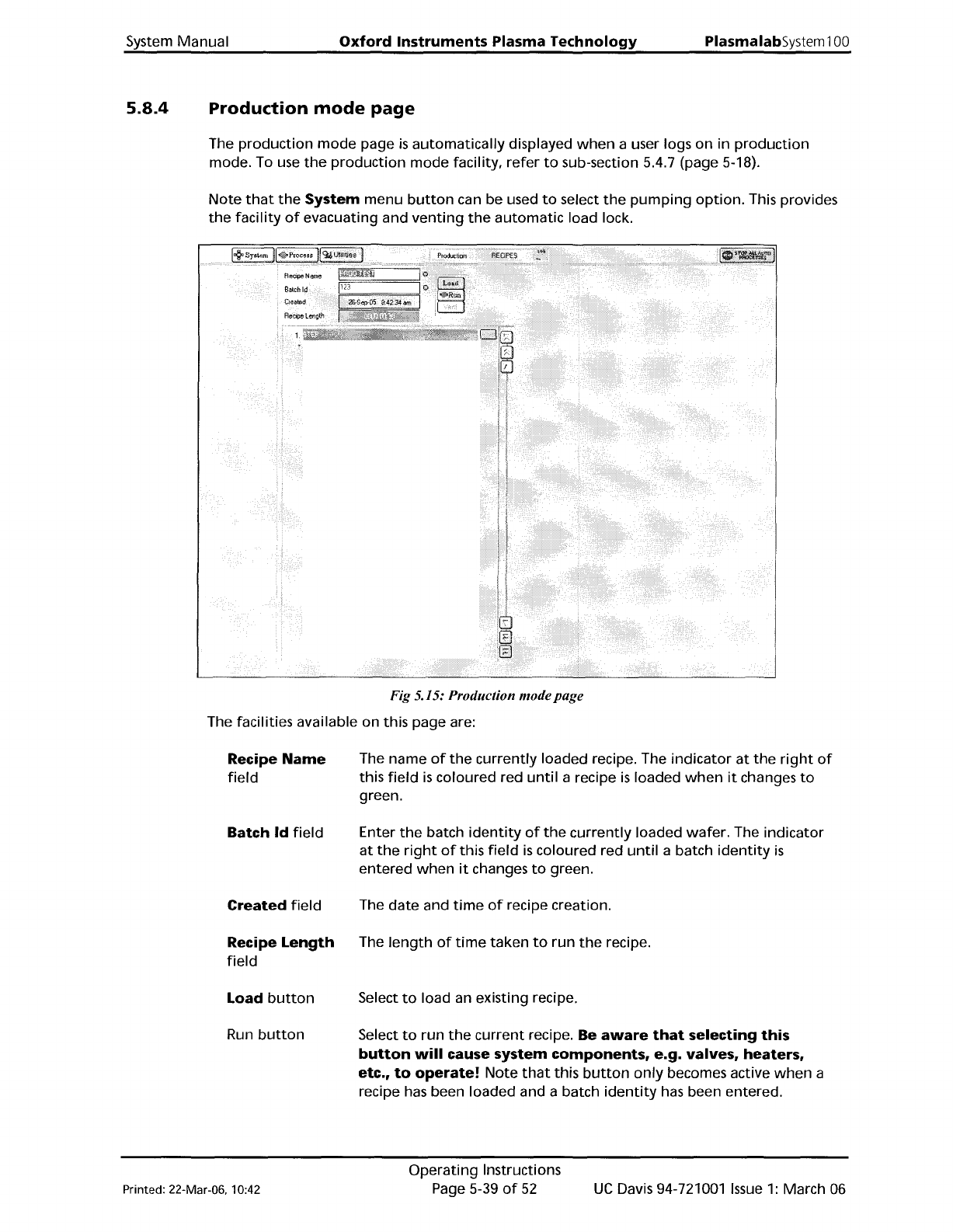
System Manual Oxford Instruments Plasma Technology PlasmalabSystem 100 5.8.4 Production mode page The production mode page is automatically displayed when a user logs on in production mode. To use the production mode fac…
PlasmalabSystem100
Oxford
Instruments
Plasma
Technology
System Manual
Manual
button
Recipe
Name
field
Data
Log
Interval
field
Created
field
Recipe
length
field
Recipe step list
New
button
Load
button
Save
button
Run
button
Select
to
carry
out
a manual process run. The
button's
indicator
is
coloured
yellow
when
selected.
The recipe
is
associated
with
a chamber.
If
selected,
further
options
'wafer'
and
'no
wafer'
are given. No
automatic
wafer
transfers are
performed;
therefore
a
wafer
must be loaded using
the
Robot Control
page
if
required.
The
name
of
the
currently
loaded recipe.
Displays
the
data
log
interval, i.e.
the
time
interval
between
the
logging
of
system parameters.
The
date
and
time
of
recipe creation.
The
length
of
time
taken
to
run
the
recipe. This
is
the
sum
of
all
the
process times, excluding
wafer
transfer
time,
process stabilisation and
pumping
times.
A scrollable sequential list
of
steps contained in
the
recipe.
Select
to
create a
new
recipe.
Select
to
load an existing recipe.
Select
to
save
the
current
recipe.
Select
to
run
the
current
recipe. Be
aware
that
selecting
this
button
will
cause
the
robotic
arm,
slit
valve,
etc
to
operate!
Step
Library
Panel
Edit
button
Select
to
edit
the
selected
(highlighted)
recipe step.
New
button
Select
to
create a
new
recipe step.
Copy
button
Select
to
copy
the
selected recipe (you are
prompted
for
a
new
step
name).
Delete
button
Select
to
delete
the
selected
(highlighted)
recipe.
Step
Library
Displays
the
recipe steps available in a scrollable list.
list
UC
Davis 94-721001
Issue
1:
March 06
Operating
Instructions
Page 5-38
of
52
Printed: 22-Mar-06, 10:42
System
Manual
Oxford
Instruments
Plasma
Technology
PlasmalabSystem100
5.8.4
Production
mode
page
The
production
mode
page
is
automatically
displayed
when
a user logs
on
in
production
mode. To use
the
production
mode
facility,
refer
to
sub-section 5.4.7 (page 5-18).
Note
that
the
System
menu
button
can be used
to
select
the
pumping
option.
This provides
the
facility
of
evacuating and
venting
the
automatic
load lock.
Fig
5.15: Production mode
page
The facilities available on this page are:
Recipe
Name
field
Batch
Id
field
Created
field
Recipe
Length
field
Load
button
Run
button
The
name
of
the
currently
loaded recipe. The
indicator
at
the
right
of
this
field
is
coloured red
until
a recipe
is
loaded
when
it
changes
to
green.
Enter
the
batch
identity
of
the
currently
loaded
wafer.
The
indicator
at
the
right
of
this
field
is
coloured red
until
a batch
identity
is
entered
when
it
changes
to
green.
The
date
and
time
of
recipe creation.
The
length
of
time
taken
to
run
the
recipe.
Select
to
load an existing recipe.
Select
to
run
the
current
recipe. Be
aware
that
selecting
this
button
will
cause system
components,
e.g.
valves,
heaters,
etc.,
to
operate!
Note
that
this
button
only
becomes active
when
a
recipe has been loaded and a batch
identity
has been entered.
Printed: 22-Mar-06, 10:42
Operating
Instructions
Page 5-39
of
52
UC
Davis 94-721001
Issue
1:
March 06
PlasmalabSystem100
Oxford
Instruments
Plasma
Technology
System Manual
Recipe step list
A scrollable sequential list
of
steps
contained
in
the
recipe.
5.8.5
Chamber
1 process
control
page
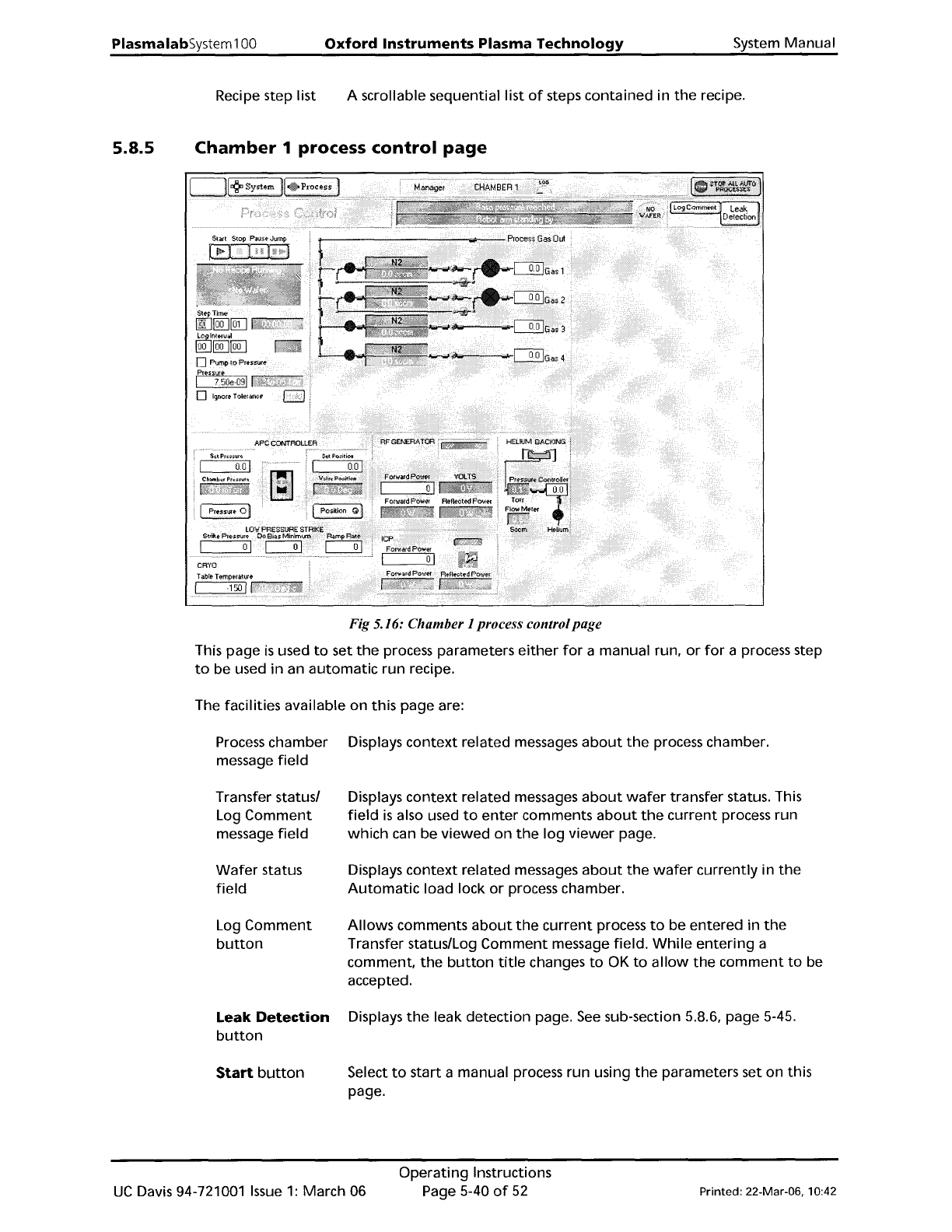
Fig 5.16: Chamber 1 process controlpage
This
page
is
used
to
set
the
process parameters
either
for
a manual run,
or
for
a process step
to
be used
in
an
automatic
run recipe.
The facilities available
on
this page are:
Process chamber
message
field
Transfer status/
Log
Comment
message
field
Wafer
status
field
Log
Comment
button
Leak
Detection
button
Start
button
Displays
context
related messages
about
the
process chamber.
Displays
context
related messages
about
wafer
transfer status. This
field
is
also used
to
enter
comments
about
the
current
process run
which
can be
viewed
on
the
log
viewer
page.
Displays
context
related
messages
about
the
wafer
currently
in
the
Automatic
load lock
or
process chamber.
Allows
comments
about
the
current
process
to
be entered in
the
Transfer status/Log
Comment
message field.
While
entering
a
comment.
the
button
title
changes
to
OK
to
allow
the
comment
to
be
accepted.
Displays
the
leak
detection
page.
See
sub-section 5.8.6, page 5-45.
Select
to
start
a manual process run using
the
parameters set on this
page.
UC
Davis 94-721001
Issue
1:
March 06
Operating
Instructions
Page
5-40
of
52
Printed: 22-Mar-06, 10:42