Oxford-100-Manual.pdf - 第253页
Equipment Manual Oxford Instruments Plasma Technology Plasma lab ICP 180 Note that Fig 5 shows an AMU control panel with control facilities for two AMUs. The left-hand side controls are for AMU1 and the right-hand side c…
Plasma
lab
ICP
180
Oxford
Instruments
Plasma
Technology
Equipment
Manual
5.
Operating
Instructions
5.1
Introduction
WARNING
BEFORE POWERING UP
THE
SOURCE, ENSURE THAT
ALL
COVERS
AND
SCREENS ARE
FITTED CORRECTLY.
DO
NOT REMOVE THE COVERS OR SCREENS WHILST
THE
SOURCE IS UNDER
VACUUM.
The
only
controls
on
the
Plasmalab
IC
P180 are
the
Automatch
Unit
(AMU)
control
switches,
mounted
on
the
system console.
5.1.1
Manual
adjustment
of
the
Automatch
Unit
NOTE:
The
following
text
refers
to
systems
fitted
with
an
Automatch
Unit
manual
adjustment
panel.
For
systems
having
software
control
of
the
Automatch
Unit,
refer
to
Section
5
(Operating
Instructions)
of
your
system
manual
and
the
Automatch
Unit's
Equipment
Manual.
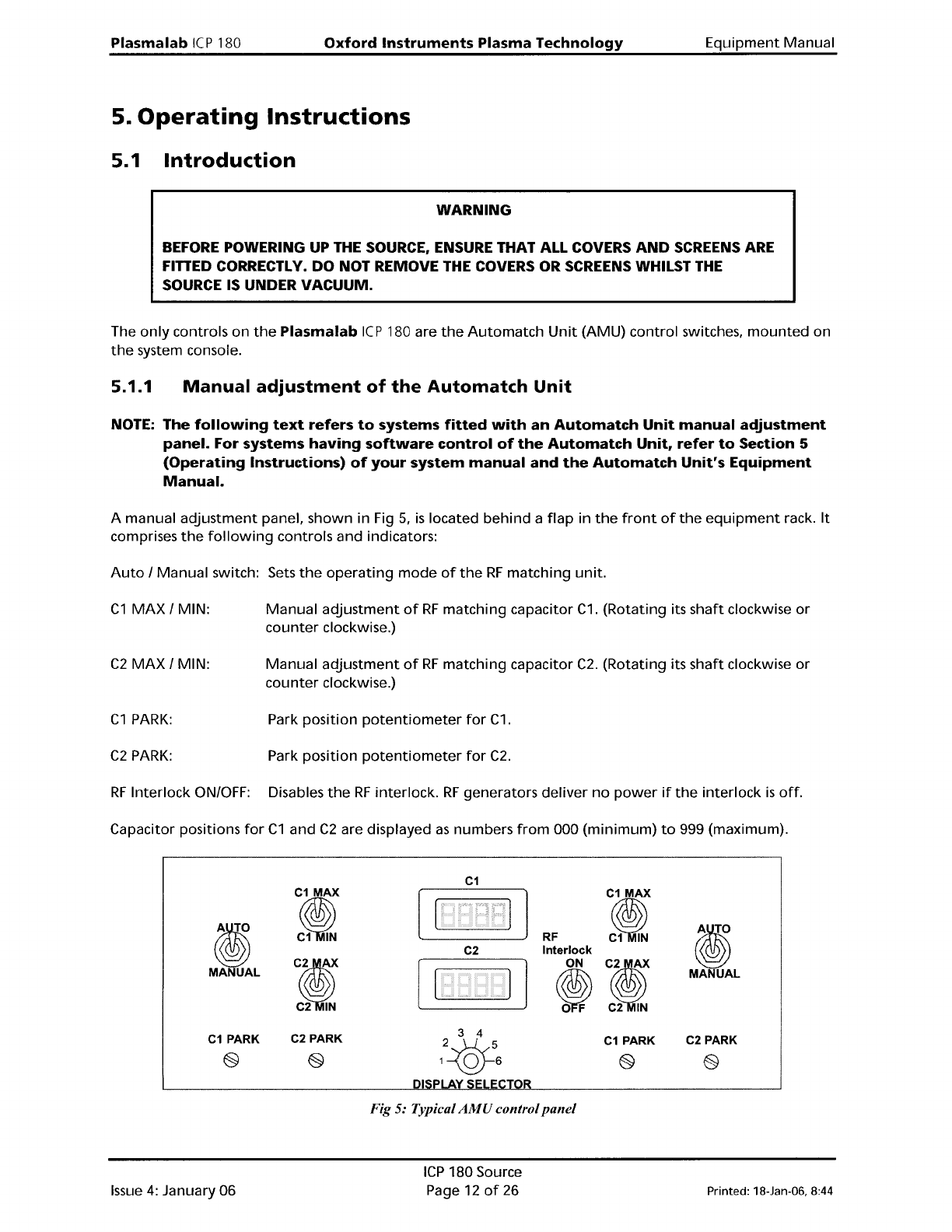
A manual
adjustment
panel, shown in Fig
5,
is
located
behind
a
flap
in
the
front
of
the
equipment
rack.
It
comprises
the
following
controls and indicators:
Auto
/
Manual
switch: Sets
the
operating
mode
of
the
RF
matching
unit.
C1
MAX
/ MIN:
Manual
adjustment
of
RF
matching
capacitor
C1.
(Rotating its
shaft
clockwise
or
counter
clockwise.)
C2
MAX
/ MIN:
Manual
adjustment
of
RF
matching
capacitor
C2.
(Rotating its
shaft
clockwise
or
counter
clockwise.)
C1
PARK:
Park
position
potentiometer
for
C1.
C2
PARK:
Park
position
potentiometer
for
C2.
RF
Interlock ON/OFF: Disables
the
RF
interlock.
RF
generators
deliver
no
power
if
the
interlock
is
off.
Capacitor positions
for
C1
and
C2
are displayed
as
numbers
from
000
(minimum)
to
999 (maximum).
fIJ
MANUAL
C1
PARK
@
C1
MAX
~
C~
~
C2 PARK
2&5
1\QJ6
C1
MAX
RF
~
Interlock
ON
Ii
~
C2
IN
C1
PARK
@
fIJ
MANUAL
C2 PARK
Issue
4:
January 06
Fig 5: Typical
AMU
control
panel
ICP
180 Source
Page 12
of
26
Printed: 18-Jan-06, 8:44
Equipment
Manual
Oxford
Instruments
Plasma
Technology
Plasma
lab
ICP
180
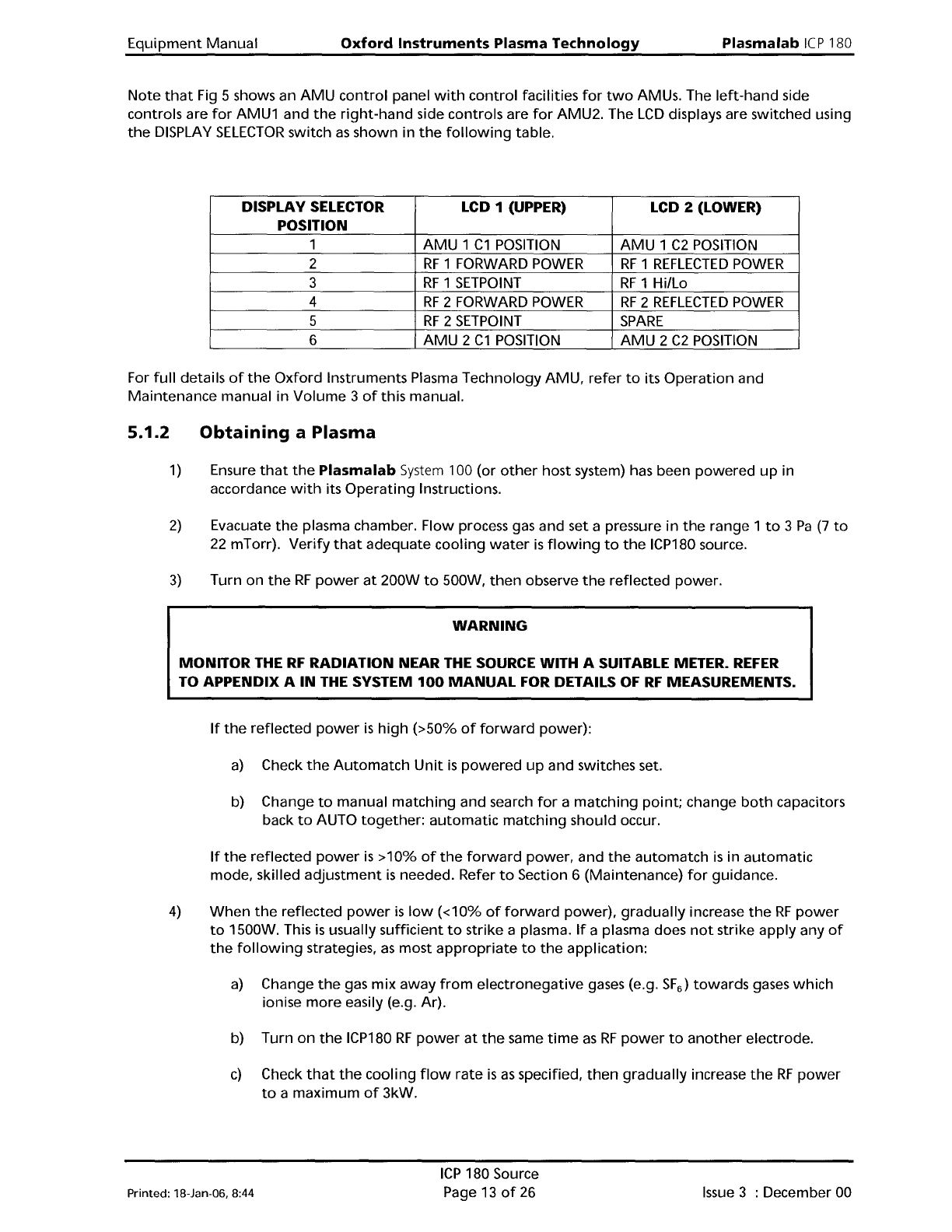
Note
that
Fig 5 shows an
AMU
control
panel
with
control
facilities
for
two
AMUs. The
left-hand
side
controls are
for
AMU1 and
the
right-hand
side controls are
for
AMU2. The
LCD
displays are switched using
the
DISPLAY
SELECTOR
switch
as
shown in
the
following
table.
DISPLAY
SELECTOR
LCD 1 (UPPER)
LCD 2 (LOWER)
POSITION
1
AMU
1
C1
POSITION
AMU
1
C2
POSITION
2
RF
1 FORWARD
POWER
RF
1
REFLECTED
POWER
3
RF
1
SETPOINT
RF
1
Hillo
4
RF
2 FORWARD
POWER
RF
2
REFLECTED
POWER
5
RF
2
SETPOINT
SPARE
6
AMU
2
C1
POSITION
AMU
2
C2
POSITION
For
full
details
of
the
Oxford
Instruments Plasma Technology
AMU,
refer
to
its
Operation
and
Maintenance
manual in
Volume
3
of
this manual.
5.1.2
Obtaining
a Plasma
1)
Ensure
that
the
Plasma
lab
System
100 (or
other
host system) has been
powered
up
in
accordance
with
its
Operating
Instructions.
2)
Evacuate
the
plasma chamber. Flow process gas and set a pressure
in
the
range 1
to
3
Pa
(7
to
22
mTorr).
Verify
that
adequate
cooling
water
is
flowing
to
the
ICP180 source.
3)
Turn on
the
RF
power
at
200W
to
500W,
then
observe
the
reflected power.
WARNING
MONITOR THE
RF
RADIATION NEAR
THE
SOURCE WITH A SUITABLE METER.
REFER
TO APPENDIX A
IN
THE
SYSTEM
100
MANUAL
FOR DETAILS
OF
RF
MEASUREMENTS.
If
the
reflected
power
is
high
(>50%
of
forward
power):
a)
Check
the
Automatch
Unit
is
powered
up
and switches set.
b) Change
to
manual
matching
and search
for
a
matching
point;
change
both
capacitors
back
to
AUTO
together:
automatic
matching
should occur.
If
the
reflected
power
is
>10%
of
the
forward
power, and
the
automatch
is
in
automatic
mode, skilled
adjustment
is
needed. Refer
to
Section 6 (Maintenance)
for
guidance.
4)
When
the
reflected
power
is
low
«10%
of
forward
power),
gradually
increase
the
RF
power
to
1500W. This
is
usually
sufficient
to
strike a plasma.
If
a plasma does
not
strike apply any
of
the
following
strategies,
as
most
appropriate
to
the
application:
a)
Change
the
gas
mix
away
from
electronegative
gases (e.g.
SF
6
)
towards
gases
which
ionise
more
easily (e.g. Ar).
b) Turn
on
the
ICP180
RF
power
at
the
same
time
as
RF
power
to
another
electrode.
c)
Check
that
the
cooling
flow
rate
is
as
specified,
then
gradually
increase
the
RF
power
to
a
maximum
of
3kW.
Printed: l8-Jan-D6, 8:44
ICP
180 Source
Page 13
of
26
Issue
3 : December 00
Plasma
lab
ICP
180
Oxford
Instruments Plasma Technology
Equipment
Manual
d)
Follow
the
procedure
in
Section 7 (Troubleshooting)
for
improving
the
quality
of
the
match.
e)
Vary
the
pressure across
the
1
to
5
Pa
range.
It
is
usually possible
to
start
the
plasma
directly
at
process conditions
of
interest. However,
it
is
difficult
to
sustain a plasma
at
low
RF
power
(<300W).
Issue
4:
January 06
ICP
180 Source
Page 14
of
26
Printed: 18-Jan-06, 8:44