Oxford-100-Manual.pdf - 第283页
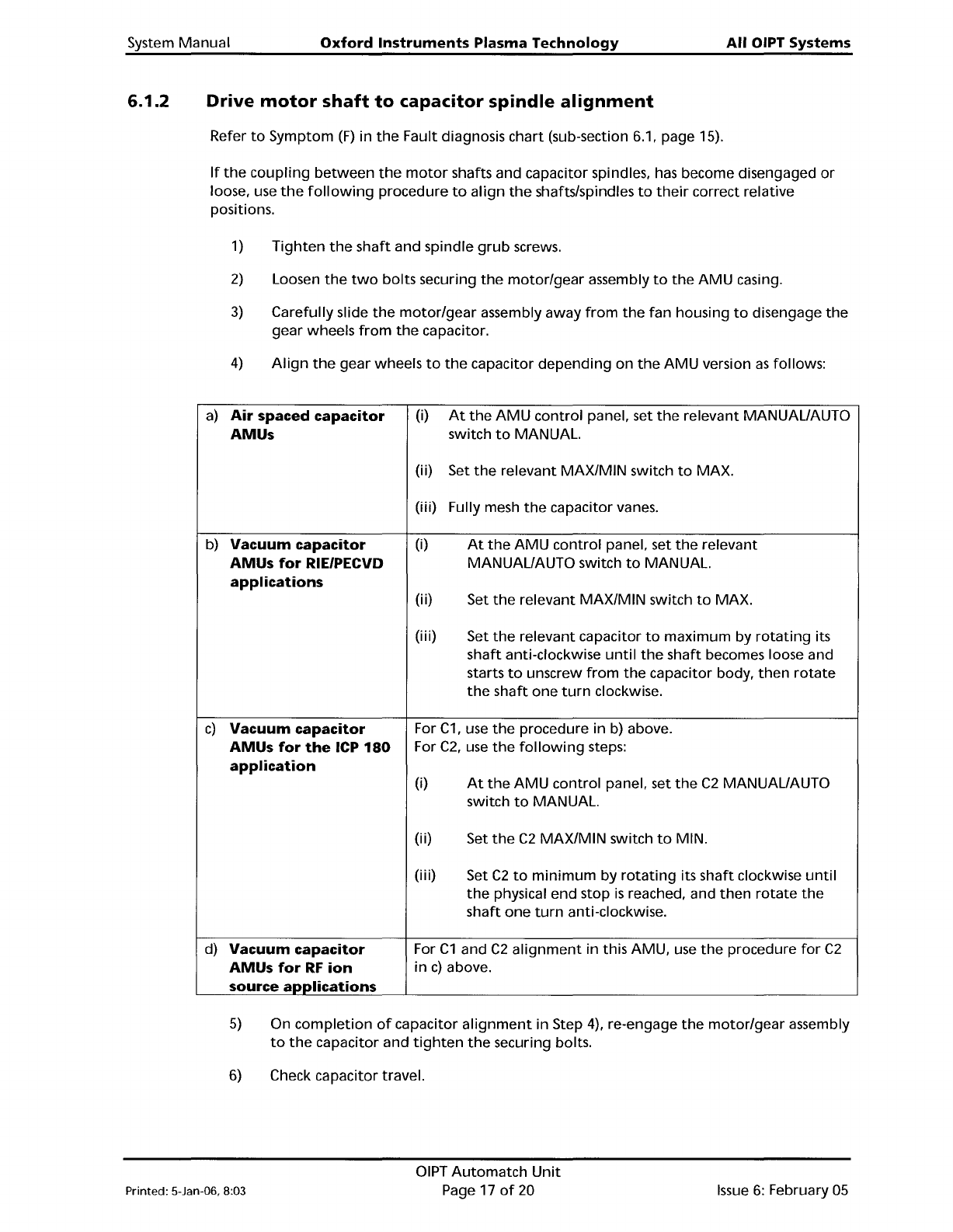
System Manual Oxford Instruments Plasma Technology All OIPT Systems 6.1.2 Drive motor shaft to capacitor spindle alignment Refer to Symptom (F) in the Fault diagnosis chart (sub-section 6.1, page 15). If the coupling bet…
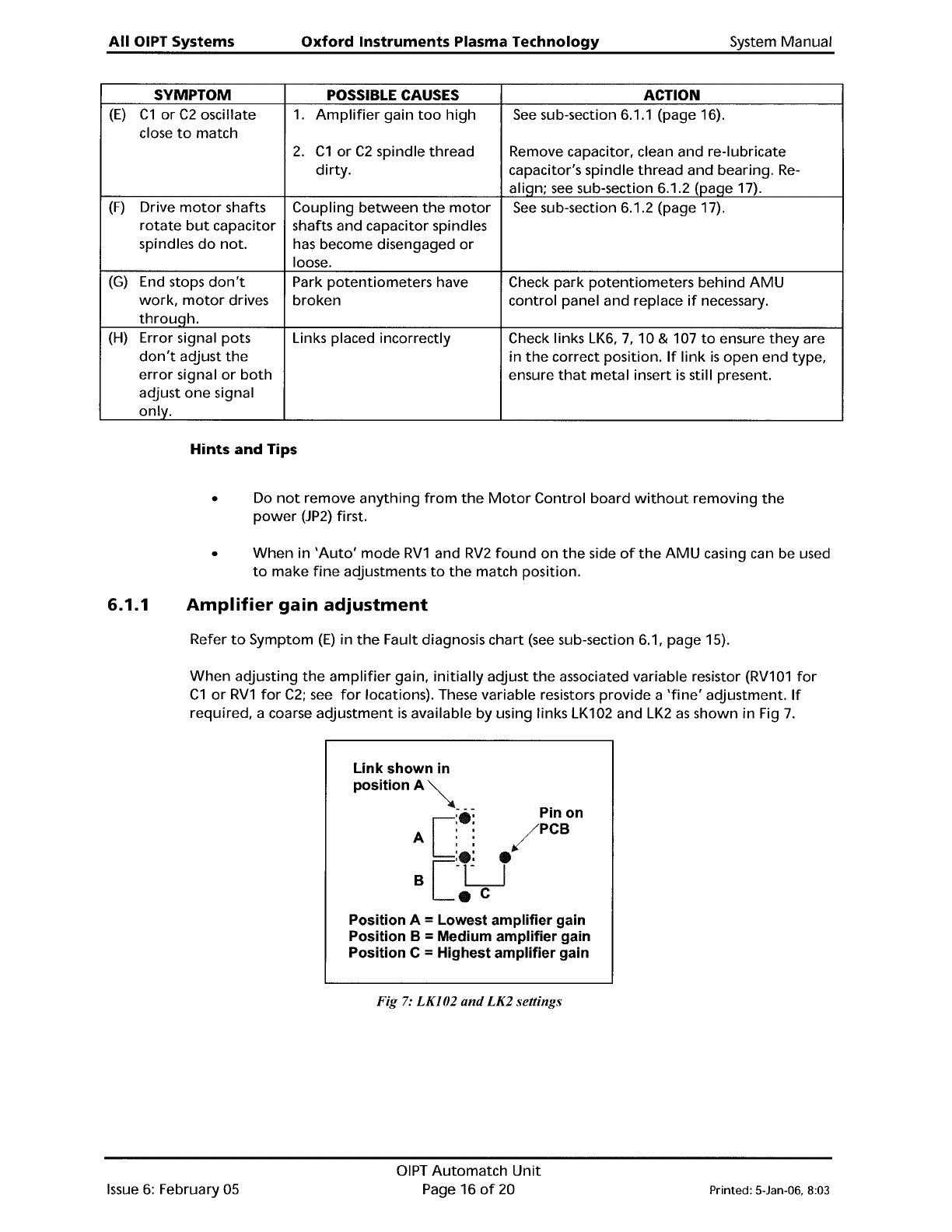
All
OIPT Systems
Oxford
Instruments
Plasma
Technology
System
Manual
SYMPTOM
POSSIBLE CAUSES ACTION
(E)
C1
or
C2
oscillate
1.
Amplifier
gain
too
high
See
sub-section 6.1.1 (page 16).
close
to
match
2.
C1
or
C2
spindle
thread
Remove capacitor, clean and re-Iubricate
dirty.
capacitor's spindle
thread
and bearing.
Re-
aliqn;
see
sub-section 6.1.2 (paqe 17).
(F)
Drive
motor
shafts
Coupling
between
the
motor
See
sub-section 6.1.2 (page 17).
rotate
but
capacitor shafts and capacitor spindles
spindles
do
not.
has become disengaged
or
loose.
(G)
End stops
don't
Park
potentiometers
have
Check park
potentiometers
behind
AMU
work,
motor
drives
broken
control
panel and replace
if
necessary.
throuqh.
(H)
Error signal pots
Links placed incorrectly Check links
LK6,
7,
10 & 107
to
ensure
they
are
don't
adjust
the
in
the
correct position.
If
link
is
open
end type,
error
signal
or
both
ensure
that
metal
insert
is
still present.
adjust
one
signal
only.
Hints
and
Tips
• Do
not
remove
anything
from
the
Motor
Control
board
without
removing
the
power
(JP2)
first.
•
When
in
'Auto'
mode
RV1
and
RV2
found
on
the
side
of
the
AMU
casing can be used
to
make
fine
adjustments
to
the
match position.
6.1.1
Amplifier
gain
adjustment
Refer
to
Symptom
(E)
in
the
Fault diagnosis
chart
(see
sub-section 6.1, page 15).
When
adjusting
the
amplifier
gain,
initially
adjust
the
associated variable resistor
(RV101
for
C1
or
RV1
for
C2;
see
for
locations). These variable resistors
provide
a
'fine'
adjustment.
If
required, a coarse
adjustment
is
available by using links LK102 and
LK2
as
shown in Fig
7.
Link shown
in
PositionA~
; -
~
Pin on
[
:e:
/PCB
A
::
[
:e:
e
B
-LJ
e
C
Position A = Lowest amplifier gain
Position B
= Medium amplifier gain
Position C
= Highest amplifier gain
Fig
7:
LKI02
and
LK2 settings
Issue
6:
February 05
DIPT
Automatch
Unit
Page 16
of
20 Printed: 5-Jan-06, 8:03
System
Manual
Oxford
Instruments
Plasma
Technology
All
OIPT Systems
6.1.2
Drive
motor
shaft
to
capacitor
spindle
alignment
Refer
to
Symptom
(F)
in
the
Fault diagnosis
chart
(sub-section 6.1, page 15).
If
the
coupling
between
the
motor
shafts and capacitor spindles,
has
become disengaged
or
loose, use
the
following
procedure
to
align
the
shafts/spindles
to
their
correct relative
positions.
1)
Tighten
the
shaft
and spindle
grub
screws.
2)
Loosen
the
two
bolts
securing
the
motor/gear
assembly
to
the
AMU
casing.
3)
Carefully slide
the
motor/gear
assembly
away
from
the
fan
housing
to
disengage
the
gear wheels
from
the
capacitor.
4)
Align
the
gear wheels
to
the
capacitor
depending
on
the
AMU
version
as
follows:
a)
Air
spaced
capacitor
(i)
At
the
AMU
control
panel, set
the
relevant MANUAL/AUTO
AMUs
switch
to
MANUAL.
(i
i)
Set
the
relevant
MAX/MIN
switch
to
MAX.
(iii)
Fully mesh
the
capacitor vanes.
b)
Vacuum
capacitor
(i)
At
the
AMU
control
panel, set
the
relevant
AMUs
for
RIE/PECVD
MANUAL/AUTO switch
to
MANUAL.
applications
(i
i)
Set
the
relevant
MAX/MIN
switch
to
MAX.
(i
i
i)
Set
the
relevant capacitor
to
maximum
by
rotating
its
shaft
anti-clockwise
until
the
shaft
becomes loose and
starts
to
unscrew
from
the
capacitor body,
then
rotate
the
shaft
one
turn
clockwise.
c)
Vacuum
capacitor
For
C1,
use
the
procedure in
b)
above.
AMUs
for
the
ICP
180
For
C2,
use
the
following
steps:
application
(i)
At
the
AMU
control
panel, set
the
C2
MANUAL/AUTO
switch
to
MANUAL.
(i
i)
Set
the
C2
MAX/MIN
switch
to
MIN.
(i
i
i)
Set
C2
to
minimum
by
rotating
its
shaft
clockwise
until
the
physical end stop
is
reached, and
then
rotate
the
shaft
one
turn
anti-clockwise.
d)
Vacuum
capacitor
For
C1
and
C2
alignment
in this AMU, use
the
procedure
for
C2
AMUs
for
RF
ion
in
c)
above.
source
applications
5)
On
completion
of
capacitor
alignment
in Step 4), re-engage
the
motor/gear
assembly
to
the
capacitor and
tighten
the
securing bolts.
6)
Check capacitor travel.
Printed: 5-Jan-06, 8:03
OIPT
Automatch
Unit
Page 17
of
20
Issue
6:
February
05
All
OIPT Systems
Oxford
Instruments
Plasma
Technology
System Manual
6.2 Link
Settings
Incorrect
link
settings can cause
the
AMU
to
malfunction.
The
factory
default
settings are
given
in
the
following
table:
Air
Low
Power
High
Power
spaced
Vacuum
Vacuum
Link
Capacitor Capacitor
Capacitor
Notes
LK1
A A A Setting A enables
park
position.
Setting B disables park.
LK2
B A B
Coarse gain setting
for
C2
CA' - low, 'B' -
medium, 'c'
- hiqh)
LK3
A A A Setting 'B' simulates
RF
on
signal
(for
testing
only).
LK4
B A A
Incremental Gain Signal.
LK4
in position
'A'
enables extra gain
when
in position
control. This
is
used
when
driving
a
vacuum capacitor.
LK5
A A
A PanellPLC Controller. Position B
for
AMU
controlled
by
PLC
LK6
A
A B Changes
the
biasing
on
the
input
amplifier
for
C2
motor
LK7
B B A
Changes
the
biasing
on
the
input
amplifier
for
C2
motor
LK101
A A A
Setting
'A'
enables
park
position.
Setting 'B' disables park.
LK102 B A
B Coarse gain setting
for
C1
CA' - low, 'B' -
medium, 'C' - hiqh)
LK104 B
A A
Incremental Gain Signal. LK104 in position
'A'
enables extra gain
when
in
position
control. This
is
used
when
driving
a
vacuum capacitor.
LK105 A A A
PanellPLC Controller. Position 'B'
for
AMU
controlled
by
PLC
LK106 A A B
Changes
the
biasing
on
the
input
amplifier
for
C1
motor
LK107
A A B
Changes
the
biasing on
the
input
amplifier
for
C1
motor
Issue
6:
February 05
DIPT
Automatch
Unit
Page 18
of
20
Printed: 5-Jan-06, 8:03