2OM-1011-002.pdf - 第104页
0305-001 Tg0858-PM-PM 2-85 Placement Data (P) U02 3.2 Example 2 (Example of Placement Data Creation) Enter “0” (zero) in all data fields of the last step and “P” or “Q” as a control command. Placement Data (O) U02 Enter …
0305-001 Tg0858-PM-PM
3.2 Example 2 (Example of Placement Data Creation)
(2) Example of Data Creation
• Use the following placement data.
Placement Data (P) U01, (O) U01, and (V) U01
(P) U02, (O) U02, and (V) U02
(P) U03, (O) U03, and (V) U03
• P.E.C. recognition must be specified for each individual repetitive pat-
terns in the operation data.
Set “ON” in the “P.E.C. RECOGNITION” and “ON” in the “IMAGE”
data box of the label “P.E.C. RECOGNITION MODE”.
Note: Data for Model C must be created as repetitive pattern for one unit
P.C.B. because the P.E.C. recognition function (global) is implemented
according to the repetitive pattern program data created for a unit P.C.B.
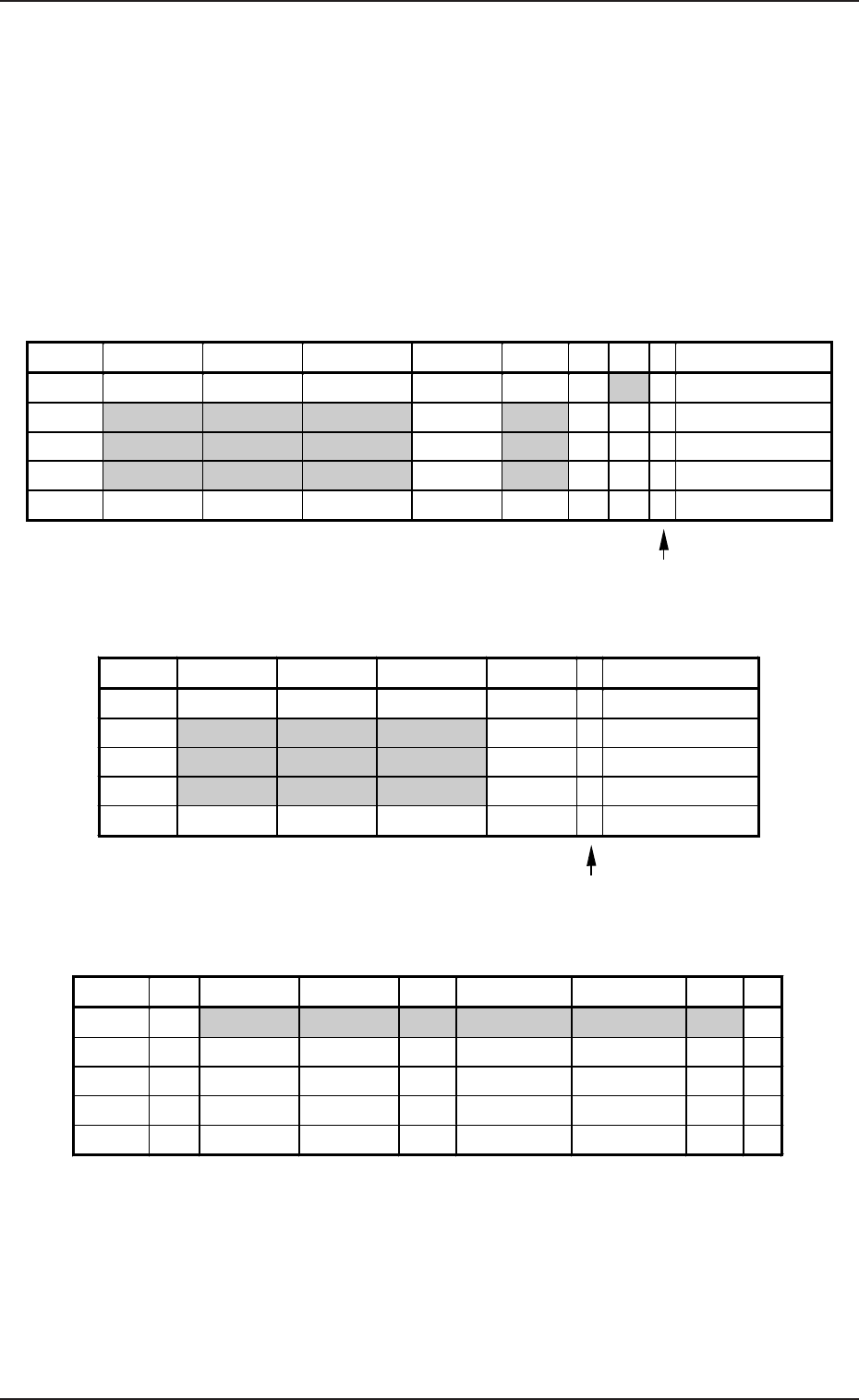
Plecemnt Data (P) U01
2-84
Enter “0” (zero) in all data fields of the last step and “P” or
“Q” as a control command.
Plecemnt Data (O) U01
Enter “0” (zero) in all data fields of the last step and “E”
as a control command.
Plecemnt Data (V) U01
Notes: (a) The mark code Nos. registered in the “MARK DATA” data boxes
at the “OPERATION DATA” display must be entered in the “F1”
and “F2” data fields.
(b) V-0001, V-0002, V-0003 ... These Nos. correspond to the place-
ment steps.
Do not enter any parameter unless the marks at the placement
position for each individual components should be recognized.
P-NO. X(mm) Y(mm) Z(THETA) H(mm) FDR S V C COMMENT
0000 +0.00 +0.00 +0°00’ +0.00 000 - 02 -
0001 +5.00 +20.00 +0°00’ +0.00 101 - 00 -
0002 +15.00 +10.00 +180°00’ +0.00 201 - 00 -
0003 +25.00 +10.00 +90°00’ +0.00 301 - 00 -
0004 +0.00 +0.00 +0°00’ +0.00 000 - 00 P
O-NO. X(mm) Y(mm) Z(THETA) H(mm) C COMMENT
0000 +0.00 +0.00 +0°00’ +0.00 -
0001 +5.00 +5.00 +0°00’ +0.00 -
0002 +35.00 +5.00 +0°00’ +0.00 -
0003 +65.00 +5.00 +0°00’ +0.00 -
0004 +0.00 +0.00 +0°00’ +0.00 E
V-NO. V X1(mm) Y1(mm) F1 X1(mm) Y1(mm) F2 C
0000 02 +5.00 +5.00 01 +25.00 +25.00 01 -
0001 00 +0.00 +0.00 00 +0.00 +0.00 00 -
0002 00 +0.00 +0.00 00 +0.00 +0.00 00 -
0003 00 +0.00 +0.00 00 +0.00 +0.00 00 -
0004 00 +0.00 +0.00 00 +0.00 +0.00 00 P
Table 2B30
Table 2B31
Table 2B32
0305-001 Tg0858-PM-PM2-85
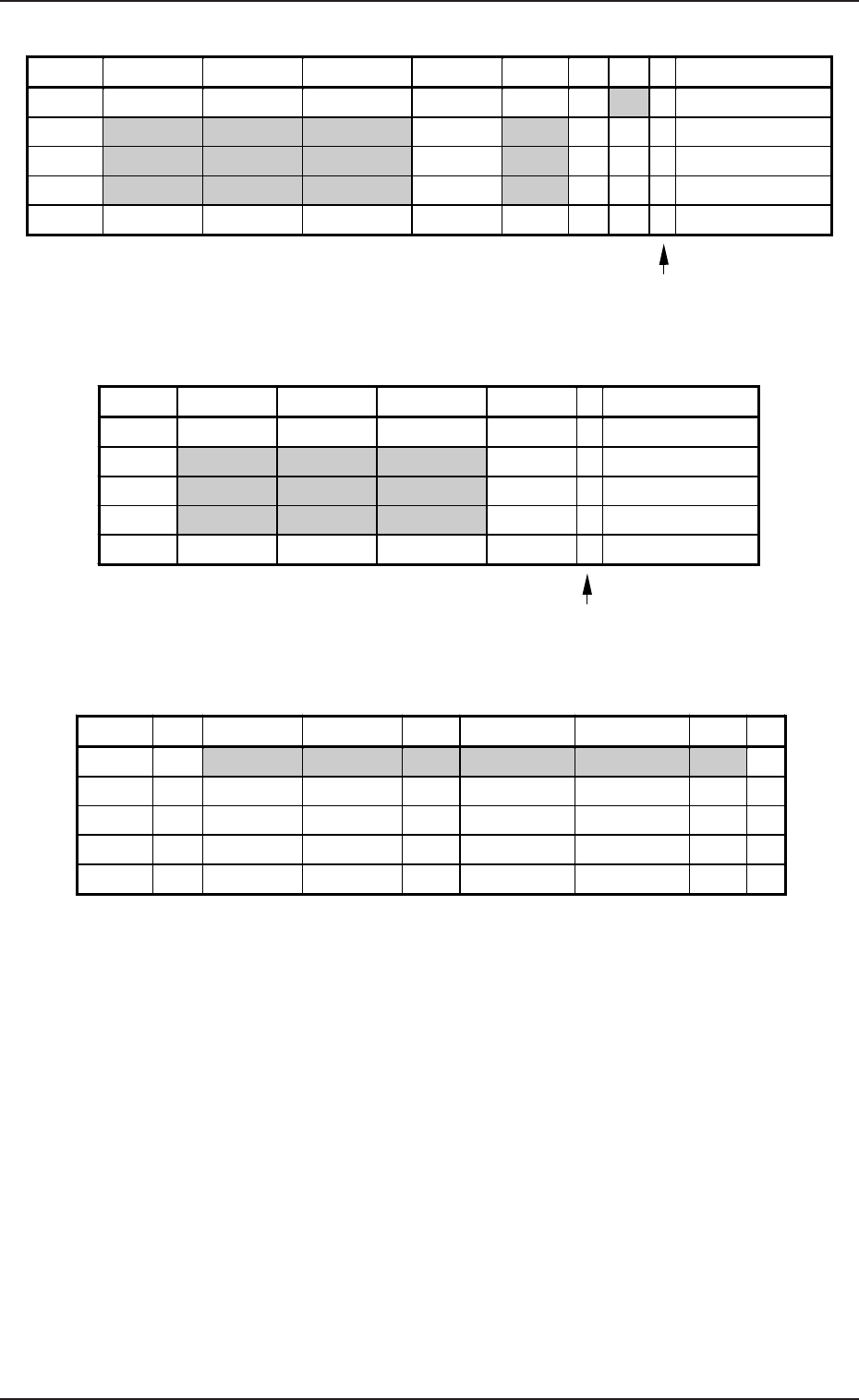
Placement Data (P) U02
3.2 Example 2 (Example of Placement Data Creation)
Enter “0” (zero) in all data fields of the last step and “P” or
“Q” as a control command.
Placement Data (O) U02
Enter “0” (zero) in all data fields of the last step and “E”
as a control command.
Placement Data (V) U02
Notes: (a) The mark code Nos. registered in the “MARK DATA” data boxes
at the “OPERATION DATA” display must be entered in the “F1”
and “F2” data fields.
(b) V-0001, V-0002, V-0003 ... These Nos. correspond to the place-
ment steps.
Do not enter any parameter unless the marks at the placement
position for each individual components should be recognized.
P-NO. X(mm) Y(mm) Z(THETA) H(mm) FDR S V C COMMENT
0000 +0.00 +0.00 +0°00’ +0.00 000 - 02 -
0001 +20.00 +5.00 +90°00’ +0.00 301 - 00 -
0002 +50.00 +10.00 +270°00’ +0.00 401 - 00 -
0003 +70.00 +10.00 +0°00’ +0.00 601 - 00 -
0004 +0.00 +0.00 +0°00’ +0.00 000 - 00 P
O-NO. X(mm) Y(mm) Z(THETA) H(mm) C COMMENT
0000 +0.00 +0.00 +0°00’ +0.00 -
0001 +5.00 +40.00 +0°00’ +0.00 -
0002 +5.00 +55.00 +0°00’ +0.00 -
0003 +5.00 +70.00 +0°00’ +0.00 -
0004 +0.00 +0.00 +0°00’ +0.00 E
V-NO. V X1(mm) Y1(mm) F1 X1(mm) Y1(mm) F2 C
0000 02 +5.00 +10.00 02 +85.00 +10.00 02 -
0001 00 +0.00 +0.00 00 +0.00 +0.00 00 -
0002 00 +0.00 +0.00 00 +0.00 +0.00 00 -
0003 00 +0.00 +0.00 00 +0.00 +0.00 00 -
0004 00 +0.00 +0.00 00 +0.00 +0.00 00 P
Table 2B33
Table 2B34
Table 2B35
0305-001 Tg0858-PM-PM
3.2 Example 2 (Example of Placement Data Creation)
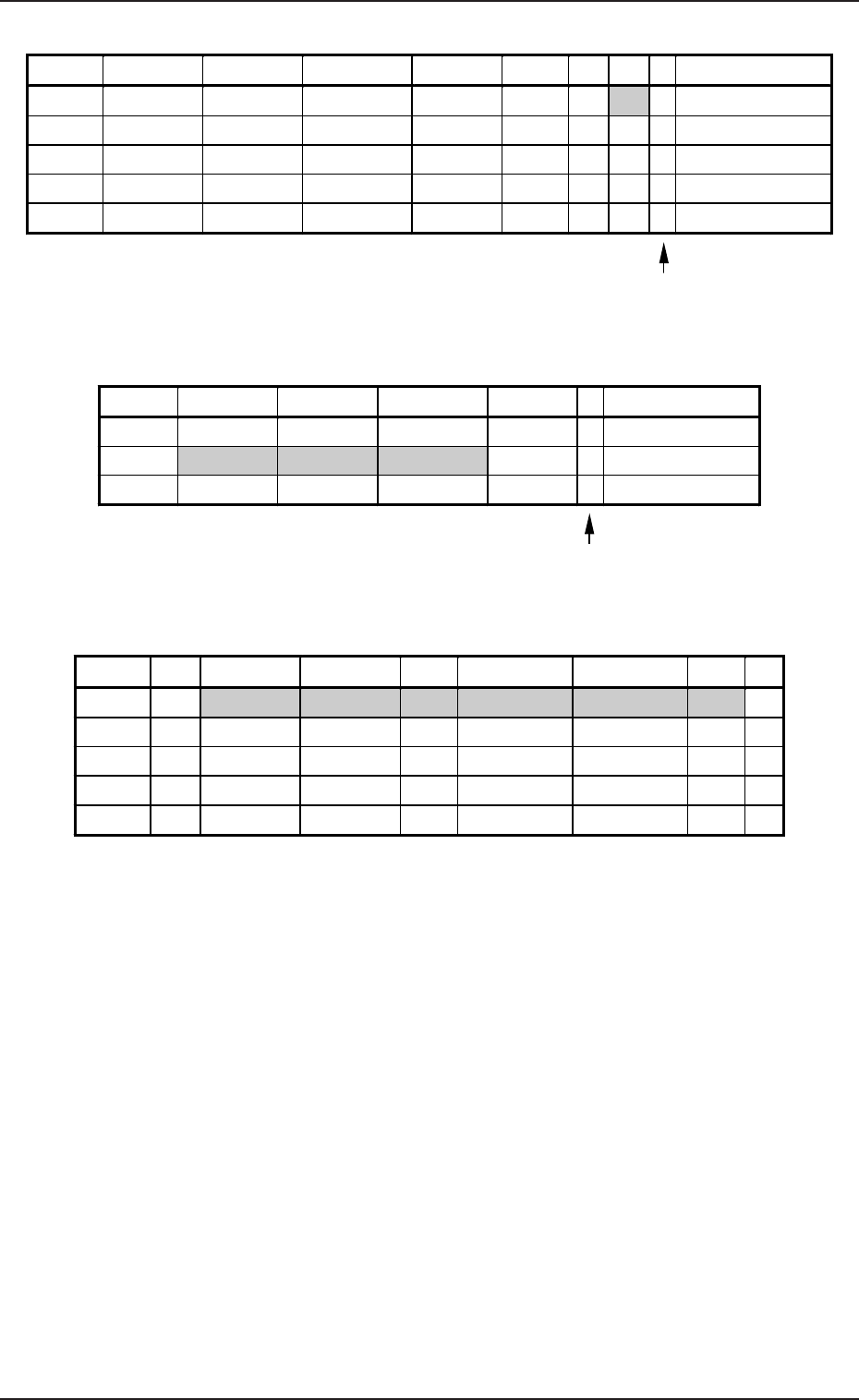
Placement Data (P) U03
2-86
Enter “0” (zero) in all data fields of the last step and “P” or
“Q” as a control command.
Placement Data (O) U03
Enter “0” (zero) in all data fields of the last step and “E”
as a control command.
Placement Data (V) U03
Notes: (a) The mark code Nos. registered in the “MARK DATA” data boxes
at the “OPERATION DATA” display must be entered in the “F1”
and “F2” data fields.
(b) V-0001, V-0002, V-0003 ... These Nos. correspond to the place-
ment steps.
Do not enter any parameter unless the marks at the placement
position for each individual components should be recognized.
P-NO. X(mm) Y(mm) Z(THETA) H(mm) FDR S V C COMMENT
0000 +0.00 +0.00 +0°00’ +0.00 000 - 02 -
0001 +10.00 +15.00 +0°00’ +0.00 111 - 00 -
0002 +10.00 +40.00 +180°00’ +0.00 302 - 00 -
0003 +10.00 +60.00 +270°00’ +0.00 602 - 00 -
0004 +0.00 +0.00 +0°00’ +0.00 000 - 00 P
O-NO. X(mm) Y(mm) Z(THETA) H(mm) C COMMENT
0000 +0.00 +0.00 +0
°
00’ +0.00 -
0001 +65.00 +5.00 +0
°
00’ +0.00 -
0002 +0.00 +0.00 +0
°
00’ +0.00 E
V-NO. V X1(mm) Y1(mm) F1 X1(mm) Y1(mm) F2 C
0000 02 +5.00 +5.00 03 +15.00 +75.00 03 -
0001 00 +0.00 +0.00 00 +0.00 +0.00 00 -
0002 00 +0.00 +0.00 00 +0.00 +0.00 00 -
0003 00 +0.00 +0.00 00 +0.00 +0.00 00 -
0004 00 +0.00 +0.00 00 +0.00 +0.00 00 P
Table 2B36
Table 2B37
Table 2B38