2OM-1011-002.pdf - 第259页
0305-001 Tg0858-PM-PM 8-12
0305-001 Tg0858-PM-PM
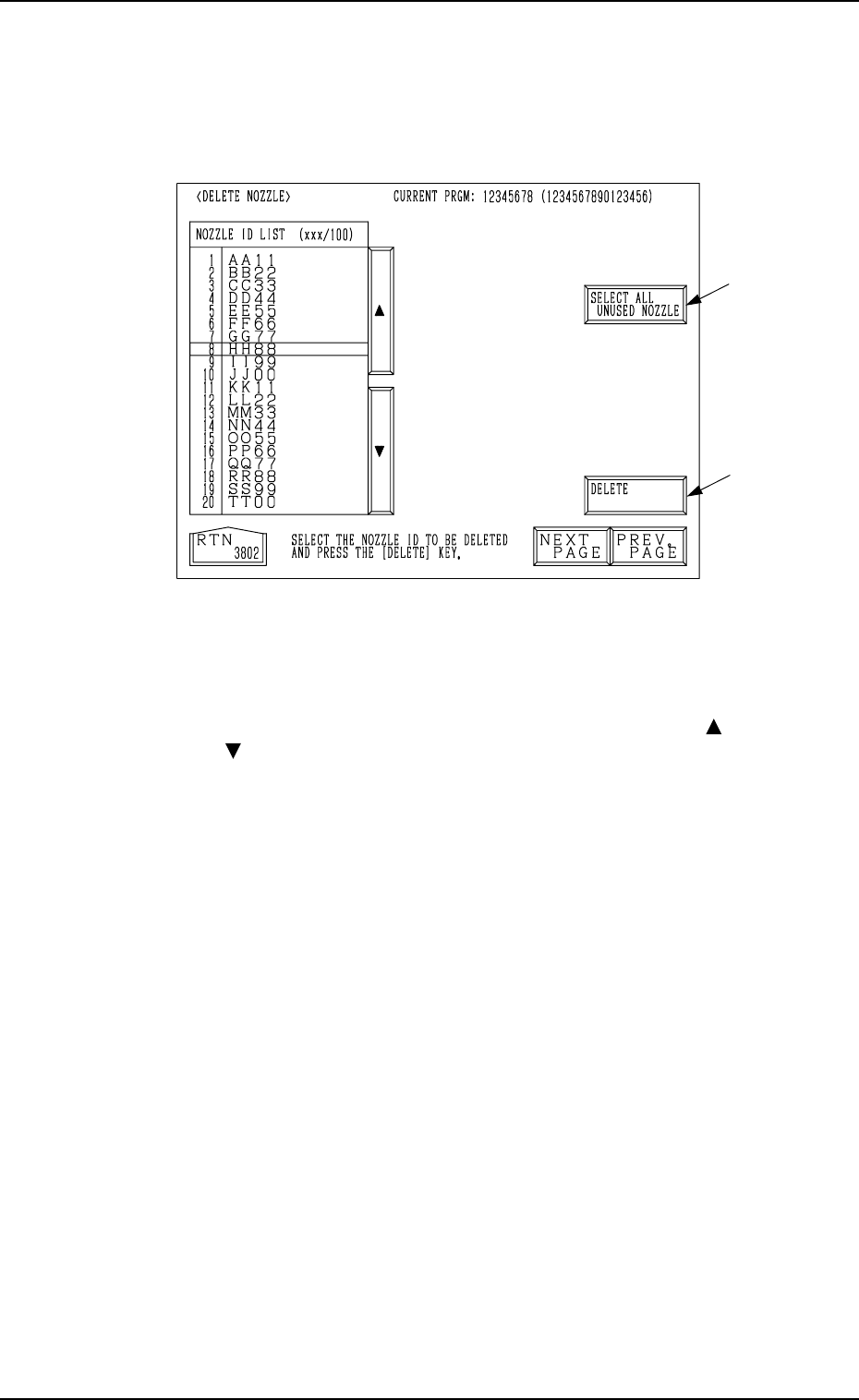
5. DELETE NOZZLE Display
When the [DELETE NOZZLE] key is pressed at the “NOZZLE LIBRARY
INFO” display (Fig. 2H1), the following display appears on the screen.
*1
*2
5. DELETE NOZZLE Display
Fig. 2H20
Operation Procedure
Deletion of Nozzle ID
(1) Move the line cursor to the nozzle ID to be deleted with the [ ] , the
[ ], the [NEXT PAGE], or the [PREV. PAGE] key.
(2) When the [DELETE] key *1 is pressed, the selected nozzle ID is
deleted.
Deletion of All Nozzle IDs
(1) When the [SELECT ALL UNUSED NOZZLE] key *2 is pressed, all
nozzle IDs are selected and the background color of the “NOZZLE
ID LIST (xxx/100)” data field turns blue.
(2) When the [DELETE] key *1 is pressed, all nozzle IDs are deleted.
Note: The nozzle IDs used in the current pattern program are not de-
leted.
• When the [SELECT ALL UNUSED NOZZLE] key is pressed, the back-
ground color of the “NOZZLE ID LIST (xxx/100)” data field turns
blue, indicating that all nozzle IDs are selected. When the [SELECT
ALL UNUSED NOZZLE] key is pressed again under this condition,
the selection of all nozzle IDs is canceled.
8-11

0305-001 Tg0858-PM-PM8-12

0305-001 Tg0858-PM-PM
Section 9
Supplementary Material
9-A
This section includes the Pattern Program Data Sheets.