2OM-1011-002.pdf - 第44页
MARK SIZE D1 (mm), D2 (mm), D3 (mm) • “D3 (mm)” is reserved data. Set the outer and inner diameters of a fiducial mark.(Unit: mm) Refer to “(1) T ype and Size” in “2.3.4 P .E.C. Fiducial Marks of Section 2” for details. …
[SCREENS] Key
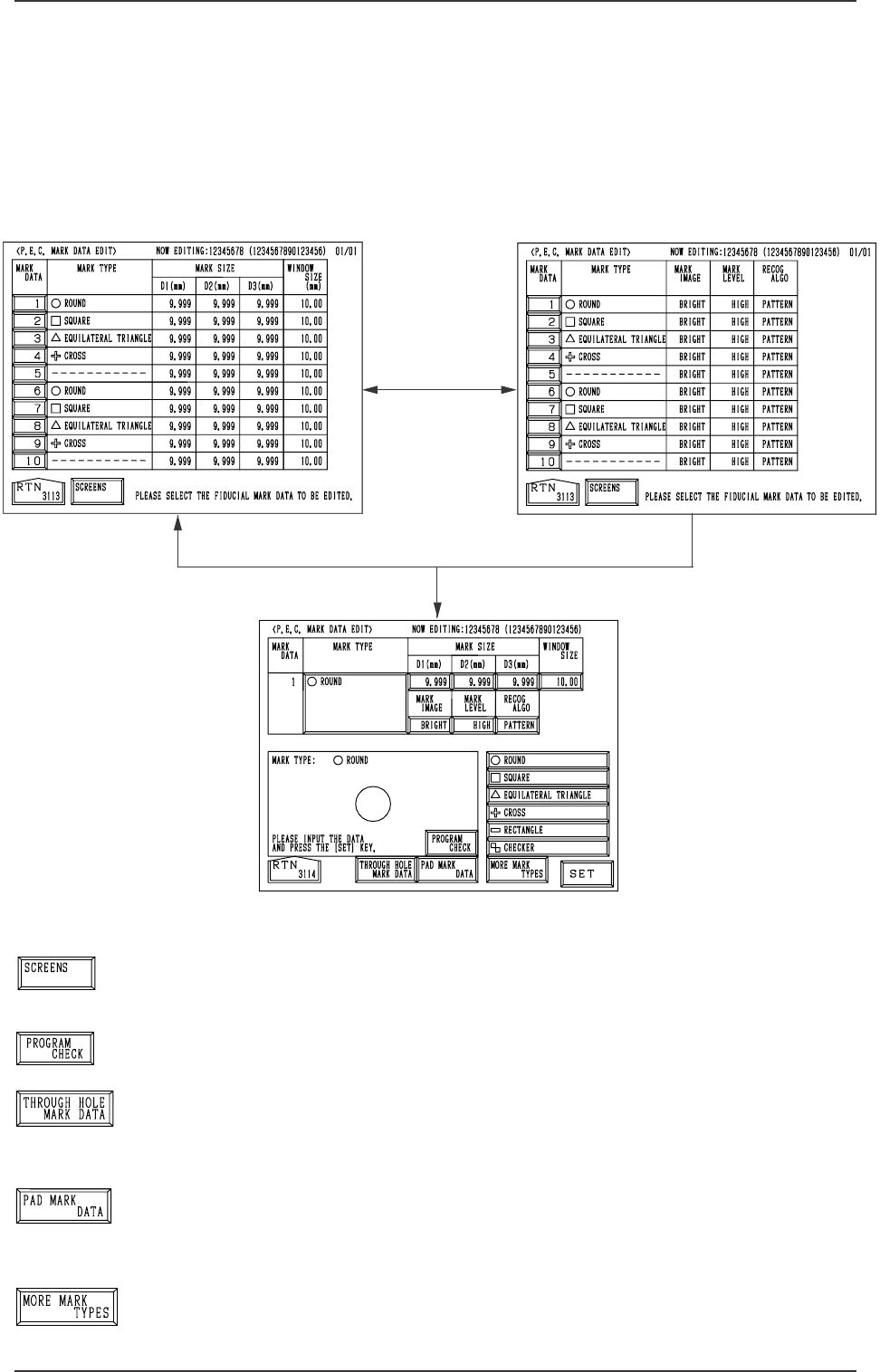
When this key is pressed, another “P.E.C. MARK DATA EDIT”
display appears on the screen.
[PROGRAM CHECK] Key
When this key is pressed, the edited pattern program is checked.
[THROUGH HOLE MARK DATA] Key
When this key is pressed, a display related to the through hole
marks (marks which belong to the selected type) appears on
the screen.
[PAD MARK DATA] Key
When this key is pressed, a display related to the pad marks
(marks which belong to the selected type) appears on the screen.
[MORE MARK TYPES] Key
When this key is pressed, other mark types in the same cat-
egory are recalled.
[1] Key
[SCREENS] Key
Fig. 2B48
Fig. 2B50
Fig. 2B49
2.3 OPERATION DATA Display
2.3.3 P.E.C. MARK DATA EDIT Display
When the [P.E.C. MARK DATA EDIT] key is pressed at the “OPERATION
DATA 02/03” display (Fig. 2B10), the following display appears on the screen.
Pressing the [SCREENS] key at this display opens another “P.E.C. MARK
DATA EDIT” display.
When the [1] key under the label “MARK DATA” is pressed, the display (Fig.
2B50) appears on the screen, enabling the editing of P.E.C. mark data.
0305-001 2-24
Tg0858-PM-PM
Fig. 2B55
Fig. 2B51
Fig. 2B52
Fig. 2B53
Fig. 2B54
MARK SIZE D1 (mm), D2 (mm), D3 (mm)
• “D3 (mm)” is reserved data.
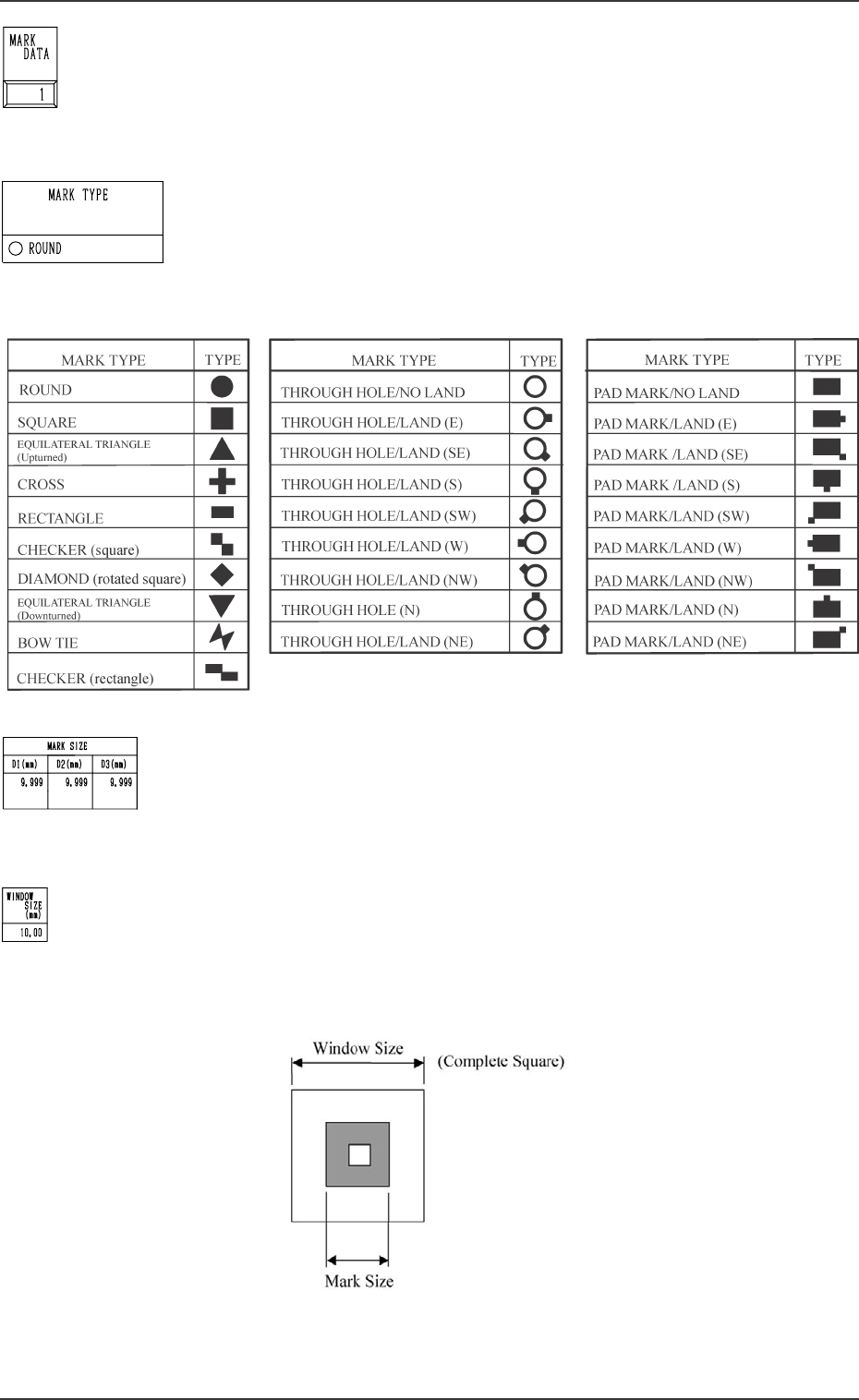
Set the outer and inner diameters of a fiducial mark.(Unit: mm)
Refer to “(1) Type and Size” in “2.3.4 P.E.C. Fiducial Marks
of Section 2” for details.
WINDOW SIZE
Set the window size (recognition area) for the P.E.C. recogni-
tion function. (Unit: mm)
Set a preferably small value to avoid false recognition and
shorten recognition time.
MARK DATA
The mark data (code) corresponds to the code No. of the fidu-
cial mark used in the P.E.C. recognition function.
• 10 types of mark codes can be registered for each program
data.
MARK TYPE
Shown is the selected type of fiducial mark.
• Marks are categorized according to the following three types
- “P.E.C. Mark”, “Through Hole”, and “Pad Mark”.
2.3 OPERATION DATA Display
<Pad Mark>
<Through Hole>
<P.E.C. Mark>
Fig. 2B60
0305-001 2-25
Tg0858-PM-PM
Fig. 2B56
Fig. 2B57
Fig. 2B58
Fig. 2B59

MARK IMAGE
Select one of the following options for a fiducial mark image
(mark pattern) taken by the camera.
“BRIGHT”
“DARK”
BRIGHT : Bright Fiducial/Dark Background
DARK : Dark Fiducial/Bright Background
• Select either mode according to the difference in contrast
between the fiducial and its surroundings.
• Select better mode to get a clear fiducial image.
Note: Wrong mode selection causes malfunction of fiducial
mark recognition.
MARK LEVEL
Select one of the following options as a level to detect a fidu-
cial mark shape.
“HIGH”
“MIDDLE”
“LOW”
HIGH : Both identity and similarity between the shape
of a fiducial mark and the real image are de-
tected on a high level.
MIDDLE : Either identity or similarity between the shape
of a fiducial mark and the real image is de-
tected on a high level.
LOW : Both identity and similarity between the shape
of a fiducial mark and the real image are de-
tected on a low level.
Identity:
Identity between the shape of the specified mark and the real
image (including the size)
Similarity:
Similarity between the shape of the specified mark and the
real image
2.3 OPERATION DATA Display
0305-001 2-26 Tg0858-PM-PM
Fig. 2B61
Fig. 2B62