2OM-1011-002.pdf - 第251页
0305-001 Tg0858-PM-PM Fig. 2H8 Sectional View A-A ’ TIP POLARITY EXISTENCE Set “ENABLE” or “DISABLE” in the data box to specify whether or not the polarity exists in the shape of the nozzle tip. ENABLE : Special Nozzle w…
0305-001 Tg0858-PM-PM
2. NOZZLE TYPE DATA Display
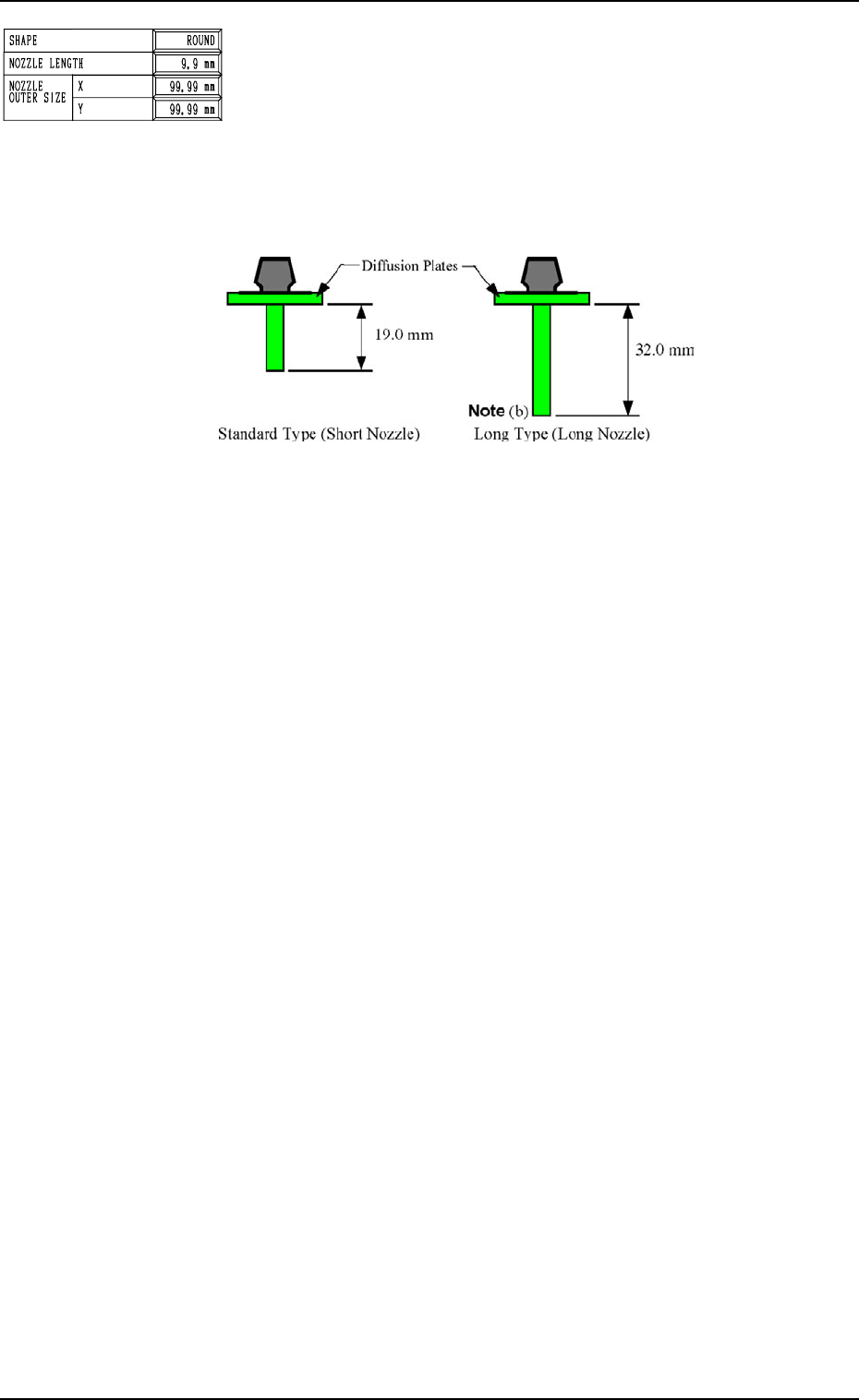
NOZZLE LENGTH
Set the nozzle length in the data box.
<Options>
“19.0 mm” (Short Nozzle)
“32.0 mm” (Long Nozzle) : (Unavailable at Present)
There are two types of vacuum nozzles - short and long ones.
The length between the lower surface of the diffusion plate
and the nozzle tip must be entered.
Fig. 2H6
Notes: (a) A short nozzle can be used for components of half an inch or less
(component thickness T: 12.70 mm or less).
Long nozzles must be used only when a hindrance is caused dur-
ing pick-up or placement operation due to the regulatory condi-
tion of the component shape and height and the height of the pre-
viously-placed components.
(b) Consult our service personnel separately for long nozzles.
(Unavailable at Present)
8-3
Fig. 2H5
0305-001 Tg0858-PM-PM
Fig. 2H8 Sectional View A-A’
TIP POLARITY EXISTENCE
Set “ENABLE” or “DISABLE” in the data box to specify
whether or not the polarity exists in the shape of the nozzle
tip.
ENABLE : Special Nozzle with Polarity (asymmetrical)
DISABLE : Round Nozzle or the like without Polarity
FIDUCIAL MARK IMAGE
Specify how (bright or dark) the image of the nozzle tip is
captured in the front lighting system.
The set parameter is required for nozzle masking in the front
lighting recognition.
“BRIGHT” or “DARK”
In normal cases, set “BRIGHT” in the data box.
LIGHTING METHOD
Determine in which lighting system (“BACK”, “FRONT”, or
“FRONT+BACK”) the nozzle can be used.
“BACK”
“FRONT”
“FRONT+BACK”
Ref.: “FRONT” must be selected for such a nozzle that the
image of the area other than the nozzle tip appears dark
in the back lighting system.
“BACK” must be selected for such a nozzle that the
image of the area other than the nozzle tip appears
bright in the front lighting system.
“FRONT+BACK” must be selected when “ROUND”
is set in the “SHAPE” data box.
V-GROOVE SIZE: Reserved Data
When the V-grooved nozzle is used for cylindrical compo-
nents, set the size of the V groove in the data box.
• Data Input Range
0 to 99.99 mm
In the case of the nozzle without a V groove, set “0” (zero) in
the data box.
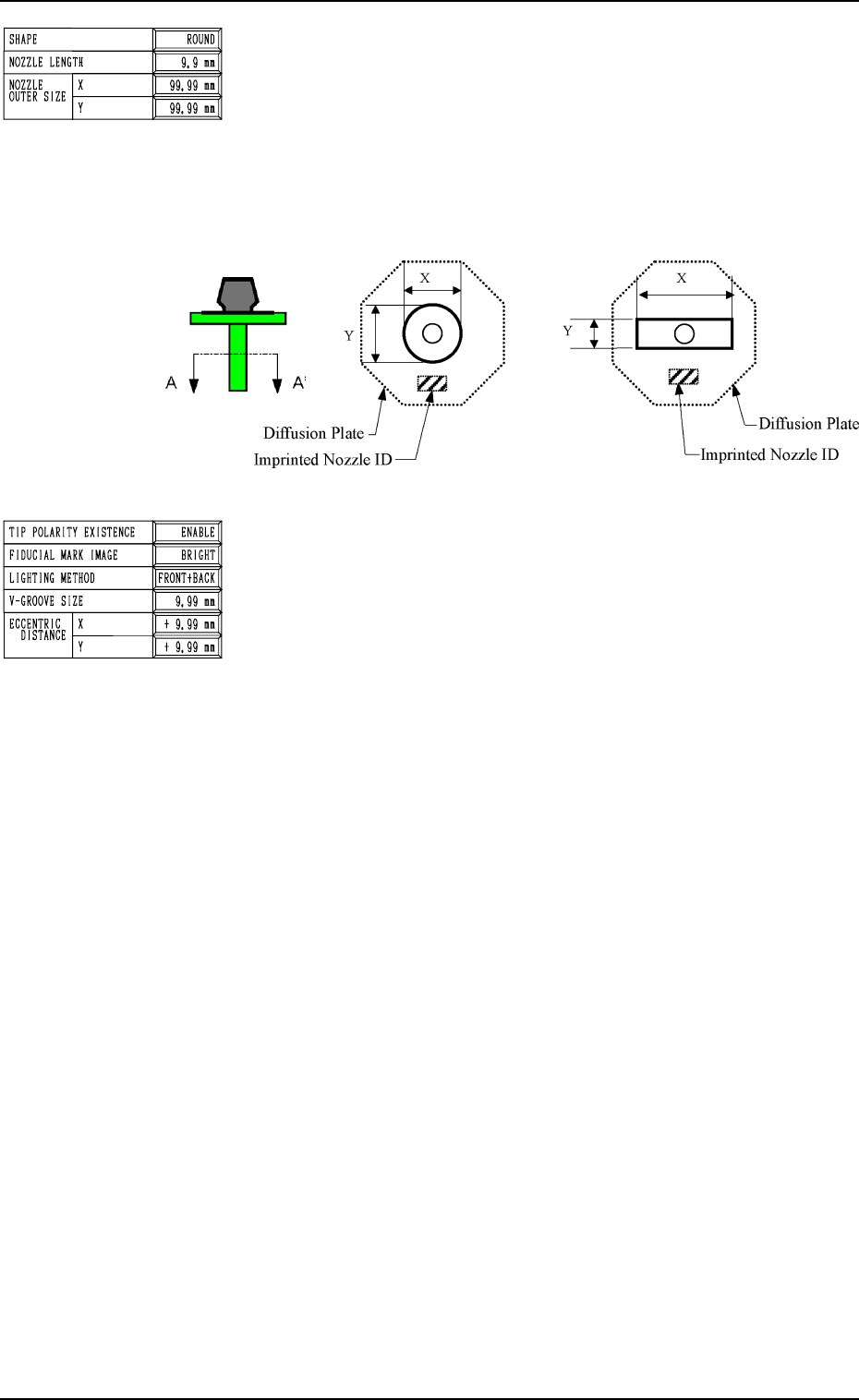
NOZZLE OUTER SIZE X (Horizontal) and Y (Vertical)
Set the outer dimensions of the nozzle tip section.
In the case of “ROUND”, set the same dimensions for “X”
and “Y”.
In the case of “RECTANGLE”, set the dimension of the longer
side in the “X” data box and the dimension of the shorter one
in the “Y” data box.
• Data Input Range
X: 0 to 99.99
Y: 0 to 99.99
2. NOZZLE TYPE DATA Display
8-4
Fig. 2H7
Fig. 2H9
0305-001 Tg0858-PM-PM
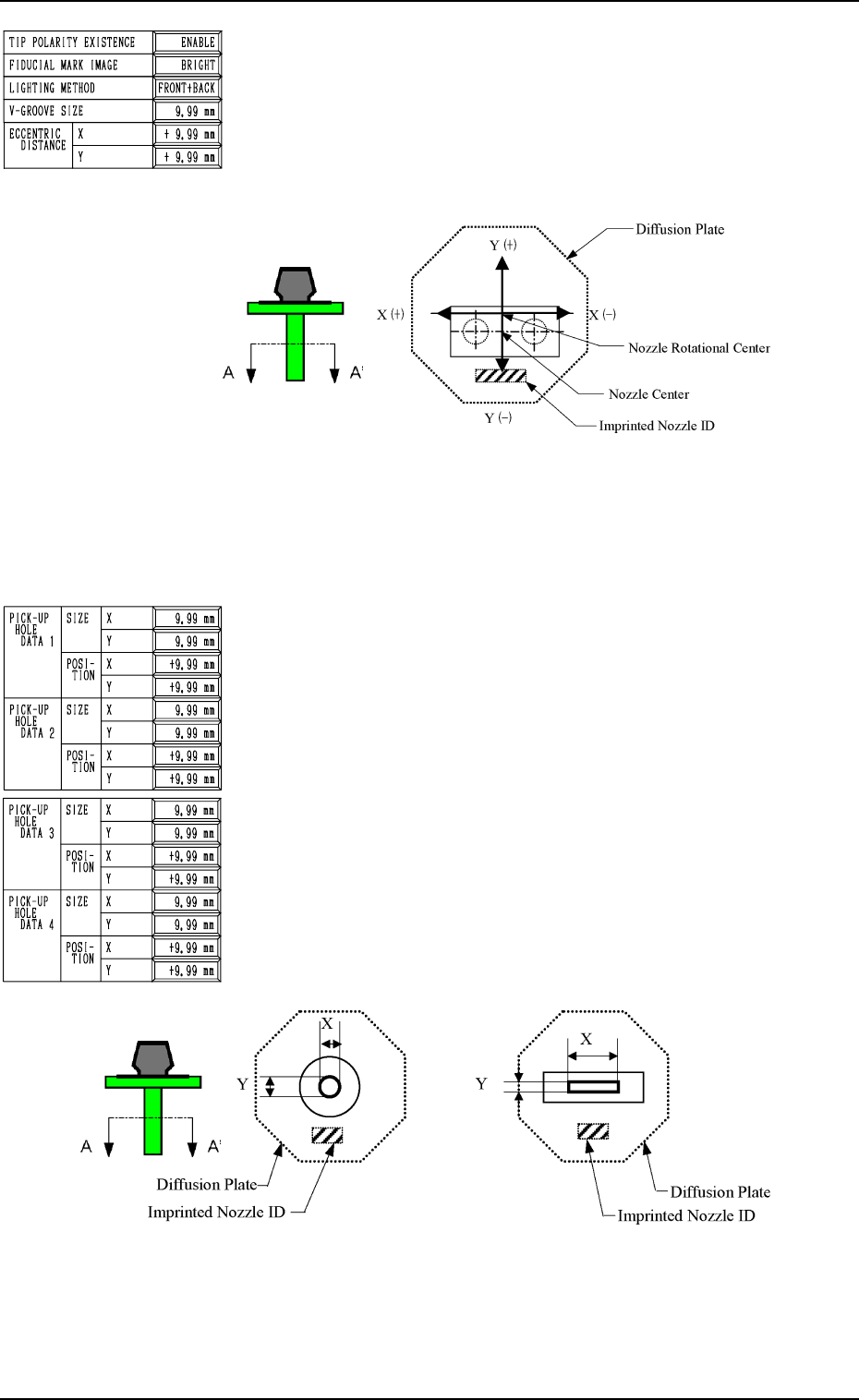
ECCENTRIC DISTANCE X (Horizontal) and Y (Vertical)
In the case of the special nozzle whose tip is manufactured
eccentrically from the head rotational center, set the eccentric-
ity (distances) separately in the “X” and “Y” data boxes.
• Data Input Range
0 to 99.99 mm
Specify X and Y as shown in the following figure.
Fig. 2H11 Sectional View A-A’
(Eccentric Designation: X = 0 and Y = Minus)
Set the data values (X, Y) as “0, 0” for a standard nozzle.
Second Page
PICK-UP HOLE DATA 1, 2, 3, 4
SIZE X (Horizontal), Y (Vertical)
Set the dimensions of the nozzle pick-up hole in the data boxes.
In the case of “ROUND”, set the same dimensions for “X”
and “Y”.
Set X and Y as shown in the following figure. in the case of a
rectangle.
• Data Input Range
X: 0 to 99.99
Y: 0 to 99.99
Fig. 2H13 Sectional View A-A’
2. NOZZLE TYPE DATA Display
8-5
Fig. 2H10
Fig. 2H12