4H4CEOM1.pdf - 第107页
Page 3-29 FUNCTIONS 3 Machine Settings 3-5-4 Setting T ime This is used to set the time of the machine. • Change the numeric value of the year , month, day , hour and minute you would like to change, and then press Set .…
Page 3-28
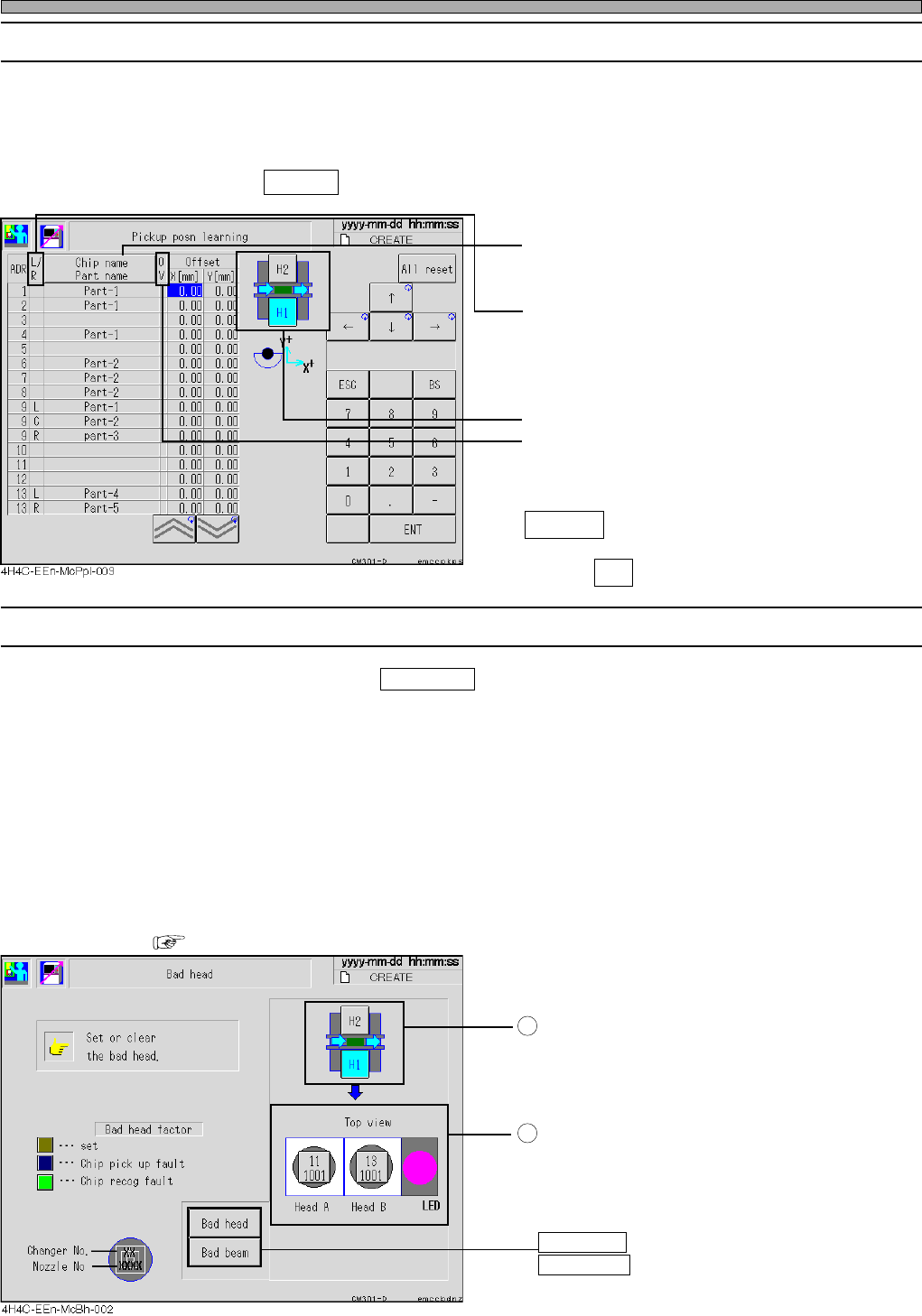
3-5-2 Pick-up Position Learning
This is used to check the correction value through the pick-up position learning during production
for each feeder address.
For the learning data, during production, 1/10 of the recognition result will be added on to the
current learning value.
When you press All reset or load production data, the pick-up position learning data of all the
feeder addresses are reset to 0.0.
• The “Chip name” or “Parts name” for each tape
feeder is displayed. (Every time you press this,
they are changed.)
• As for the vibratory stick feeder, L, C or R are
displayed.
• Choose the feeder table to be displayed.
• OV : This field lights up in yellow when the
pick-up learning position exceeds the
limit.
All reset
Deletes all the learning data.
Press Yes when the message appears.
3-5-3 Defective Head
∗ This screen is displayed when Bad nozzle is pressed on the “Machine configuration menu” screen.
This is used to check the state of the head and specify/reset the defective head.
The button of the head which has become defective automatically during production is colored
according to the factor.
• The defective head will not be used for production. When canceling it after checking, press the
button of the head you would like to cancel. Then the color of the button returns to a normal color
(light gray).
• When you would like to specify a normal nozzle as a defective one, press the button of the head
you would like to specify defective. Its button will be colored in yellow (specified defective head
color).
• During an automatic operation, you cannot specify and cancel defective head.
• At the judgment value screen, set the conditions for the automatic defective head setting.
( Maintenance Manual)
Choose the stage that has the head you will
specify or cancel.
Press the switch of the head you would like to
specify defective or cancel.
Every time you press the switch, “specify” and
“cancel” are changed over.
Bad head : Specifies by the head.
Bad beam : Specifies by the head.
Machine Settings
1
2
4H4C-E-OMA03-A01-04
L :Left
C:Center
R:Right
Page 3-29
FUNCTIONS
3
Machine Settings
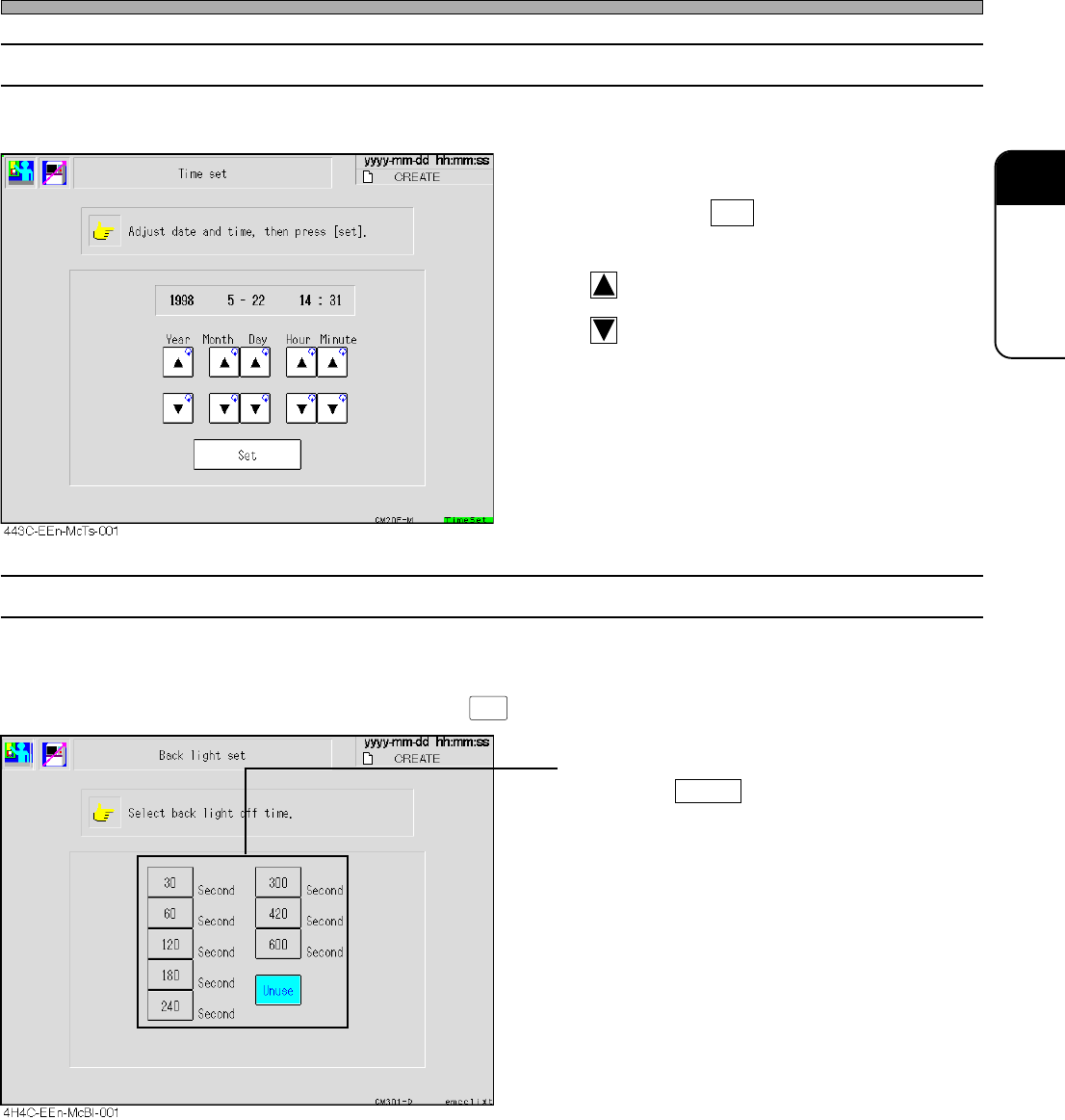
3-5-4 Setting Time
This is used to set the time of the machine.
• Change the numeric value of the year, month,
day, hour and minute you would like to change,
and then press Set .
The current time is changed.
: Forwards the time.
: Reverses the time.
3-5-5 Setting Backlight
This is used to set the backlight-off time.
∗ When the touch panel is not used for the set time, the backlight of the touch panel will turn off. To
turn on the backlight again, press .
• Press the desired time.
As long as Unuse is pressed, the backlight
will be ON all the time.
4H4C-E-OMA03-A01-01
LIGHT ON
Page 3-30
Machine Settings
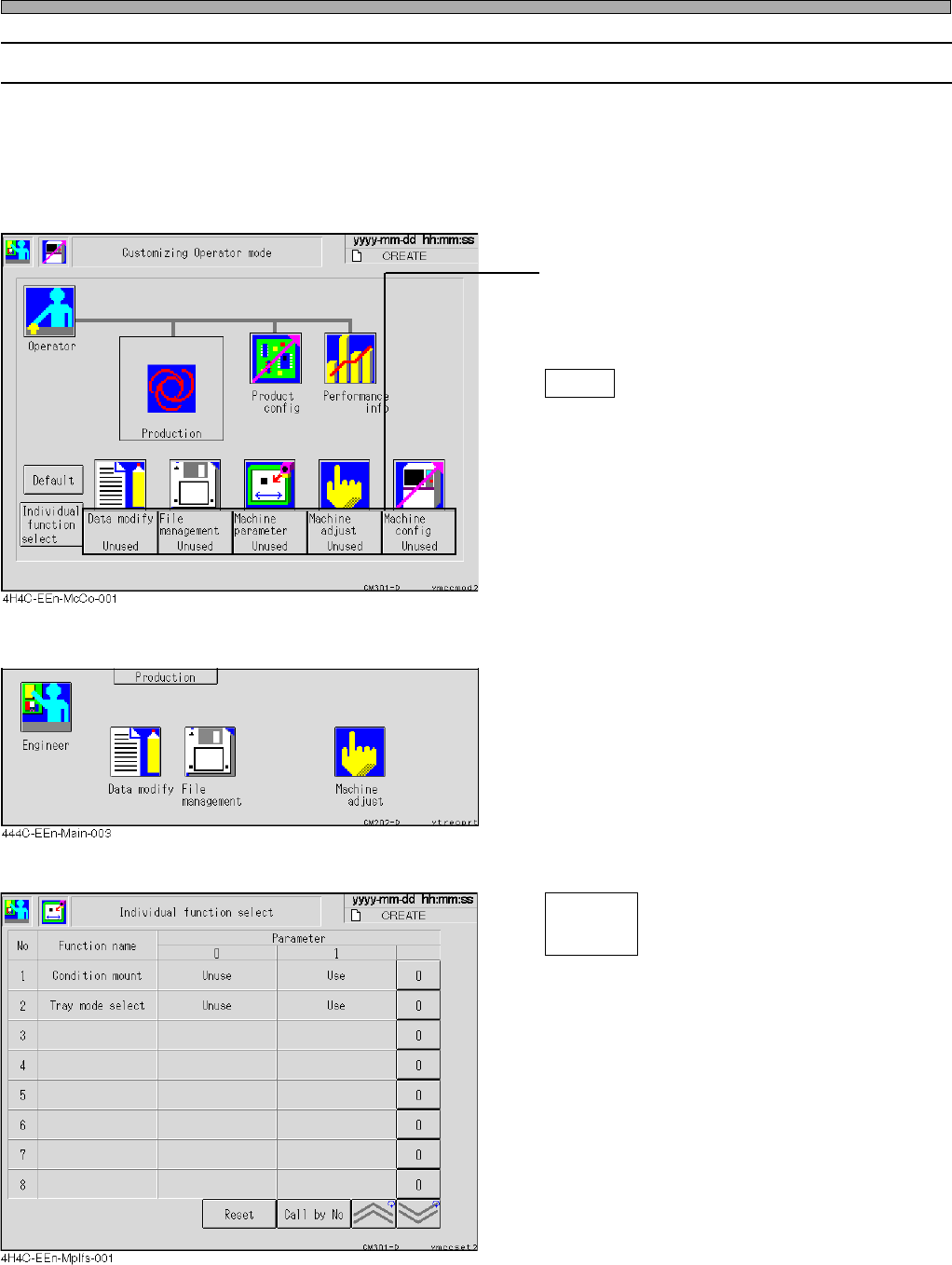
3-5-6 Customizing Operator Mode
The operator mode can be customized so that you can use the functions of data modification, file
operation, machine parameters, machine adjustment and machine settings in this mode.
∗ Even when you have set the machine settings so that it will be available in the operator mode,
operator mode cannot be customized while in operator mode. When customizing the operator
mode, be sure to choose the machine settings from the engineer mode.
• Press the switch of the function you would like
to use in the operator mode.
Every time you press it, the display changes
alternately “Use” ←→ “Unused”.
Default
Returns all the displays to “Unused”.
<Main menu in the operator mode>
• The icons of the functions you have set “Use”
are displayed on the main menu in the operator
mode, then you can use those functions.
<Individual Function Selection Screen>
Select the desired function in operator mode.
Condition mount
During automatic operation, the conditional
mounting selection screen is displayed.
Tray mode select
The screen of the exchange mode and
spare mode is displayed.
4H4C-E-OMA03-A01-02
Individual
function
select