4H4CEOM1.pdf - 第65页
Page 2-1 Basic Operation This chapter describes the basic operation. This includes how to operate the operat- ing panel, touch panel and the functions. Y ou can choose an item by pressing its icon or button on the screen…

Page 1-20
= MEMO =
4H4C-E-OMA01-A01-01
Page 2-1
Basic Operation
This chapter describes the basic operation. This includes how to operate the operat-
ing panel, touch panel and the functions.
You can choose an item by pressing its icon
or button on the screen.
4H4C-E-OMA02-A01-02
Chapter 2
BASIC OPERATION
Page 2-2
hctiwS noitcnuF
.potsyraropmetaretfatiemuserotdnanoitcudorptratsotdesU
.tuognitnirppotsdna)potsetaidemmI(yliraropmetnoitcudorppotsotdesU
.noitneverpregnadrofhctiwssihthtiwdesueraenihcamehtkrowotsehctiwsehT
.potsyraropmetamorfnoitompetsehtrofdesU
.lenaphcuotfothgilkcabehtnonrutotdesU
)thgilkcaBgnitteS5-5-3(.yllanoitpotesebnacemitffo-thgilkcabehT•
hcuotdnalenapgnitarepoehtesuuoynehwedisraerrotnorfehtesoohcotdesU
).elbareposemocebedissihtdnasthgilpmaleht,dehsupsitinehW(.lenap
.cte,FFOOVRESotgniwodilavnisilenapgnitarepofoesuehtnehwsthgilpmalehT
.sthgilpmalsiht,ffosnrutlenaphcuotfothgilkcabehtelihW
)hctiwsovres(OVRES
trapelibomehtotnisdnahruoytresniuoynehW.rotomehtrofhctiwsrewopasisihT
htobNOnrut,noitcudorptratsuoynehW.hctiwssihtFFOnrutoteruseb,enihcamfo
.slenapraerdnatnorfnosehctiwsovres
)nottubpotsycnegreme(POTSYCNEGREME
tillup,teseroT.potstnegremenaotsemocenihcameht,nottubsihtsserpuoynehW
.drawrof
4H4C-E-OMA02-A01-00
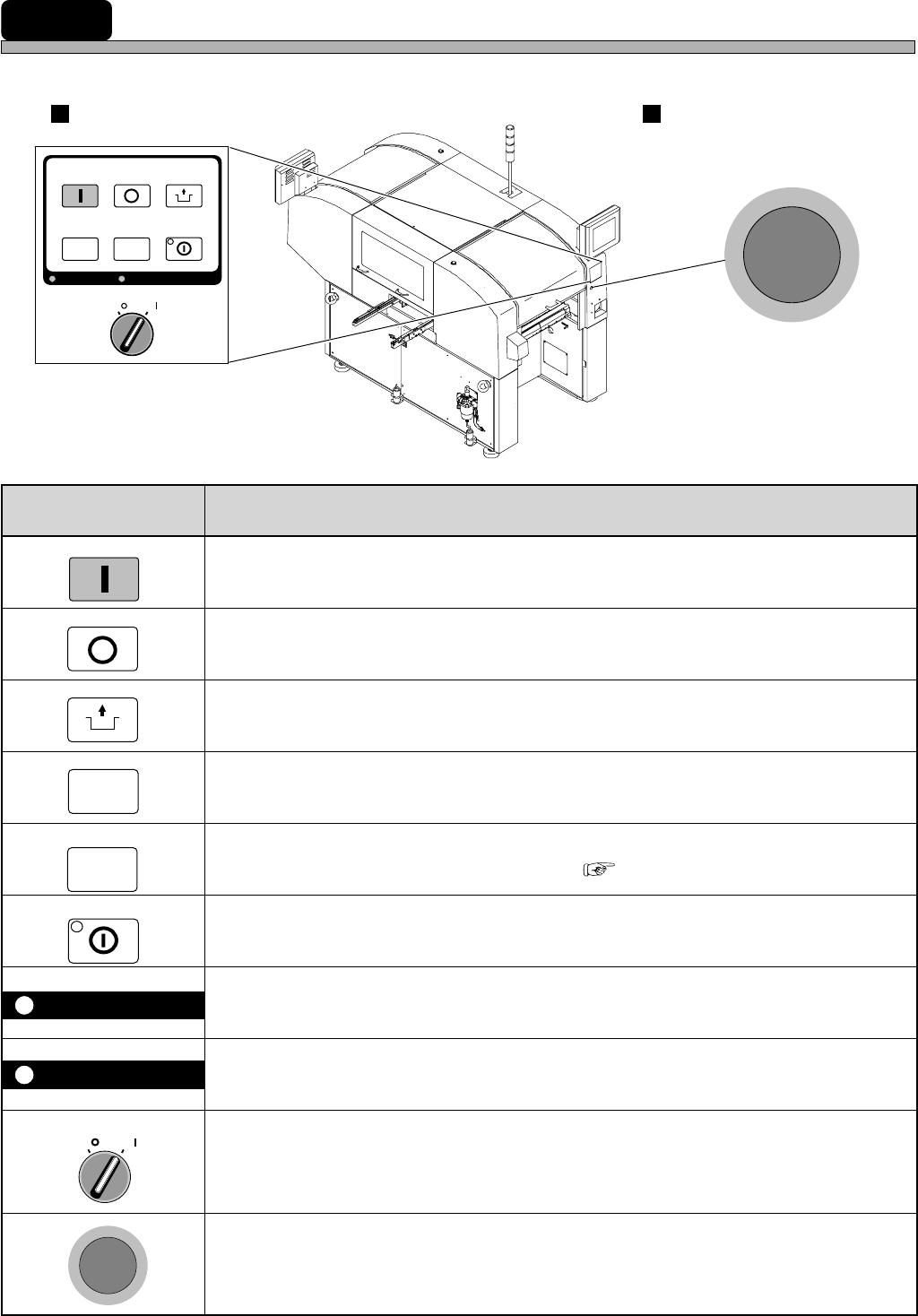
2-1 Operating Panel
This section describes the operational areas of the machine and its basic operation.
START
STOP
UNLOCK
E
M
E
R
G
E
N
C
Y
S
T
O
P
OFF ( )
ON ( )
SERVO
SELECT
E
M
E
R
G
E
N
C
Y
S
T
O
P
KEY LOCK
OFF ( )
ON ( )
SERVO
STOP
UNLOCK
STEP
START
LIGHT ON
SELECT
KEY LOCK BACK LIGHT OFF
4H4C-006TE
Operating Panel Emergency Stop Button
(Two in All)
STEP
BACK LIGHT OFF
LIGHT ON
4H4C-AA01
( 3-5-5 Setting Backlight)