4H4CEOM1.pdf - 第36页
Page 34 SAFETY PRECAUTIONS Be sure to observe About Interlock 4H4C-E-OMA00-A03-00 About Safety Cover Interlock 1. Basic feature of safety cover interlock Before starting regular automatic production on this machine, clos…
Page 33
SAFETY PRECAUTIONS
Be sure to observe
4H4C-E-OMA00-A03-00
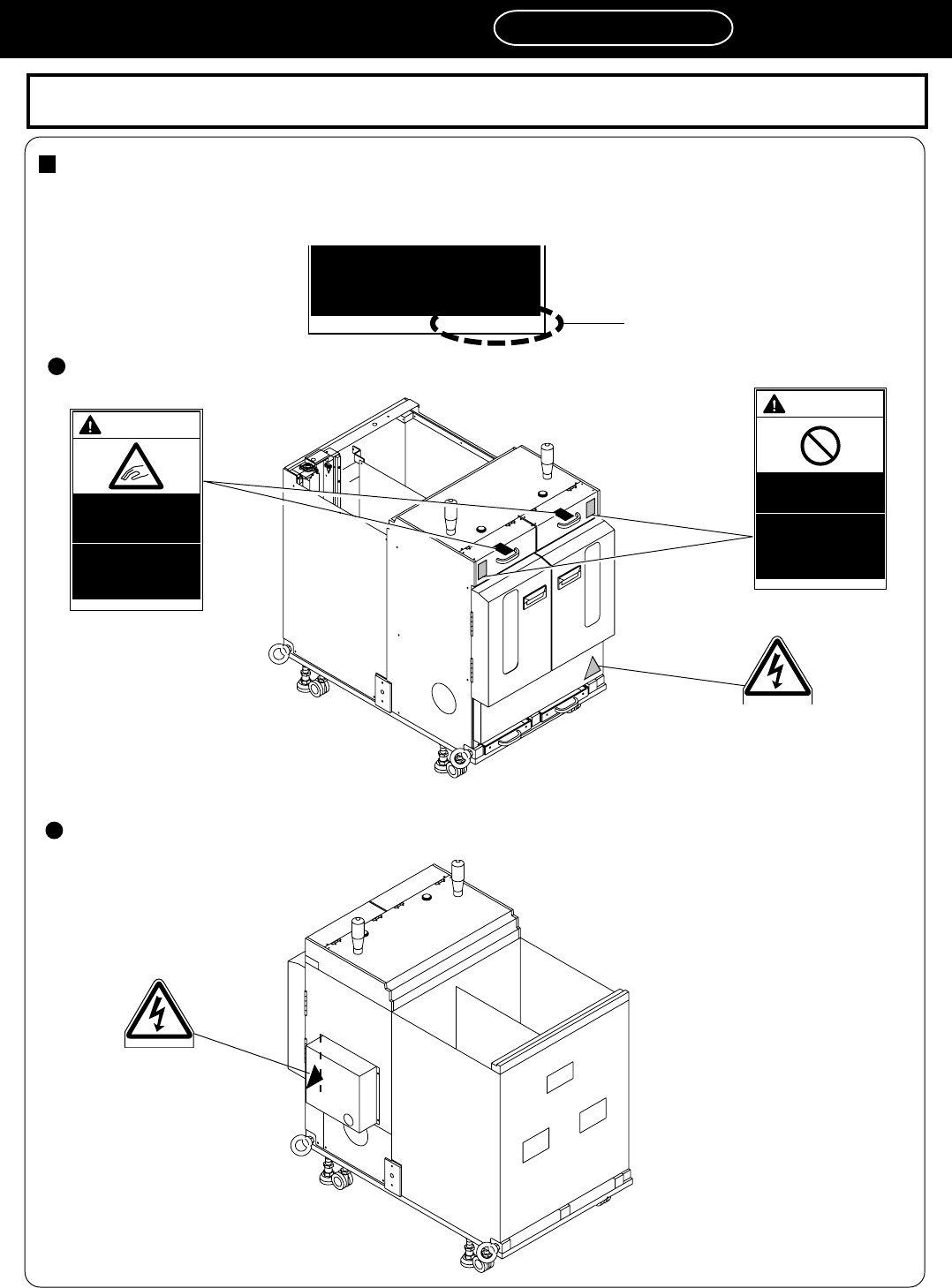
Direct Twin Tray Feeder DT40T-40U (Warning Labels)
The following warning labels are pasted on this machine. Follow the instructions on each label. If a label has
come off, put a new one on a proper position. To order a label from the manufacturer, refer to PARTS LIST.
Label part No.
0 1 J Q B
feeder tables will have
serious injury.
The labels for safety pasted on the product
The positions of warning labels on the front side
The positions of warning labels on the rear side
4M4C-AD00
0 1 J K A
0 1 P 9 B
WARNING
DO NOT DISABLE
SAFETY SENSOR
You will have serious
injury by active part
if you disable safety
sensor.
0 1 N 8 A
WARNING
WATCH YOUR
HANDS OR
FINGERS
You will have serious
injury if you touch
active part.
4M4C-AA00
0 1 J K A
Page 34
SAFETY PRECAUTIONS
Be sure to observe
About Interlock
4H4C-E-OMA00-A03-00
About Safety Cover Interlock
1. Basic feature of safety cover interlock
Before starting regular automatic production on this machine, close all safety covers.
Since a screen displays the message prompting you to supply a member when it needs to be
supplied, open the corresponding cover according to the member to be supplied and then conduct
the work.
If you accidentally open a safety cover during automatic production, the machine comes to an
emergency stop to ensure the safety of operators.
2. How to use servo switch
Since an operator needs to put the hands or part of body into the machine for the purpose of model
changeover or maintenance, the operating panel is equipped with the servo switch in order to
ensure on-the-job safety. When this servo switch is turned OFF, all of the drive shafts of the ma-
chine will be inactive. For information about the operations above, refer to the instruction manuals
for each model.
About Key Switch for Maaintenance
1. Key switch for maintenance at our company
This switch, which is targeted for the technician belonging to our company or the commissioned
maintenance technician, can release all of the safety cover interlocks. It is used for such an exten-
sive maintenance work as you cannot perform.
2. Feature of key switch for maintenance at our company
It is dangerous to use this maintenance key, because the safety cover interlock function will be
disabled and both the hardware and software judge that the safety covers are closed; eventually,
the safety features will be disabled in all modes.
If you need to put your hands or part of body into the machine while the safety cover interlock is
released, be sure to turn OFF the servo switch and restrict each shaft action before work.
3. Handling of maintenance key
We basically do not deliver this maintenance key to you.
If you should make a request for the maintenance key, we will deliver it after exchanging the
certificates of delivery acknowledgement.
In that case, we assume no responsibility for any accidents caused by your unsafe acts, for ex-
ample, releasing the interlock function.
Your safety manager should manage the maintenance key adequately.
4
Page 35
4H4C-E-OMA00-A04-02
170AC0AA
4H4C-AA01
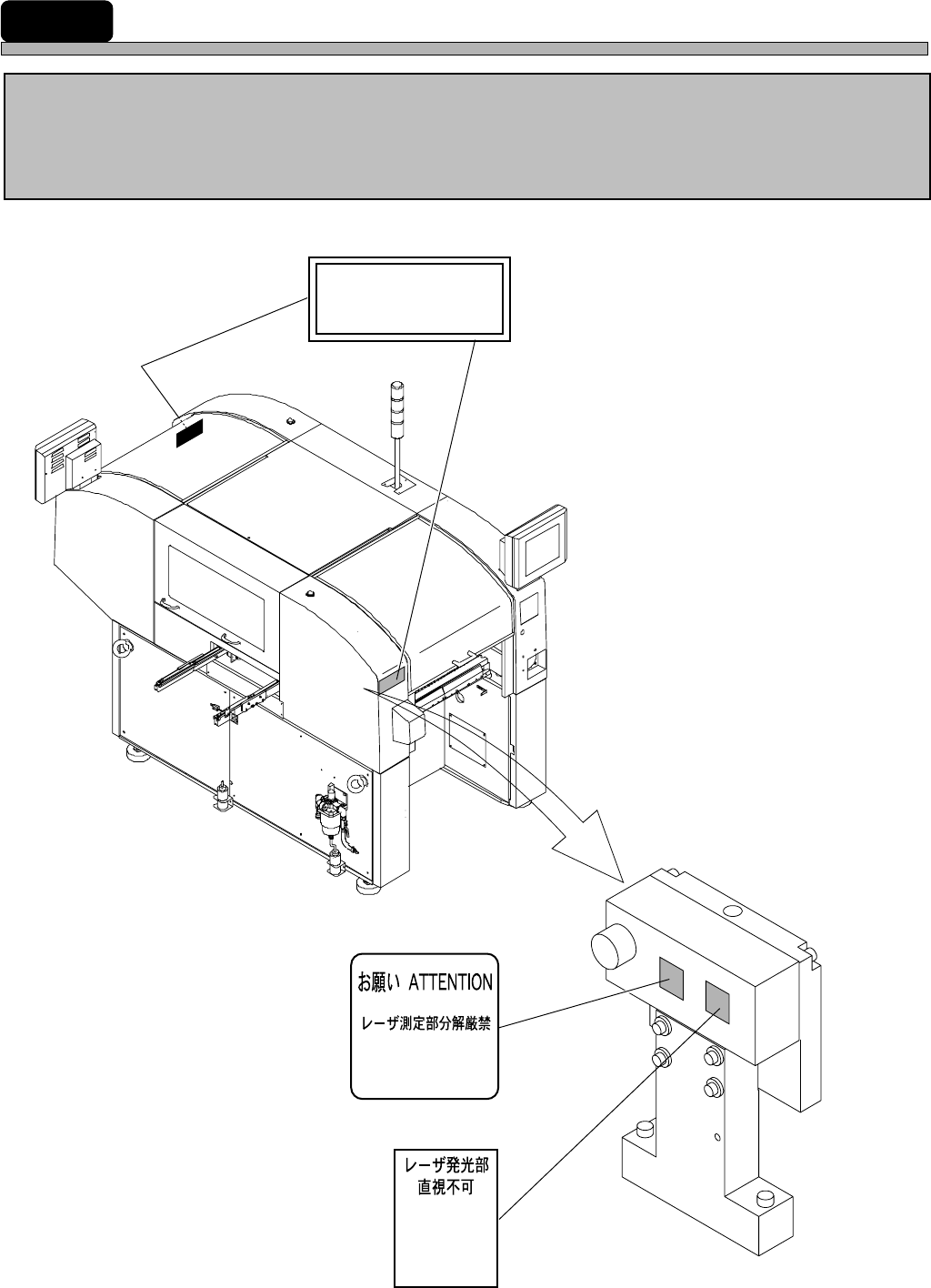
IDENTITY PLATE AND CAUTION LABEL
Both an identity plate and a caution label for this product are attached to the
machine.
Operate and maintain the machine according to instructions on the label.
∗∗
∗∗
∗The label below is not attached to the machine without the lead checker.
CLASS 1 LASER PRODUCT
AAA0046A
LASER
EMITTING
AVOID DIRECT
EXPOSURE
Never diassemble
LASER UNIT
AAA0047A
AAA0048B