4H4CEOM1.pdf - 第76页
Page 2-12 2-4 Engineer Mode 2-4-1 How to Enter Engineer Mode ∗ T o enter engineer mode, the password is required. If you have not set the password, set it referring to “ 2-4-2 How to Change Password ” . 1 . Press Enginee…
Page 2-11
BASIC OPERATION
2
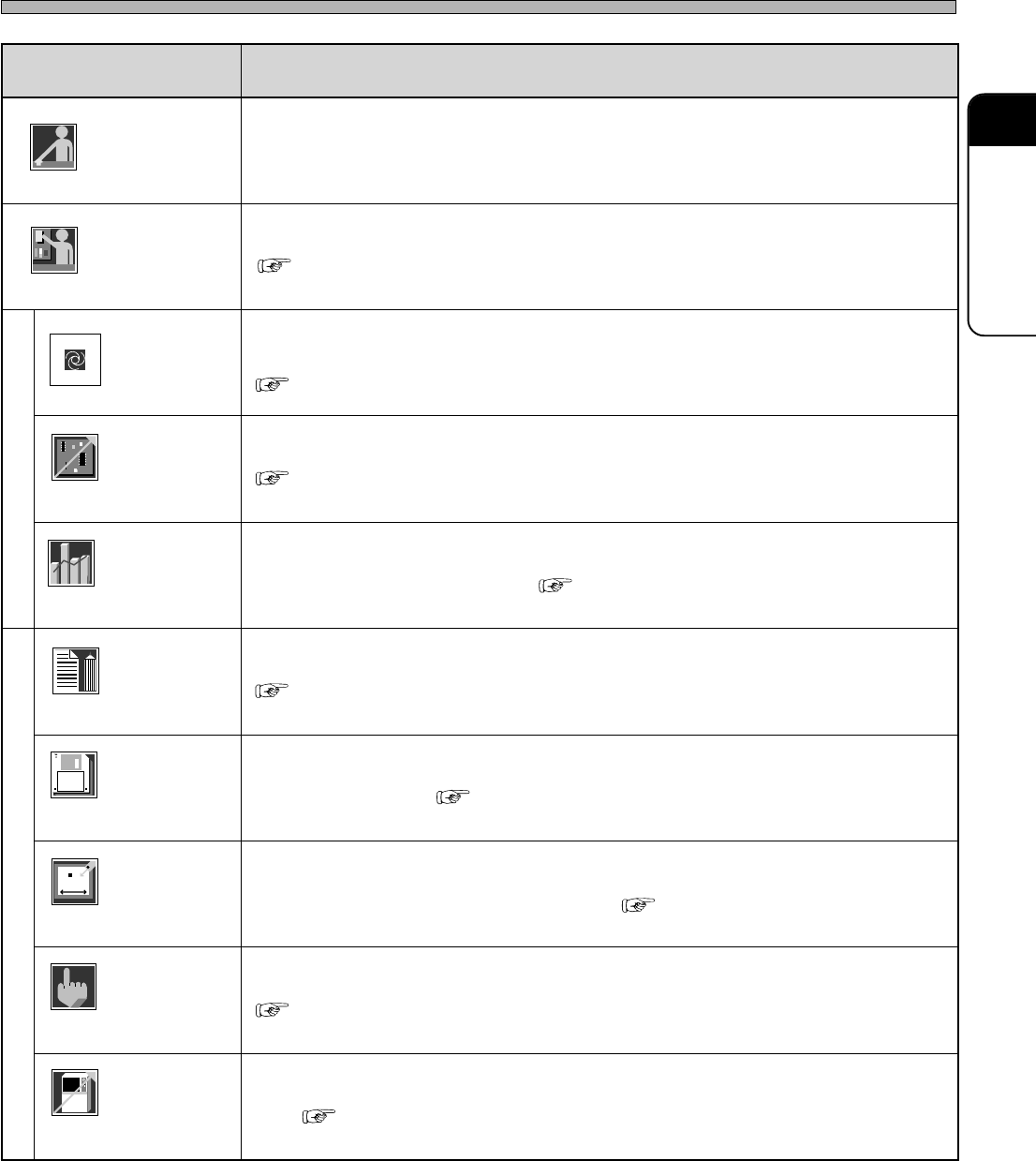
Main Menu
metI noitcnuF
rotarepO.edomrotareponaswohssihT
reenignE
).deriuqersidrowssapehT(.edomreenignenaotdehctiwssiedomrotareponA
noitcudorP
.noitarepocitamotuanastratssihtgnisserP
.tesneebevahatadnoitcudorpdnaderaperpneebsahenihcamehtretfadesusitI
tcudorP
gifnoc
.noitomehtkcehcotdnatnempiuqeehtrofetisiuqersgnittesehtrofdesusisihT
ecnamrofreP
ofni
nehwevitceffesitI.deyalpsidsinoitarepocitamotuanamorftognoitamrofniehT
.noitcudorpfoetatsehthctacuoy
yfidomataD
.atadnoitcudorpehtgnihcaetdnagnitide,gnitaercsahcusrofdesusisihT
eliF
tnemeganam
drah,TPaivsretemarapenihcamdnaatadnoitcudorpehtdaol/evasotdesusisihT
.ksidyppolfdnaksid
enihcaM
retemarap
oteud,tnempiuqeehtfo.cte,eulavecnereferehttesdnaegnahcotdesusisihT
).launaMecnanetniaM(.tnemecalperstrapehtroecnanetniameht
enihcaM
tsujda
.enihcamehtfotraphcaefotnemtsujdadnakcehcnoitomehtrofdesusisihT
enihcaM
gifnoc
noitcudorpnodnepedtonseodtahtenihcamehtfoetatsehttesotdesusisihT
.atad
Operator
Engineer
444C-106TE
Operator
Engineer
Production
Product
config
Performance
info
Data modify
File
managment
Machine
parameter
Machine
adjust
Machine
config
( 2-4 Engineer Mode)
( Chapter 4 PRODUCTION)
( 3-2 Production Settings)
( 3-3 Production Information)
( Chapter 7 DATA MODIFICATION)
( Chapter 6 FILE OPERATION)
( 3-4 Machine Adjustment)
( 3-5 Machine Settings)
4H4C-E-OMA02-A01-01
Page 2-12
2-4 Engineer Mode
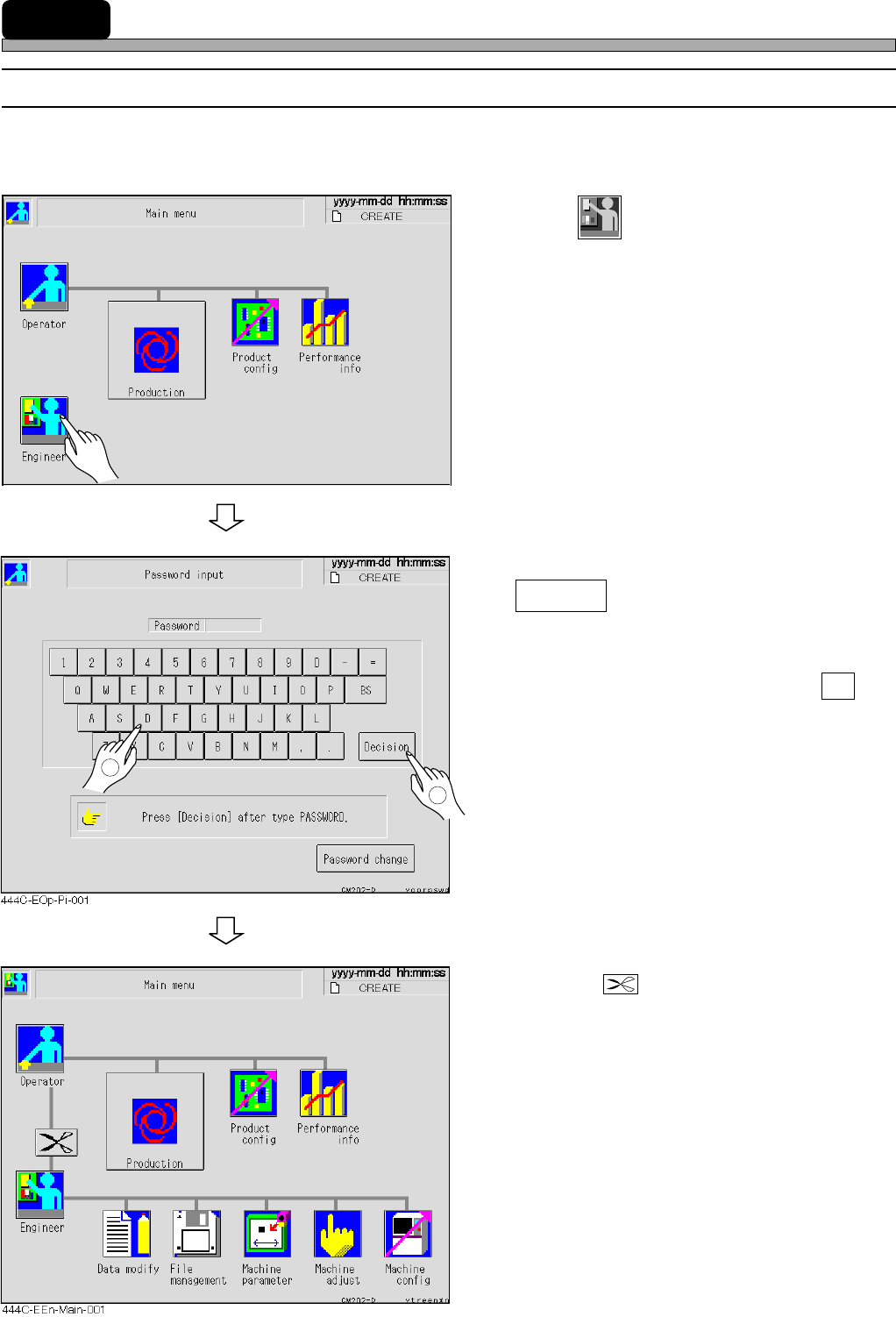
2-4-1 How to Enter Engineer Mode
∗ To enter engineer mode, the password is required. If you have not set the password, set it
referring to “2-4-2 How to Change Password”.
1. Press
Engineer
.
• Password input screen is displayed.
2. Enter the password, then press
Decision .
• The main menu of engineer mode is displayed.
∗ If you pressed an incorrect key, press BS and
re-enter a correct letter.
• Pressing switches engineer mode to an
operator mode.
444C-EOP-Main-001
2
1
4H4C-E-OMA02-A01-01
Page 2-13
BASIC OPERATION
2
Engineer Mode
2-4-2 How to Change Password
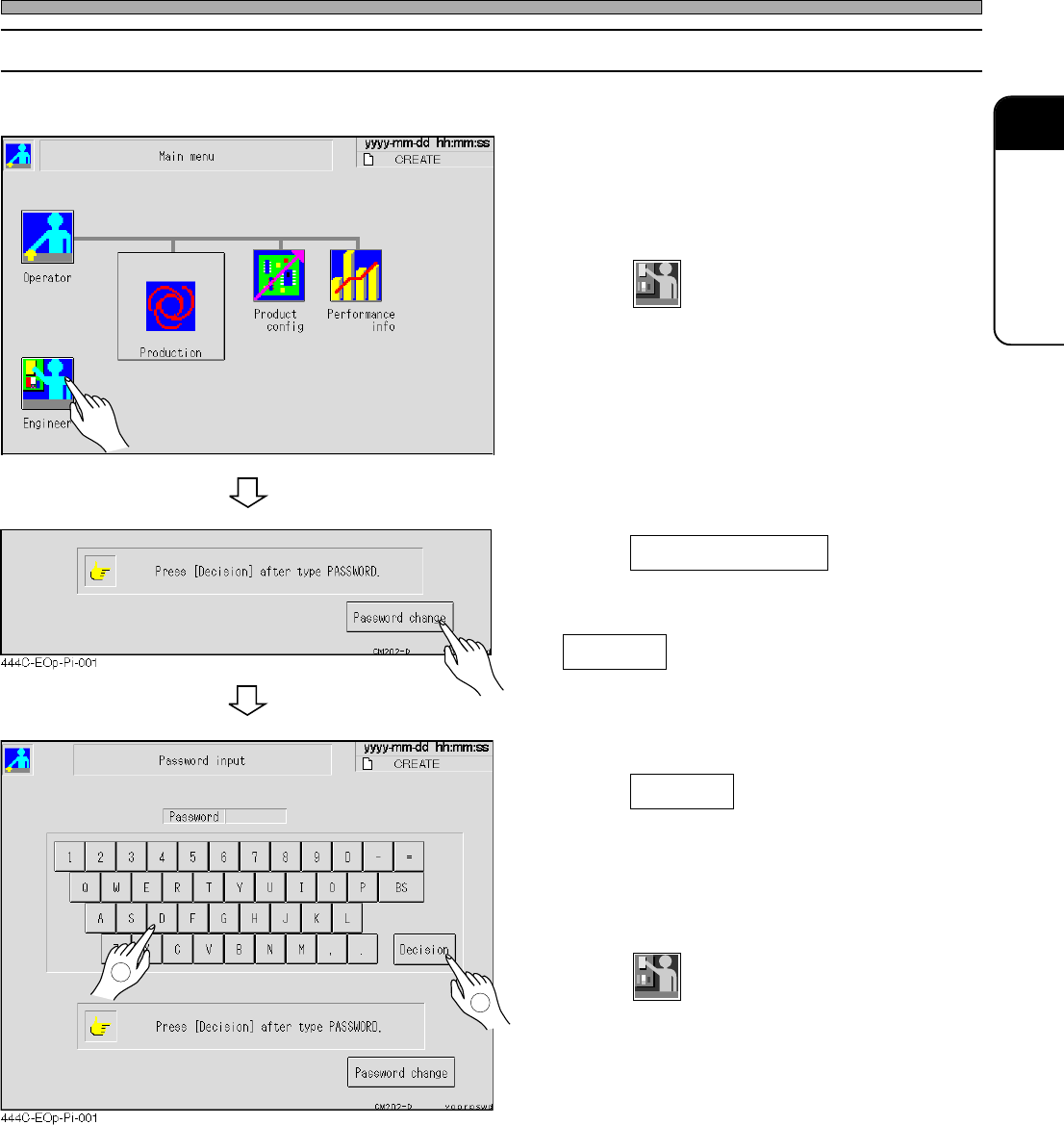
∗ To change (set) the password, you need the key floppy disk for changing password.
1. Insert the key floppy disk for chang-
ing password into the floppy disk
drive.
2. Press
Engineer
on the main menu in op-
erator mode.
3. Press Password change .
4. Enter a new password, then press
Decision .
∗ Enter between 1 and 10 letters.
5. Enter the new password again, then
press Decision .
• When the password entered at the step 4 is the
same as the one entered at the step 5, it is
changed and the main menu of operator mode
is displayed.
6. Press
Engineer
, and make sure you can
enter engineer mode with the new
password.
∗ If you cannot enter engineer mode, perform
this procedure from step 3 again.
7. Take out the key floppy disk from the
floppy disk drive.
444C-EOP-Main-001
2
1
4H4C-E-OMA02-A01-01