4H4CEOM1.pdf - 第109页
Page 4-1 4H4C-E-OMA04-A01-00 Chapter 4 PRODUCTION Safety during Production Do not put hands into the machine while it is running. The machine is running in the following states. 1. While the machine is considered actuall…
Page 3-30
Machine Settings
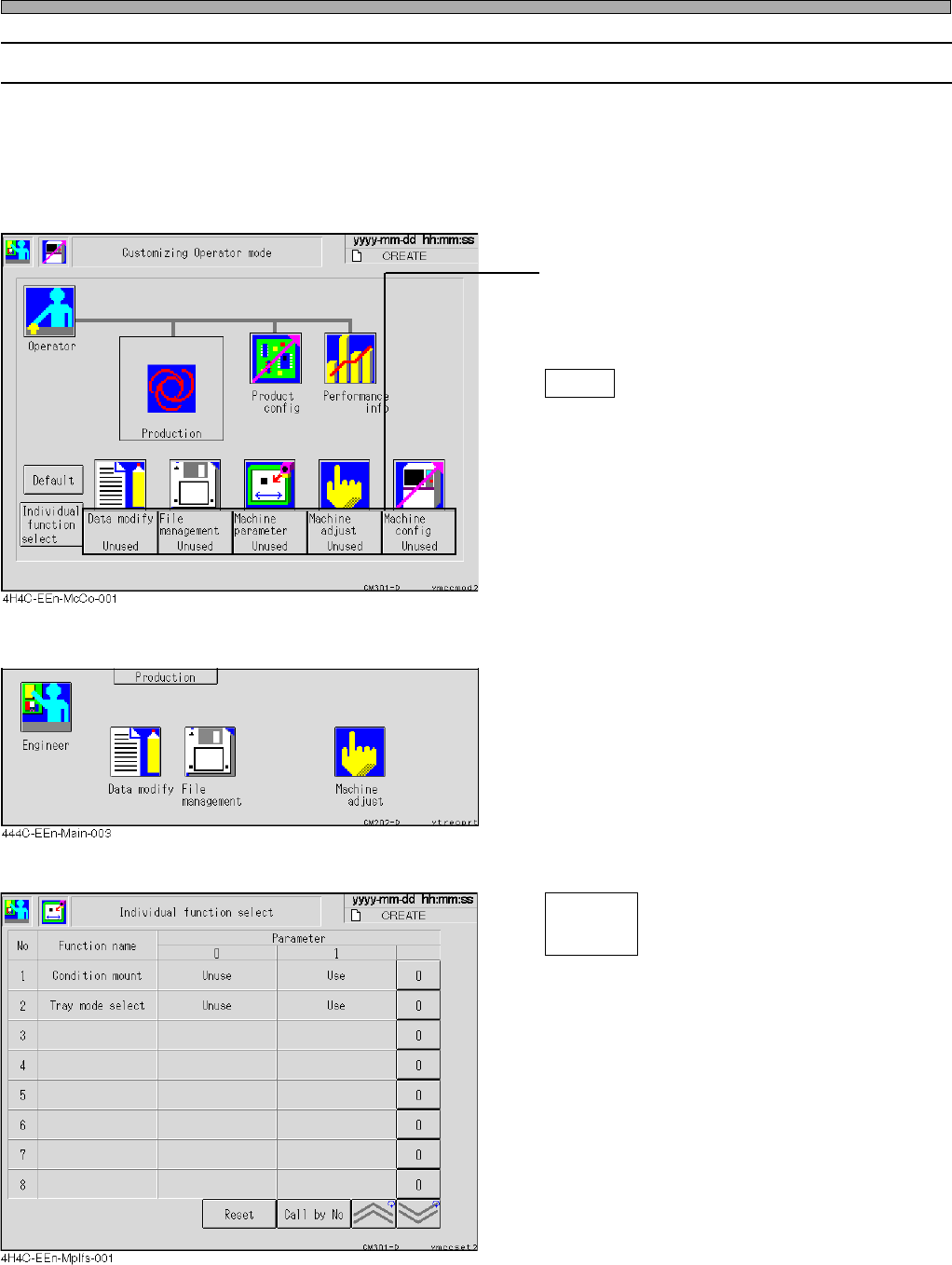
3-5-6 Customizing Operator Mode
The operator mode can be customized so that you can use the functions of data modification, file
operation, machine parameters, machine adjustment and machine settings in this mode.
∗ Even when you have set the machine settings so that it will be available in the operator mode,
operator mode cannot be customized while in operator mode. When customizing the operator
mode, be sure to choose the machine settings from the engineer mode.
• Press the switch of the function you would like
to use in the operator mode.
Every time you press it, the display changes
alternately “Use” ←→ “Unused”.
Default
Returns all the displays to “Unused”.
<Main menu in the operator mode>
• The icons of the functions you have set “Use”
are displayed on the main menu in the operator
mode, then you can use those functions.
<Individual Function Selection Screen>
Select the desired function in operator mode.
Condition mount
During automatic operation, the conditional
mounting selection screen is displayed.
Tray mode select
The screen of the exchange mode and
spare mode is displayed.
4H4C-E-OMA03-A01-02
Individual
function
select

Page 4-1
4H4C-E-OMA04-A01-00
Chapter 4
PRODUCTION
Safety during Production
Do not put hands into the machine while it is running. The machine is running in the
following states.
1. While the machine is considered actually running
2. During a stop to wait for a board
3. During a temporary stop
Depending on circumstances, the machine may begin running unexpectedly, espe-
cially “2. During a stop to wait for board” and “3. During a temporary stop”.
When putting hands into the machine, make sure servo switch is OFF or power
supply is OFF.
Daily Production
This chapter describes the basic operation for automatic operation, the basic work
against production stops and so on.
Page 4-2
4H4C-E-OMA04-A01-02
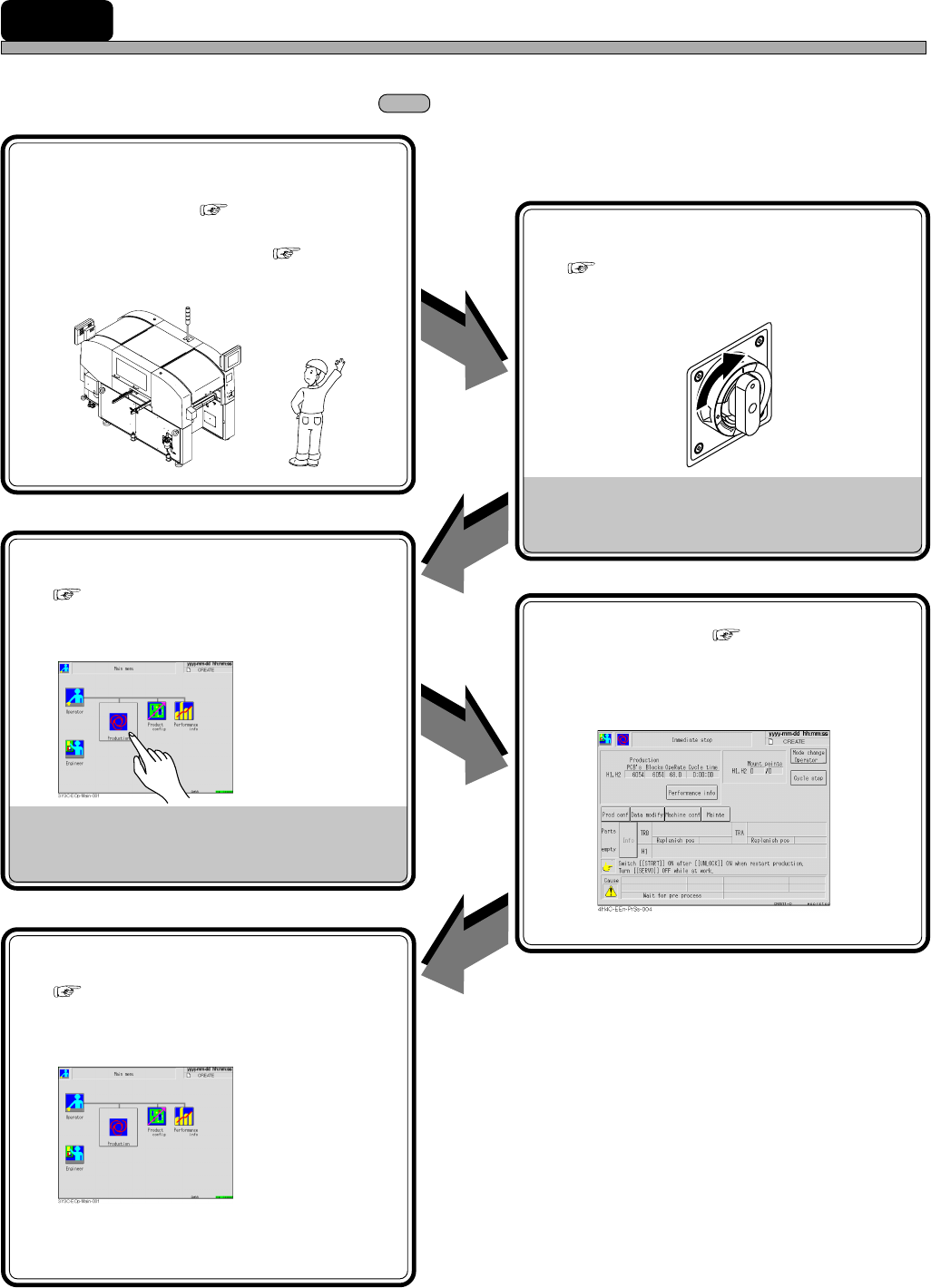
4-1 Production Work Flow
This section describes an operator’s work for production.
∗ Entrust the operations inside to an engineer.
1 Preparations
• Start-up inspection (
4-2-1 Start-up
Inspection)
• Setting production materials ( Chapter 5
SETTING PRODUCTION MATERIALS)
Preparation
OK
5 Finishing production
( 4-6 Completion of Production)
• Perform the operation to finish production.
Production finishes.
3 Starting production
( 4-3-2 Starting Operation)
• Perform the operation to start production.
Production starts.
File operation (Data loading, etc.)
Troubleshooting of board recognition
error, etc.
2 Starting up machine
( 4-3-1 Starting up Machine)
• Turn on the power supply switch to start up
the machine.
Adjust the equipment if it is in bad
condition.
4 Supplying chips ( Chapter 5 SETTING
PRODUCTION MATERIALS)
• Supply the chips when they are run out.
T
R
I
P
O
F
F
O
N
O
P
E
N
R
E
S
E
T
4H4C-AN00