00193631-0602.pdf - 第106页
7 Entering the addresses of the masterdrive s Adjustment Instructions MTC 2 7.1 Masterdrives 12/2007 Edition 106 1.1.6 Error messages issued via the st ation Fault s and Alarms Master drive NOTE Alarm messages will begin…
Adjustment Instructions MTC 2 7 Entering the addresses of the masterdrives
12/2007 Edition 7.1 Masterdrives
105
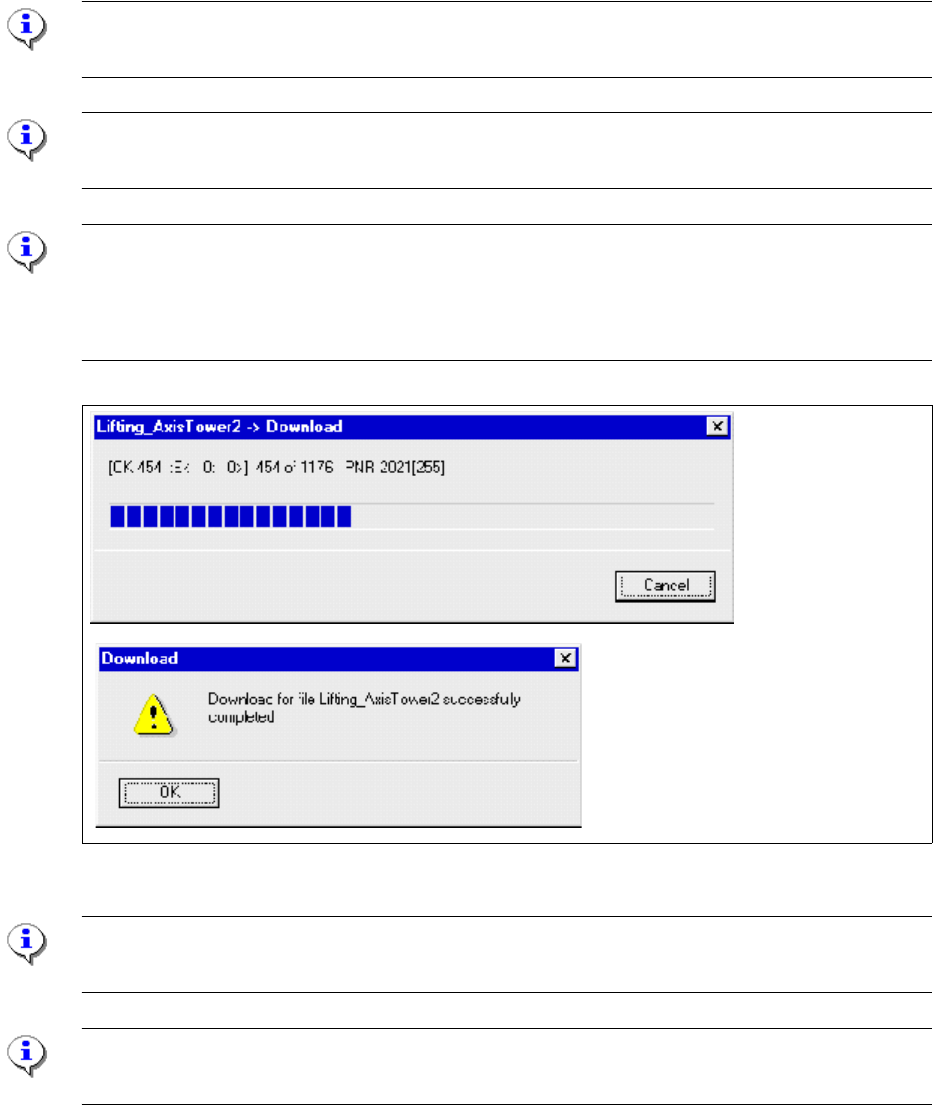
Download parameter set:
Select "File" --> "DOWNLOAD" --> "Save (EEPROM)"
Switch OFF and ON the MTC and start the reference run.
Note:
Before you start the download, the master drive should be reset to factory defaults (see 7.1.3)
Note:
The axis concerned must not be subject to position control!
TIP
There are two ways of deactivating position control:
- Open the door of the MTC.
- Switch the MTC on and do not perform a reference run.
Fig. 1.1 - 8 Download Parametersatz
Note:
Save om EEPROM!
Note:
When errors are counted in the field E:(Error), abort the download immediately and try again.
7 Entering the addresses of the masterdrives Adjustment Instructions MTC 2
7.1 Masterdrives 12/2007 Edition
106
1.1.6 Error messages issued via the station
Faults and Alarms Master drive
NOTE
Alarm messages will begin with „Axxx“. An alarm cannot be acknowledged.
It is automatically deleted once the cause has been eliminated.
A140, A141 Axis blocked, Check the mechanical system.
NOTE
Fatal errors will begin with „FFxx“. Fatal errors are serious hardware or software errors which no
longer permit normal operation of the Master drives. They only appear on the PMU in the form
"FF<No>". The software is re-booted by actuating any key on the PMU.
FF01 Time overflow
FF04 A fault has occurred during the test of the RAM.
FF05 A fault has occurred during the test of the EPROM.
FF13 A versions conflict between the firmware and the hardware has
occurred.
NOTE
Fault messages will begin „Fxxx“. If a fault message is not reset before the electronic supply volt-
age is switched off, then the fault message will be present again when the electronic supply is
switched on again.
F002 The monitoring time has expired.The DC link voltage has not
reached the setpoint(3s).
F006 DC link overvoltage.
F008 DC link undervoltage. (lower limit value(76%)of the DC link volt-
age)
F011 Overcurrent
F015 Axis blocked during the reference run
F020 Monitoring Motor temperature occurred.
F021 Motor blocked, (I2t-Monitoring for the motor)
F023 Excess temperature Master drives.
F035 Axis in the limit switch.
F041 A fault has occurred during the storage of values in the EEPROM.
F051 Fault Resolver or connecting fault
F082 Telegram fault.
F085 A fault has occurred during initialization of the Controller board
Master drives.
Adjustment Instructions MTC 2 8 Machine data
12/2007 Edition 8.1 General machine parameters
107
8 Machine data
NOTE
The machine parameters listed are only an example of a data record. The individual values can
be different for every MTC 2.
WARNING
Incorrectly set machine data can result in a crash between the lifting and feed axes or at the limit
positions of these axes.
8.1 General machine parameters
Software version: 2.01
Serial number, MTC 2: 14
Delta fiducial transfer position: 10000