00193631-0602.pdf - 第65页
Adjustment Instr uctions MTC 2 5 Feed axes 12/2007 Edition 5.2 Zero offset, removal position and tran sfer position 65 Select " Cassette 2 ". Confirm yo ur choice by clicking on " OK ". Select &…
5 Feed axes Adjustment Instructions MTC 2
5.2 Zero offset, removal position and transfer position 12/2007 Edition
64
5.2.4 Checking the removal positions
Check the zero offset (see section 5.2.3 "Checking and setting the zero offset").
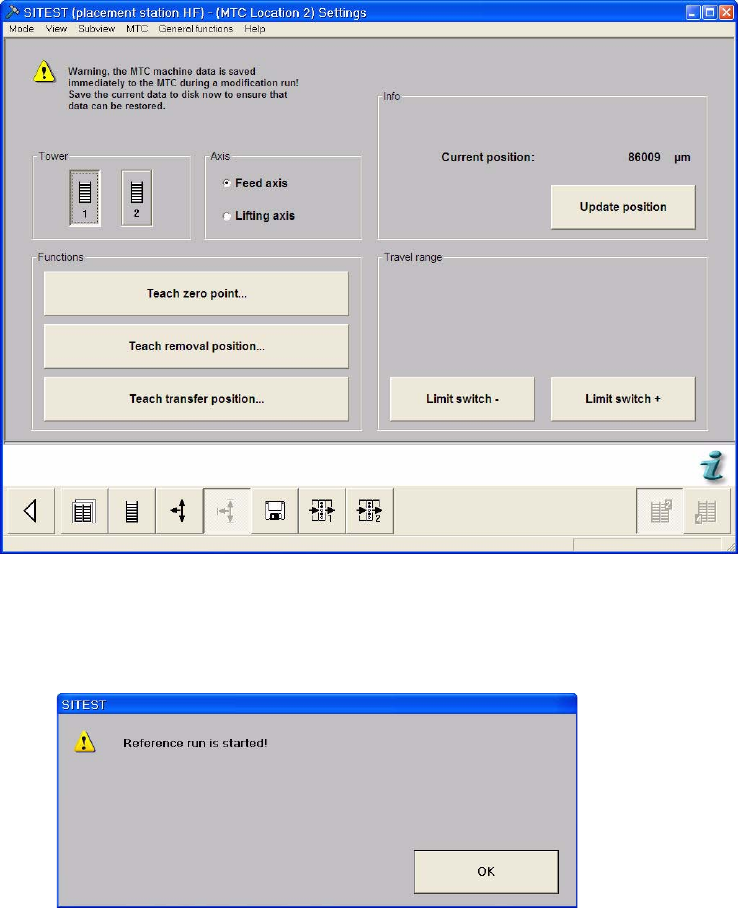
Select the Settings button from the menu bar at the bottom.
Select "Tower 1" and "Feed axis".
Select "Teach removal position...".
Adjustment Instructions MTC 2 5 Feed axes
12/2007 Edition 5.2 Zero offset, removal position and transfer position
65
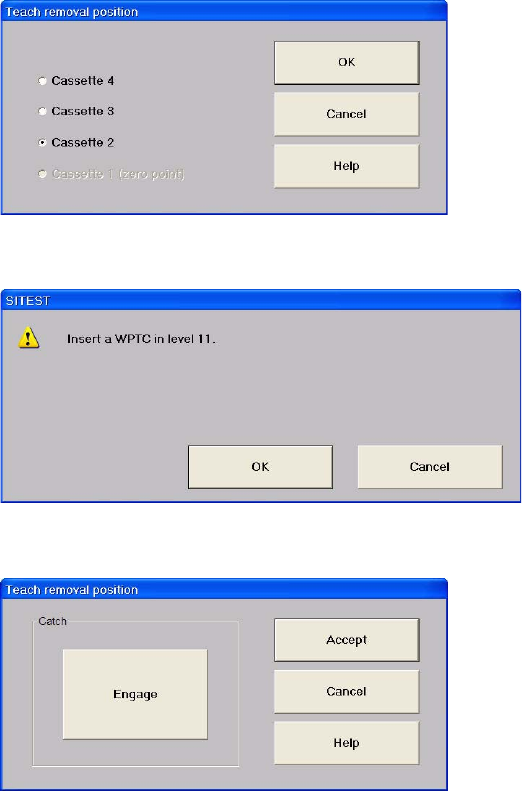
Select "Cassette 2".
Confirm your choice by clicking on "OK".
Select "Engage" and "Disengage" several times.
If this results in the WTC being moved, this removal position must be calibrated (see section
5.2.6 "Calibrating the removal positions").
Close the window with "Cancel".
Repeat this check for the other cassettes.
5 Feed axes Adjustment Instructions MTC 2
5.2 Zero offset, removal position and transfer position 12/2007 Edition
66
5.2.5 Calibrating the zero offset
Carry out the relevant preparatory measures (see section 5.2.2 "Preparatory measures").
Carry out the steps according to section 5.2.3 "Checking and setting the zero offset".
Check the removal positions of the feed axis (see section 4.2.4 "Checking the removal positi-
ons").
Check the transfer position of the feed axis (see section 4.2.4 "Checking the transfer positi-
ons").
Check the end positions of the feed axis (see section 5.3.2 "Checking and calibrating the end
positions").