00193631-0602.pdf - 第15页
Adjustment Instructions MTC 2 3 Construction and mode of operation 12/2007 Edition 3.1 Incorporating the MTC in the SIPLACE station 15 3.1.3 EMERGENCY STOP interface The MTC 2 is incorporated in the sa fety circuit of th…
3 Construction and mode of operation Adjustment Instructions MTC 2
3.1 Incorporating the MTC in the SIPLACE station 12/2007 Edition
14
3.1 Incorporating the MTC in the SIPLACE station
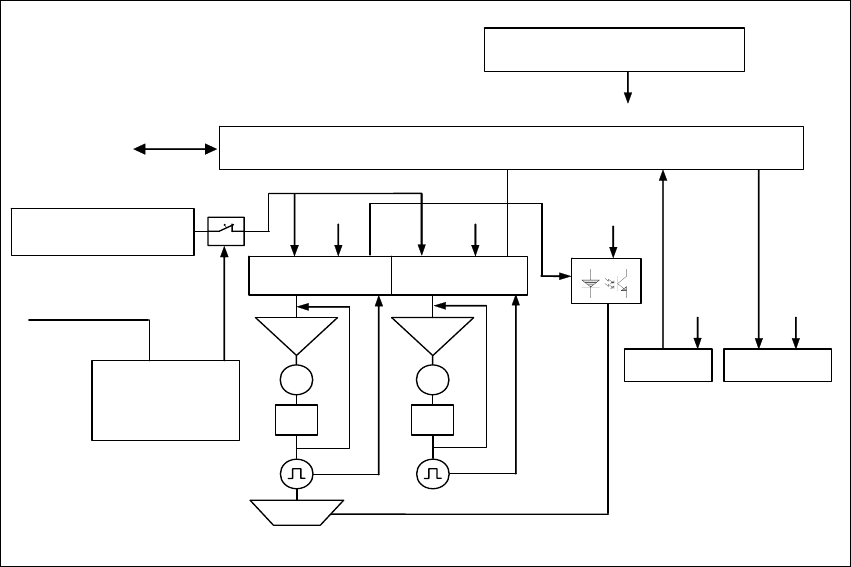
Fig. 3.1 - 1 The interfaces and power supply of the MTC 2 (shown for tower 1)
3.1.1 CAN bus
This interface is used for all commands which are sent by the machine controller of the SIPLACE
station.
Example: Reference position run and transfer of set-up data.
3.1.2 400 V power supply
The MTC 2 is supplied externally with 400 V (USA/Japan: 208/204 V).
24 V supply voltage
C167 Controller board
Servo
M
PI
Servo
M
PI
Brake
CAN bus
Sensors
RS 232
Safety
interface
400 V supply
voltage
SIPLACE
Actuators
24 V
24 V
24 V
24 V 24 V
Masterdrive
lifting axis 1
Masterdrive
feed axis 1
Safety
circuit
1
2
3
4
Adjustment Instructions MTC 2 3 Construction and mode of operation
12/2007 Edition 3.1 Incorporating the MTC in the SIPLACE station
15
3.1.3 EMERGENCY STOP interface
The MTC 2 is incorporated in the safety circuit of the SIPLACE station. This provides feedback in
the form of a protective circuit voltage of 24 V. This protective circuit voltage switches the relevant
combination circuit breaker and thus the 400 V of the inverters for the Masterdrives.
The contactors switch off the servo voltage (400 V) and also immediately switch off the power
supply to the brake.
The signaling contact (make contact) of the EMERGENCY STOP button is connected to the input
of the SIPLACE safety signalling system. The break contact interrupts the 24 V protective circuit
voltage of the SIPLACE machine.
If the EMERGENCY STOP circuit in a machine is interrupted (EMERGENCY STOP button), the
Masterdrives of the MTC 2 trip. Both systems are then not under power.
When one of the two protective doors of the MTC 2 is opened, only the control voltage of the
relevant tower falls.
3 Construction and mode of operation Adjustment Instructions MTC 2
3.2 Reference position run 12/2007 Edition
16
3.2 Reference position run
When the MTC 2 is switched on, a reference position run needs to be performed on the servo
axes, as for the SIPLACE station. If the MTC 2 remains switched on when the SIPLACE station
is switched off and back on, it reports that it has already been referenced.
During the reference position run, both towers move into their reference positions simultaneously.
The two feed axes are moved first and then the two lifting axes.
Each axis first moves to its physical home position then checks the position of the two software
limit switches and finally stops in the software zero position (this corresponds to the relevant zero
offset of the physical home position). The positions adopted by the axes are then defined as
reference and calibration positions.
The reference run for an individual axis is performed as follows:
– The current zero offset is sent to the Masterdrive.
– The controller queries the "neutral position" of the light barrier and waits for a rising edge.
If the axis is already positioned in the light barrier, it issues a "HIGH" signal. The axis moves in
a positive direction until the light barrier delivers a falling edge. The axis then moves in the
negative direction again.
If the axis is not positioned in the light barrier, it issues a "LOW" signal. The axis moves in a
negative direction.
– The axis moves in the negative direction until the light barrier delivers the necessary rising
edge and the first rotor zero position (index) has been found.
This procedure is necessary, since the zero pulses of the resolver angular encoder are
repeated with each revolution and thus appear several times within the possible travel range.
– The axes move to both software limit switches in the maximum and minimum positions to within
a few millimeters, to check the saved data.
– Finally, they move to the current zero offset.