00193631-0602.pdf - 第30页
4 Lifting axes Adjustment Instructions MTC 2 4.1 Belt tension 12/2007 Edition 30 DANGER The following activities require access to machine p arts that are moved or carry dangerous voltag e. Only perform the activity that…
Adjustment Instructions MTC 2 4 Lifting axes
12/2007 Edition 4.1 Belt tension
29
4.1 Belt tension
4.1.1 Tools and accessories
– Belt frequency measurement device (inductive)
– 2 belt tension stickers
– 1 set of hexagon socket wrenches
– 1 set of open-ended wrenches
4.1.2 Preparatory measures
Empty the MTC 2 completely (see the User Manual).
Move the lifting axis to its lowest position (see section 4.3.3 "Moving to the end positions").
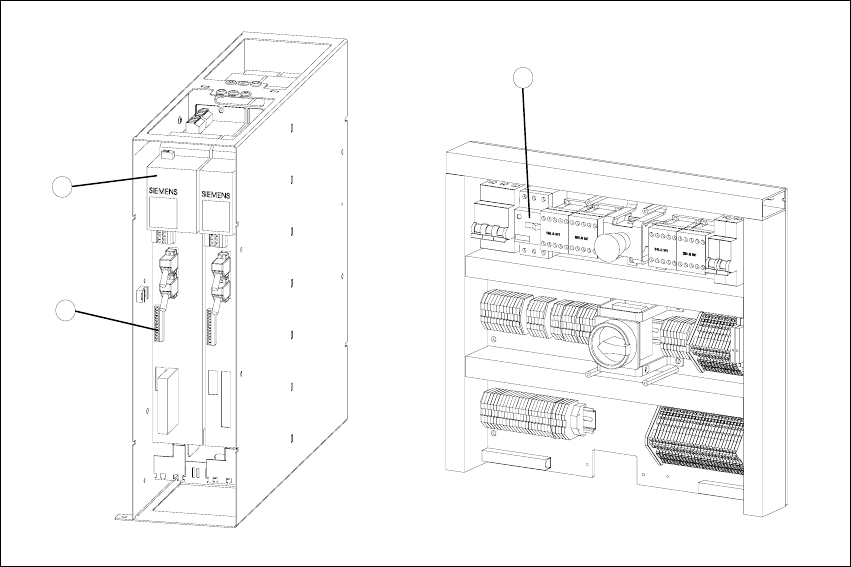
Fig. 4.1 - 1 Connections to the Masterdrives of the lifting axes
Key
1. Masterdrive, lifting axis (shown here for tower 1)
2. Connection terminal for external signals
3. Motor protection switch on the electronics board
2
1
3

4 Lifting axes Adjustment Instructions MTC 2
4.1 Belt tension 12/2007 Edition
30
DANGER
The following activities require access to machine parts that are moved or carry dangerous
voltage. Only perform the activity that is described and do not touch any other live or moving parts.
There is a risk of death, severe injury and/or considerable damage to equipment even if only one
of these instructions is not followed.
Remove the left cover in front of the electronics board and the covers on the right and the left
in front of the Masterdrives (see Fig. 3.4 - 1).
Switch the motor protection switch off (see Fig. 3.4 - 2).
To relieve the tension the toothed belts, loosen the brake on the servo motor in the following
way to rest the lifting axis on the buffer:
Check that the MTC 2 has been switched off and is isolated from the power supply.
Remove the connector for external signals from the Masterdrive for the lifting axis (see Fig.
4.1 - 1, item 2).
Move the cable from Pin 3 to Pin 1.
Attach the connector.
Connect the MTC 2 to the power supply and switch it on.
The lifting axis audibly moves a distance of a few mm up to the buffer.
Check that the lifting axis is actually at its end position.
Reconnect the cable as it was originally in the following way:
Switch off the MTC 2 and isolate it from the power supply.
Remove the connector for external signals from the Masterdrive for the lifting axis (see Fig.
4.1 - 1, item 2).
Move the cable from Pin 1 to Pin 3.
Attach the connector.
Switch the motor protection switch on.
Attach the covers.
Undock the MTC 2 from the SIPLACE station (see User Manual).
Crank up the MTC 2 in a clockwise direction until it stops.
Adjustment Instructions MTC 2 4 Lifting axes
12/2007 Edition 4.1 Belt tension
31
4.1.3 Checking and setting the belt tension
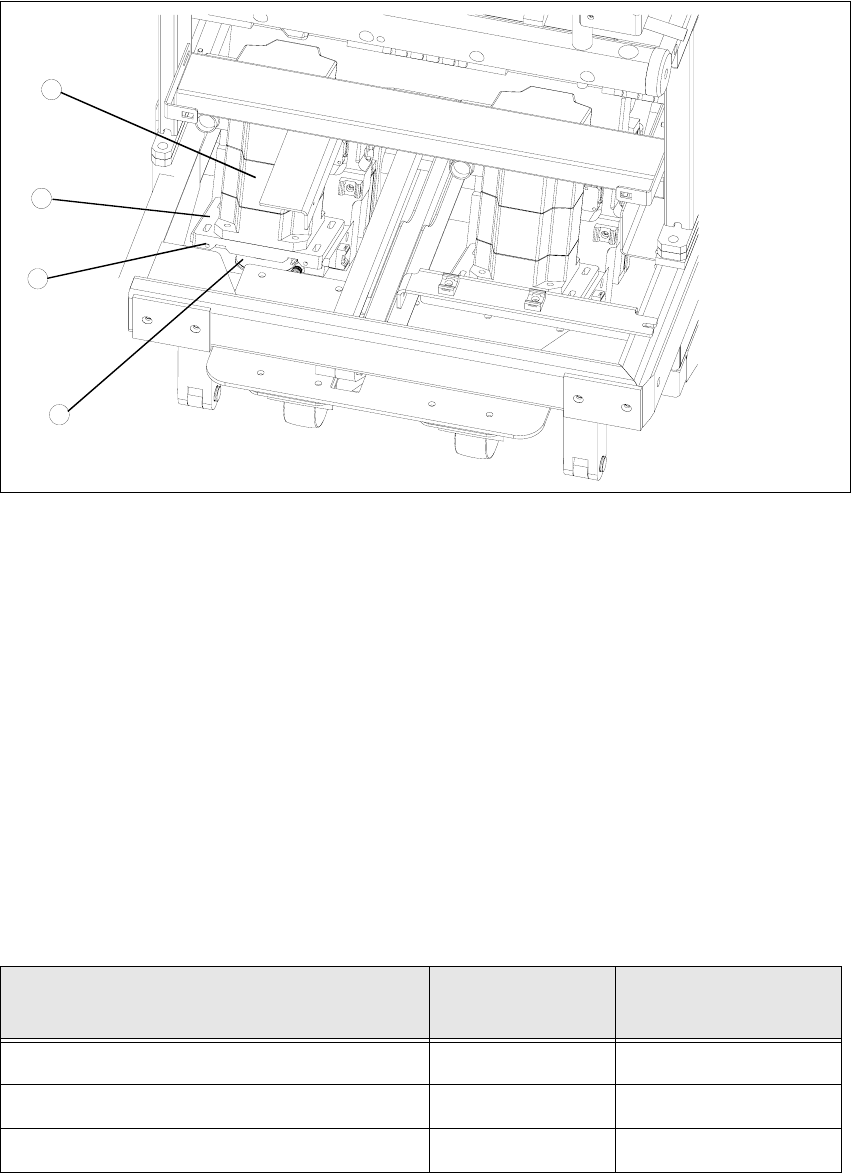
Fig. 4.1 - 2 Setting the belt tension
Key
1. Servo motor of the lifting axis (shown here for tower 2)
2. Dual toothed belt (shown here for tower 2)
3. Mounting plate with clamping screws (shown here for tower 2)
4. Adjusting screws with lock nuts (shown here for tower 2)
Å Carry out the relevant preparatory measures (see section 4.1.2 "Preparatory measures").
Å Measure the belt tension with the belt frequency measuring device in the following way:
Å
Find the holes for the measurement head of the belt frequency measuring device on the lifting
axis. Two holes are provided for each of the dual toothed belts.
Å
Attach the toothed belt tension stickers (item no. 00370691-0) onto the belts in this area.
Å Cause the belts to oscillate and measure their frequency
Å Set the belt tension if the measured frequency deviation deviates from the nominal value..
MTC2 functional status drive pinion
nominal frequenz of
belt tension
MTC2 functional status 1 without counter bearing 36 Teeth 170 Hz +/-5Hz
MTC2 functional status 1 with counter bearing 36 Teeth 200Hz +/-5Hz
MTC2 functional status 2 with counter bearing 30 Teeth 210Hz +/-5Hz
table 4.1 - 1 belt tension lifting axis
1
3
4
2