00193631-0602.pdf - 第73页
Adjustment Instr uctions MTC 2 5 Feed axes 12/2007 Edition 5.3 End positions 73 5.3 End positions NOTE When the end positions are calibrate d, the value determined is automatically sa ved. 5.3.1 Prep aratory measures NOT…
5 Feed axes Adjustment Instructions MTC 2
5.2 Zero offset, removal position and transfer position 12/2007 Edition
72
2b. Transfer position of the Tower 2 WTC
When you press the button to calibrate the Transfer position the tray moves out and stops approx.
5mm before the feed axis end.
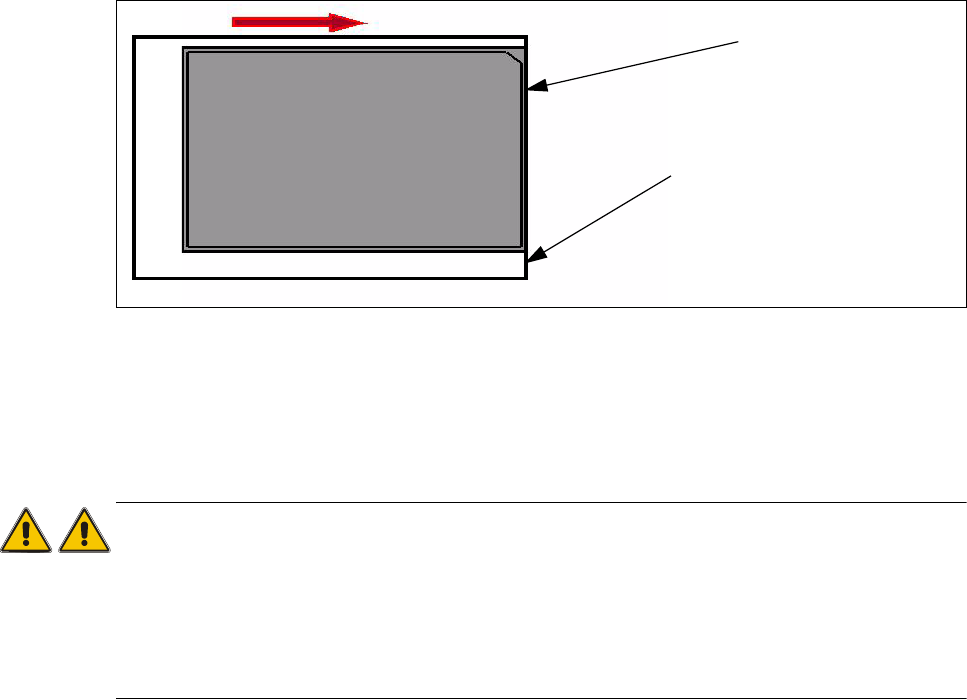
Then move the tray in the direction to the machine and stop so that the plastic edge comes into
line with outer edge of the frame from the feed axis. You must do this in one step, because that
you eliminate the tolerance between the space and the driver and you don‘t need a pick up
offset for the tray.
Fig. 5.2 - 5 Transfer position JEDEC tray
During the production the trays move a different way to her pick up position but the Y Position of
the machinen (pick up postion) of both trays is the same.
Attention:
When you accept this calibration procedure with "ACCEPT" now, you get a wrong transfer position
and pick up position for the twin head.
The transfer position of tower 1 is situated a few millimeters further than the end of the feed axis,
of tower 2 it is situated a few millimeters before the end of the feed axis.This offset is automatically
calculated and adjusted.
Plastic edge of the WTC
Edge of the frame from the MTC

Adjustment Instructions MTC 2 5 Feed axes
12/2007 Edition 5.3 End positions
73
5.3 End positions
NOTE
When the end positions are calibrated, the value determined is automatically saved.
5.3.1 Preparatory measures
NOTE
The zero offset must be checked before the end positions are checked and calibrated.
Check the zero offset of the feed axis (see section 5.2.3 "Checking and setting the zero off-
set").
5 Feed axes Adjustment Instructions MTC 2
5.3 End positions 12/2007 Edition
74
5.3.2 Checking and calibrating the end positions
Carry out the relevant preparatory measures (see section 5.3.1 "Preparatory measures").
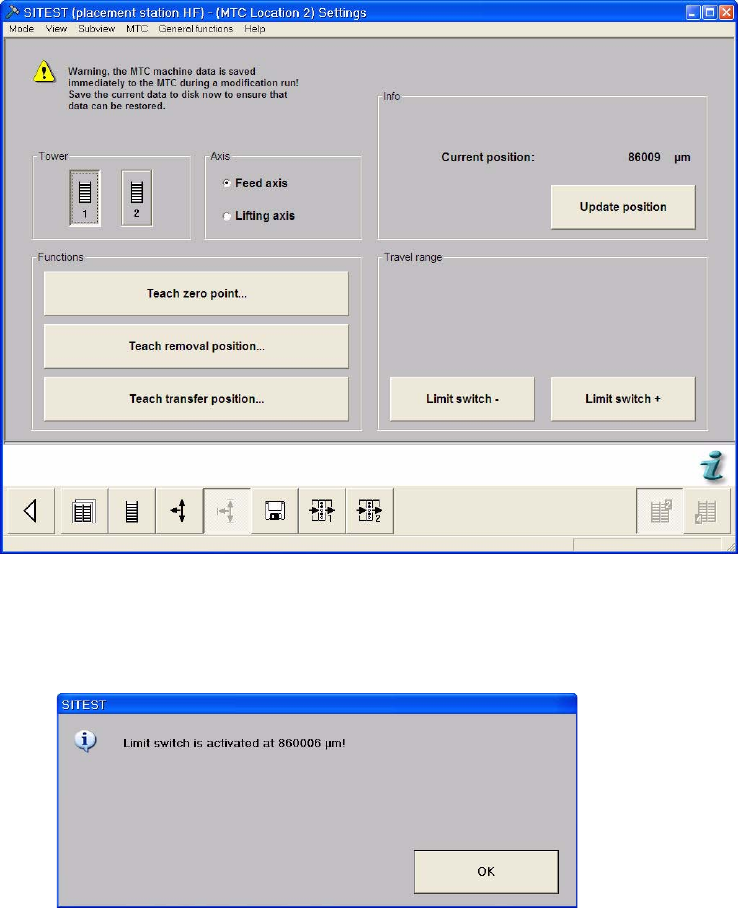
Select the Settings button from the menu bar at the bottom.
Select "Tower 1" and "Feed axis".
Select "Limit switch –". The feed axis moves until the rear limit switch is reached.
Confirm your choice by clicking on "OK". The value displayed is saved.