00193631-0602.pdf - 第33页
Adjustment Instr uctions MTC 2 4 Lifting axes 12/2007 Edition 4.2 Zero offset, refill position and transfer position 33 4.2 Zero offset, refill position and transfer position NOTE Y ou must carry out the steps described …
4 Lifting axes Adjustment Instructions MTC 2
4.1 Belt tension 12/2007 Edition
32
Turn the adjusting screws as far as they will go. Before doing this you will need to loosen
the lock nuts.
Loosen the four lock screws on the mounting plate of the motor.
Use the two adjusting screws to raise the belt tension (by turning in a clockwise direction)
or lower it (by turning in an anticlockwise direction), until the nominal frequency is achieved.
Tighten the lock nuts each time you measure the belt tension.
Firmly tighten the clamping screws and varnish them with red screw locking varnish.
Check the belt tension again.
Remove the belt tension stickers.
Dock the MTC 2 onto the SIPLACE station (see the User Manual).
Check the zero offset of the lifting axis (see section 4.2.2 "Checking the zero offset") if you
have changed the belt tension.

Adjustment Instructions MTC 2 4 Lifting axes
12/2007 Edition 4.2 Zero offset, refill position and transfer position
33
4.2 Zero offset, refill position and transfer position
NOTE
You must carry out the steps described for checking and calibrating the refill positions
for cassettes 2 - 5, on tower 1 and
for cassettes 2 -4, on tower 2.
The refill position for cassette 1 corresponds to the zero position (zero offset).
You must carry out the steps described for checking and calibrating the transfer positions
for cassettes 1 - 5, on tower 1 and
for cassettes 1 -4, on tower 2.
NOTE
Always close the tower locking mechanism and the protective door before moving the lifting axis.
4.2.1 Preparatory measures
NOTE
The positions must be checked and calibrated with all cassettes in the towers. There must be a
WTC in each cassette of each level.
Set the MTC 2 up completely with all empty cassettes (see the User Manual).
Set up each cassette with an empty WTC.
4 Lifting axes Adjustment Instructions MTC 2
4.2 Zero offset, refill position and transfer position 12/2007 Edition
34
4.2.2 Checking the zero offset
Carry out the relevant preparatory measures (see section 4.2.1 "Preparatory measures").
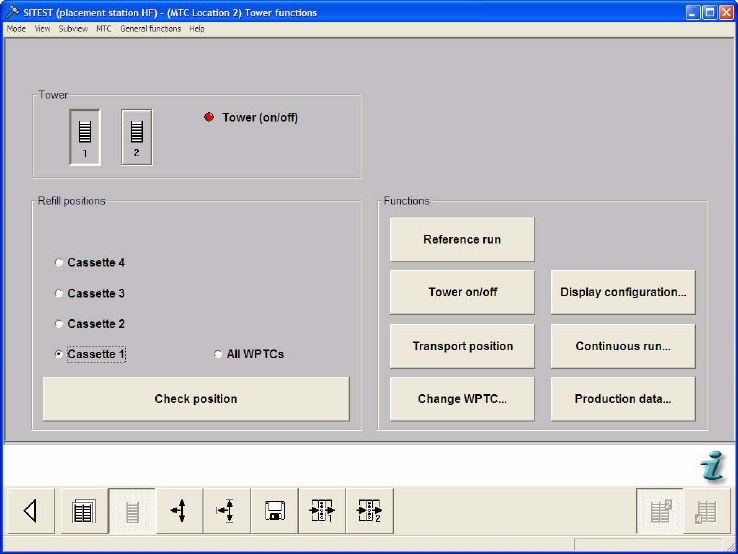
Select the Tower functions button from the menu bar at the bottom.
Select "Tower 1" and "Cassette 1".
Select "Check position".
Check that Cassette 1 can be moved in and out without any problems. If this is not possible,
the zero offset must be calibrated (see section 4.2.5 "Calibrating the zero offset").