00193631-0602.pdf - 第61页
Adjustment Instr uctions MTC 2 5 Feed axes 12/2007 Edition 5.2 Zero offset, removal position and tran sfer position 61 5.2 Zero offset, removal position and transfer position NOTE Y ou must carry out the steps descr ibed…
5 Feed axes Adjustment Instructions MTC 2
5.1 Belt tension 12/2007 Edition
60
5.1.4 Checking and setting the toothed belt
Carry out the relevant preparatory measures (see section 5.1.2 "Preparatory measures").
Measure the belt tension with the belt frequency measuring device in the following way:
Cause the toothed belt to oscillate and measure the frequency - from the underside of the
belt - in the middle between the outer deflection roll and the first deflection roll of the drive
(for the measuring point, see Fig. 5.1 - 1, item 7). Ensure that the driver is approximately in
its reference position.
You must set the belt tension if the measured frequency deviation deviates from the nominal
value (70 Hz ± 2 Hz):
Place the open-ended wrench on the setting flats of the eccentric axis.
Loosen the clamping screw on the eccentric axis and maintain the position of the axis with
the open-ended wrench.
Raise or lower the belt tension with the open-ended wrench (turning it in a direction depen-
ding on the position of the eccentric axis), until the nominal frequency is achieved. Firmly
tighten the clamping screw each time you measure the belt tension and varnish it with red
screw locking varnish.
Check the belt tension again and make sure the screws are varnished with red screw lok-
king varnish.
Secure the cover plates and dock the MTC 2 onto the SIPLACE station (see the User Manual).
Check the zero offset of the feed axis (see section 5.2.3 "Checking and setting the zero offset")
if you have changed the belt tension.

Adjustment Instructions MTC 2 5 Feed axes
12/2007 Edition 5.2 Zero offset, removal position and transfer position
61
5.2 Zero offset, removal position and transfer position
NOTE
You must carry out the steps described for checking and calibrating the removal positions
for WTCs 2 - 5 on tower 1 and
for WTCs 2 -4 on tower 2.
The removal position for WTC 1 corresponds to the zero position (zero offset).
WARNING
You may only check and calibrate the positions of the feed axis with the correct zero position and
correct transfer positions of the lifting axis.
5.2.1 Tools and accessories
– Adjustment gauge, WTC
– Adjustment gauge, WTC XL
5.2.2 Preparatory measures
NOTE
The positions must be checked and calibrated with cassettes in the towers. There must be a WTC
in the bottom level of each cassette.
Set the MTC 2 up completely with empty cassettes (see the User Manual).
Set up every cassette with an empty WTC in the bottom level.
5 Feed axes Adjustment Instructions MTC 2
5.2 Zero offset, removal position and transfer position 12/2007 Edition
62
5.2.3 Checking and setting the zero offset
Carry out the relevant preparatory measures (see section 5.2.2 "Preparatory measures").
Select SITEST --> MTC --> Settings
Press the button "Teach zero point"
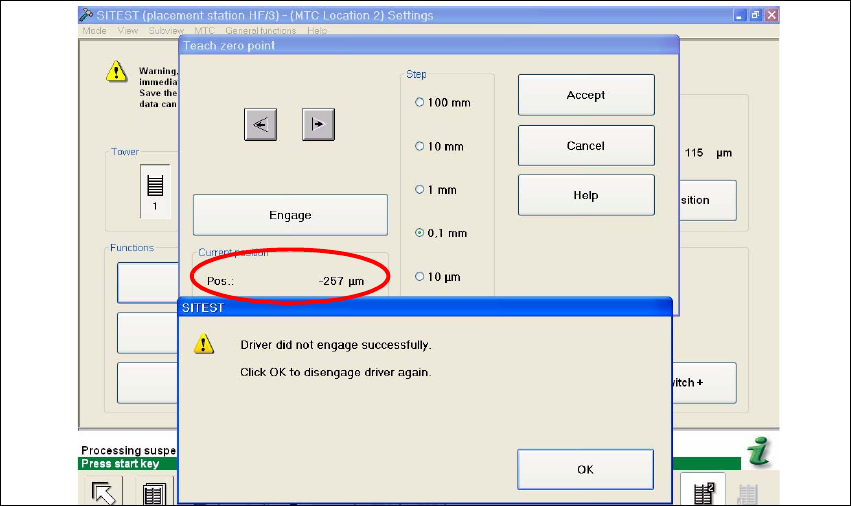
Check the position of the driver with the button "ENGAGE". In case the driver did not engaged
successfully you must determine the middle of the notch of the waffel pack tray.
The accurate adjustment is described below:
Determine the minimum position of the notch Fig. 5.2 - 1.
Fig. 5.2 - 1 Minimum position
Determine the maximum position of the notch Fig. 5.2 - 2. at which the driver just engages no
more.