00193631-0602.pdf - 第55页
Adjustment Instr uctions MTC 2 5 Feed axes 12/2007 Edition 55 5 Feed axes NOTE Setup activities require the SITEST program. All the steps described for one tower also apply to the second tower . All screws locked with re…
4 Lifting axes Adjustment Instructions MTC 2
4.5 Cassette guide rails 12/2007 Edition
54
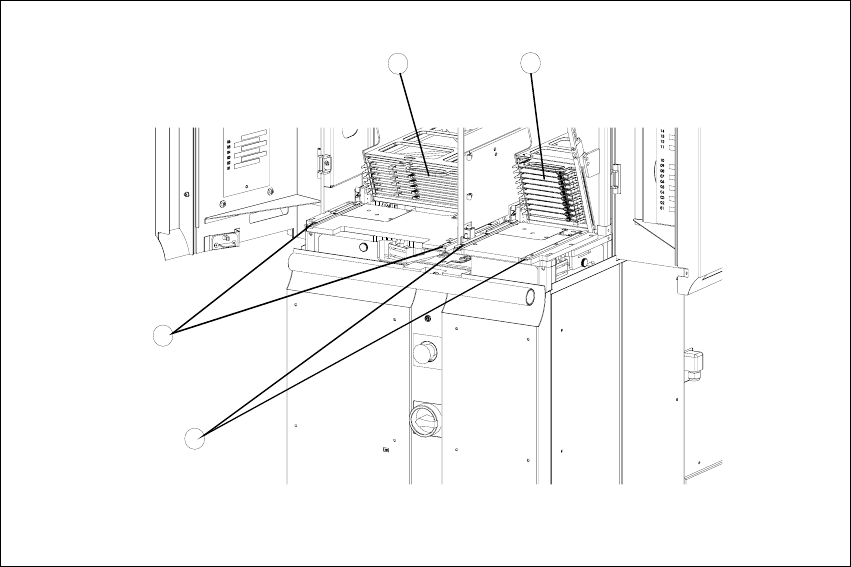
4.5.3 Setting the cassette guide rails
4
Fig. 4.5 - 1 Setting the cassette guide rails
Key
1. Cassette XL in the refill position for tower 1
2. Cassette in the refill position for tower 2
3. Cassette guide rails for tower 1
4. Cassette guide rails for tower 2
Move the lifting axis into the refill position for cassette 1 (see section 4.2.2 "Checking the zero
offset").
Loosen the securing screws on both cassette guide rails.
Tighten the securing screws of the inner cassette guide rail at the position in which the cassette
can still be inserted into the tower smoothly.
Position the second cassette guide rail by means of the cassette parallel to the first cassette,
so that the cassette can be moved easily but without any lateral play. Tighten the securing
screws here as well.
Check the setting of the other refill positions (see section 4.2.3 "Checking the refill positions").
If necessary, correct the position of the cassette guide rails which has been set.
4
3
1
2

Adjustment Instructions MTC 2 5 Feed axes
12/2007 Edition
55
5 Feed axes
NOTE
Setup activities require the SITEST program. All the steps described for one tower also apply to
the second tower.
All screws locked with red screw varnish must be relocked after an adjustment has been made.
NOTE
The inclination of the towers is relative to the load. In order to guarantee an accurate operation for
all loads of the towers (minimal up to maximal load) the MTC must be calibrated with its standard
load. That means that all levels must carry a WPC (without tray). This way you will make sure that
the driver can engage accurately for all loads.
Zero offset (zero position)
The zero offset is used to define the removal position of WTC 1. The zero offset is the difference
between the physical home position of the feed axis and the position of the driver at which it is
inserted in the WTC on level 1.
Removal positions (WTC removal positions)
At the removal positions of WTCs 1 - 5 (tower 2: WTCs 1 - 4), the driver can be inserted into the
lowest WTC in each cassette and move this into the transfer position.
Transfer position (component transfer position)
The transfer position is the position of the feed axis at which components can be picked up by the
placement head of the SIPLACE station without a correction value. The position of the reference
edges of a waffle pack tray in relation to the reference holes of the MTC 2 is stored in the line
computer.
End positions (min. and max. position)
The end positions of an axis are reached when contact is made with the relevant limit switch.
The value determined here is used as a safety constraint when values are entered in the service
menu of the controller software. If a limit switch is overrun during operation, the relevant axis is
stopped immediately to prevent a crash from occurring.
Handle sensor, WTC safety query and crash light barriers
The handle sensor checks the handle of the WTC in the removal position and thus the position of
the WTC which has been moved back, to prevent a crash from occurring.
The WTC safety query checks the correct position of the WTC which has been moved back before
5 Feed axes Adjustment Instructions MTC 2
12/2007 Edition
56
the lifting axis is moved, to prevent a crash from occurring.
Depending on the height of the waffle pack tray which has been set up, the crash light barriers
check the height of the WTC which is moving back, to prevent a crash from occurring in the
cassette.
Disengaging mechanism
The disengaging mechanism enables the driver to engage with and disengage from the WTC.