00193631-0602.pdf - 第94页
7 Entering the addresses of the masterdrive s Adjustment Instructions MTC 2 7.1 Masterdrives 12/2007 Edition 94 7.1 Masterdrives 7.1.1 Operating the master drive with the p arametrization unit (PMU) The PMU parame terizi…
Adjustment Instructions MTC 2 7 Entering the addresses of the masterdrives
12/2007 Edition
93
12.Step through the options with until "P060" appears. Now you are back in the menu sel-
ection.
13.Press and set "1" with . This returns you to the menu command "Parameter
menu".
14.Press . "009" is displayed.
15.Press . "P60" is displayed.
16.Set "r000" with .
17.Press . The initial state is restored.
7 Entering the addresses of the masterdrives Adjustment Instructions MTC 2
7.1 Masterdrives 12/2007 Edition
94
7.1 Masterdrives
7.1.1 Operating the master drive with the parametrization unit (PMU)
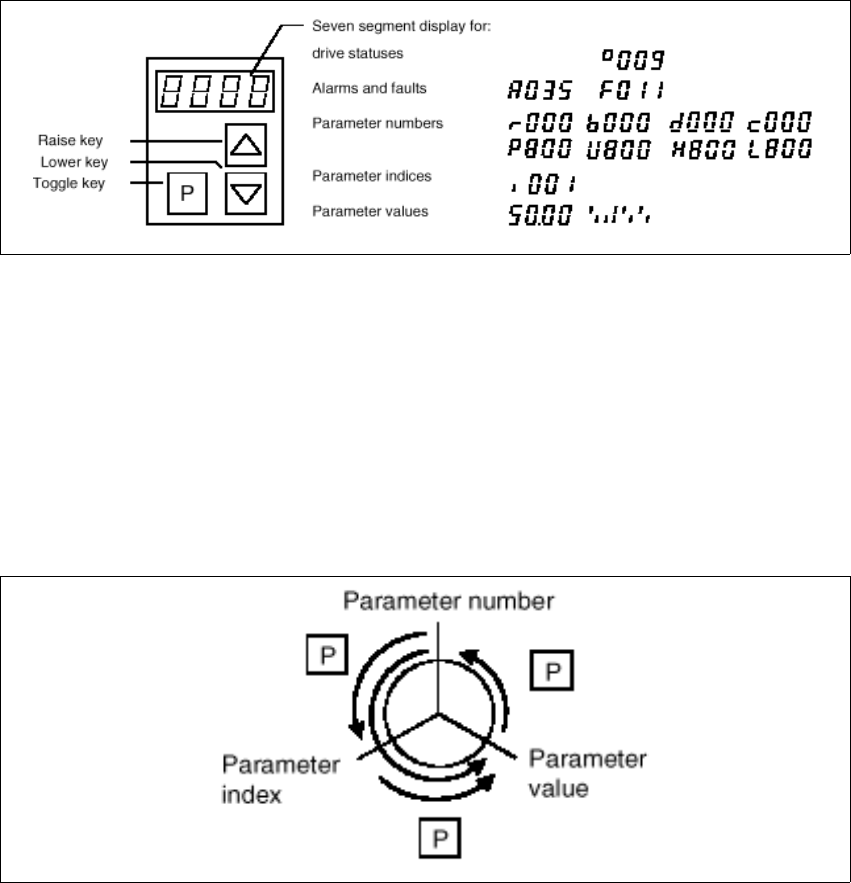
The PMU parameterizing unit enables parameterization, operator control and visualization of the
converters and inverters directly on the unit itself.
Fig. 7.1 - 1 PMU parameterizing unit
With the toggle key, you can change over:
– from the parameter number to the parameter index
– from the parameter index to the parameter value
– from the parameter value to the parameter number
If the parameter is not indexed, you can jump directly from the parameter number to the parameter
value.
Fig. 7.1 - 2 Toggle key of the PMU

Adjustment Instructions MTC 2 7 Entering the addresses of the masterdrives
12/2007 Edition 7.1 Masterdrives
95
7.1.2 Important Parameter for trouble shooting
– U / r = visualization parameters
– P = parameters which can be changed
– r004 = Output current inverter, converter
– r006 = actually DC link voltage
– r009 = Temperature motor
– r069 = Software version Index 1 main unit
Index 2 Option unit slot A 7
Index 3 Option unit slot B 7
Index 4 Option unit slot C 7
– U003 = Parameter set version:
for the Feed axis tower 1/2 software version
for the Lifting axis tower 1/2 software version
Note:
On the MTC 2 are four different parameter sets, because the mechanical construction for tower 1
and tower 2 is different.
– U501 = Machine data
– P060 = Function parameter to choose actually menu.
Index 4:Unit configuration: Address 7
– P095 = Motor list with standard motors
– P096 =Function parameter motor
Define serial Interface:
– P700 interface address of COM 1
– P701 baud rate 8 is equal to 38400