80S-20用户手册.pdf - 第118页
3 Introduction and basic concepts SIPLACE 80S-20/F4 User Manual 3.1 Machine displays and controls Software version SR .407.xx 01/2001 US E dition 118 3.1 Machine di splays and cont rols 3.1.1 Ove rview 3 Fig. 3.1 - 1 Ove…

SIPLACE 80S-20/F4 User Manual 3 Introduction and basic concepts
Software version SR.407.xx 01/2001 US Edition
117
3 Introduction and basic concepts
This chapter describes the machine displays and controls together with the components of the
graphic user interface.
3
It also provides a basic understanding of the use of the user interface and its functions. 3
NOTE
It is essential for operators who are not yet familiar with the user interface of the station computer
software (SC software) to read this chapter. 3
3 Introduction and basic concepts SIPLACE 80S-20/F4 User Manual
3.1 Machine displays and controls Software version SR.407.xx 01/2001 US Edition
118
3.1 Machine displays and controls
3.1.1 Overview
3
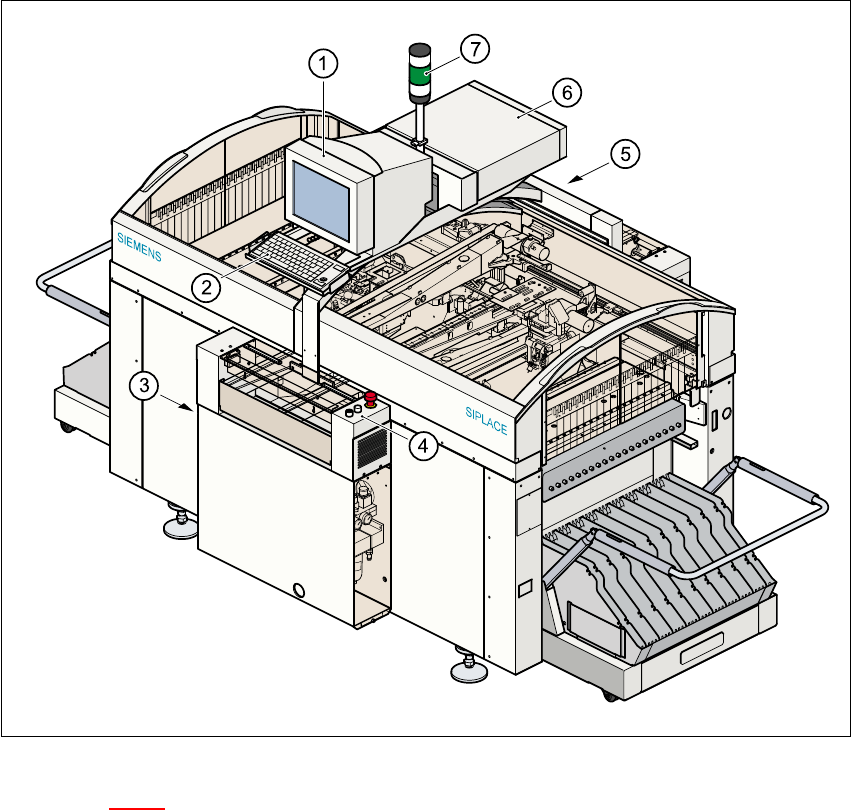
Fig. 3.1 - 1 Overview
Key to Fig. 3.1 - 1
(1) Monitor
(2) Keyboard
(3) Main power switch
(4) Front control panel
(5) Rear control panel
(6) Computer
(7) Main fault indicator

SIPLACE 80S-20/F4 User Manual 3 Introduction and basic concepts
Software version SR.407.xx 01/2001 US Edition 3.1 Machine displays and controls
119
3.1.1.1 General
Every station is equipped with a station computer. The station computer, monitor and keyboard
are mounted on a pivoting console above the placement system.
There is an operating panel on both the input and the output side of the placement system. Each
panel has a Start and a Stop button, an emergency stop mushroom-head push-button, a key
switch and a component counter.
NOTE
You can operate the SR software interface either via the keyboard and trackball or via the touch
screen (see section 3.2.1). 3
The position of the switches and buttons (main switch, key-operated switches, start/stop button,
EMERGENCY STOP button etc.) is illustrated in Figure 3.1 - 2
. The functions are described in
Chapter 2
.
3
WARNING
The machine base doors may only be opened by qualified personnel since certain machine
components carry hazardous voltages.
The relevant accident prevention and applicable regulations (DIN) regarding electrical/electrome-
chanical installations must be strictly complied with. Failure to do so may result in death, severe
physical injury or considerable damage to property. 3
3
3
3