80S-20用户手册.pdf - 第93页
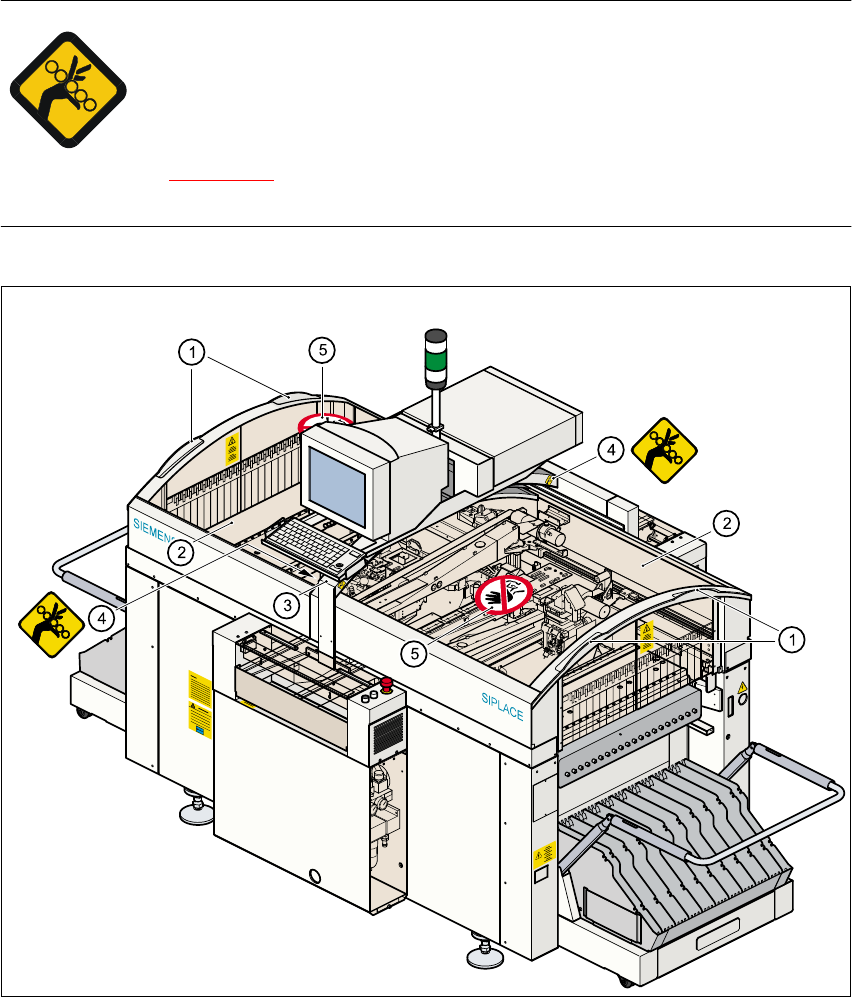
SIPLACE 80S -20/F4 User Manual 2 Operational Safety Software version SR.407.xx 01/2001 US Edition 2.1 Safety instructions 93 Key to Fig. 2.1 - 15 (1) Recess ed grips for o pening and closin g the prot ective (2) Protecti…
2 Operational Safety SIPLACE 80S-20/F4 User Manual
2.1 Safety instructions Software version SR.407.xx 01/2001 US Edition
92
2.1.13 Safety instructions for opening the protective covers
To prevent any risk of injury when the protective covers on automatic placement machines are
opened, the owner must instruct his operators to use the protective covers exactly as specified in
the following description. 2
RISK OF TRAPPING FINGERS IF THE PROTECTIVE
COVERS ARE OPENED OR CLOSED INCORRECTLY
When you open the protective covers, if you place one hand in one of the
recessed grips (1) and place the other hand on the protective cover in order to
guide it (item (5) in Fig. 2.1 - 15
), you risk trapping your fingers in the narrow gap (4) between the
monitor traverse (3) and the protective cover (2). 2
2
Fig. 2.1 - 15 Protective covers on the SIPLACE automatic placement machine

SIPLACE 80S-20/F4 User Manual 2 Operational Safety
Software version SR.407.xx 01/2001 US Edition 2.1 Safety instructions
93
Key to Fig. 2.1 - 15
(1) Recessed grips for opening and closing the protective
(2) Protective cover
(3) Monitor traverse
(4) Narrow gap (between 4 and 10 mm) between
the monitor traverse and protective cover
(5) Do NOT place your hand on this surface!
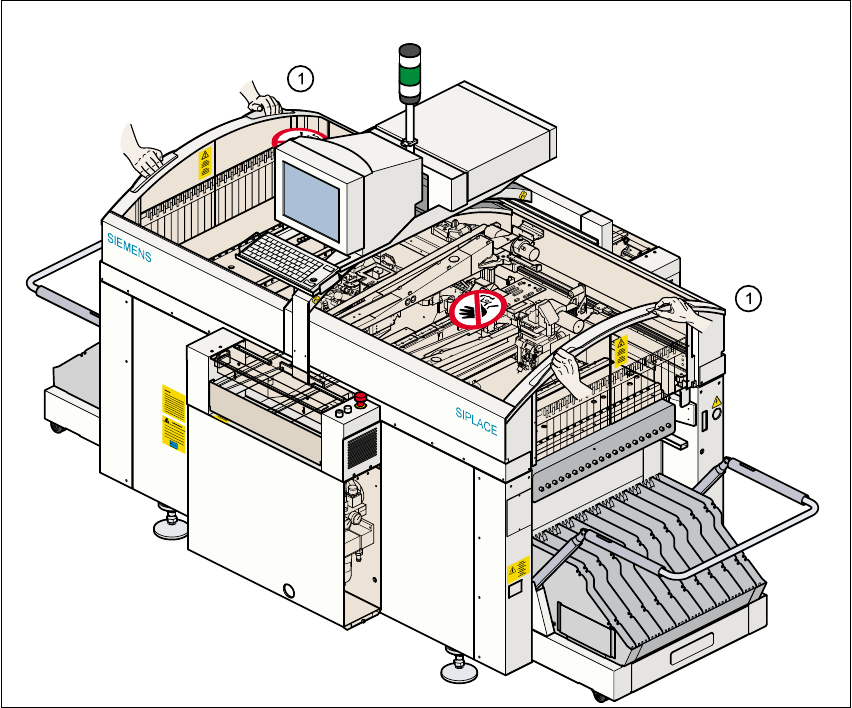
Every protective cover on the automatic placement machine has two recessed grips (1). 2
PLEASE NOTE
Always place both hands in these recessed grips (see item (1) in Fig. 2.1 - 16
) in order to open
or close the protective covers. This “two-handed operation” will prevent any risk of injuring your
hands.
You will also avoid tilting the protective covers during opening or closing, which would place an
excessive load on the guides. 2
2 Operational Safety SIPLACE 80S-20/F4 User Manual
2.1 Safety instructions Software version SR.407.xx 01/2001 US Edition
94
2
Fig. 2.1 - 16 Two-handed operation
(1) Two-handed operation
2