80S-20用户手册.pdf - 第322页
6 Vision functions SIPLA CE 80S-20/F4 User Manual 6.6 Test Co mponent Software version SR.407.xx 01/2001 US Edition 322 Measuring mode menu 6 Click on the ’ Measur ing m ode ’ fiel d to call up the Measuring mode menu. 6…

SIPLACE 80S-20/F4 User Manual 6 Vision functions
Software version SR.407.xx 01/2001 US Edition 6.6 Test Component
321
6.6.4.13 Measure Mode Option
NOTE 6
This option can only be activated when a GF number has been loaded.
In this menu you can manipulate the measurement conditions. The menu options are primarily in-
tended for the description of non-standard components. 6
This option allows you to 6
Å select and activate a particular measurement method or combination of several measurement
methods
Å deactivate individual measurement methods, and
Å change the parameters belonging to each measurement method.
6
The hex parameters for the individual measuring methods can be modified in two ways: 6
Å either indirectly, i.e. menu-driven
You will be guided by the package form manipulator by means of setting menus and explana-
tory text in order to obtain the desired measuring results quickly and accurately.
Å or directly, i.e. you enter the necessary hex parameters directly into the ’Measuring mode 2’
input box.
NOTE 6
Please note that entering the hex values directly requires considerable knowledge of the
measuring method sequence.
If you intend to enter or modify hex values directly, please contact Siemens Service first and
do not enter the bit-coded hex values until you have spoken to the Service Department.
We recommend that you generally use the menu-driven package form manipulator. 6
6 Vision functions SIPLACE 80S-20/F4 User Manual
6.6 Test Component Software version SR.407.xx 01/2001 US Edition
322
Measuring mode menu 6
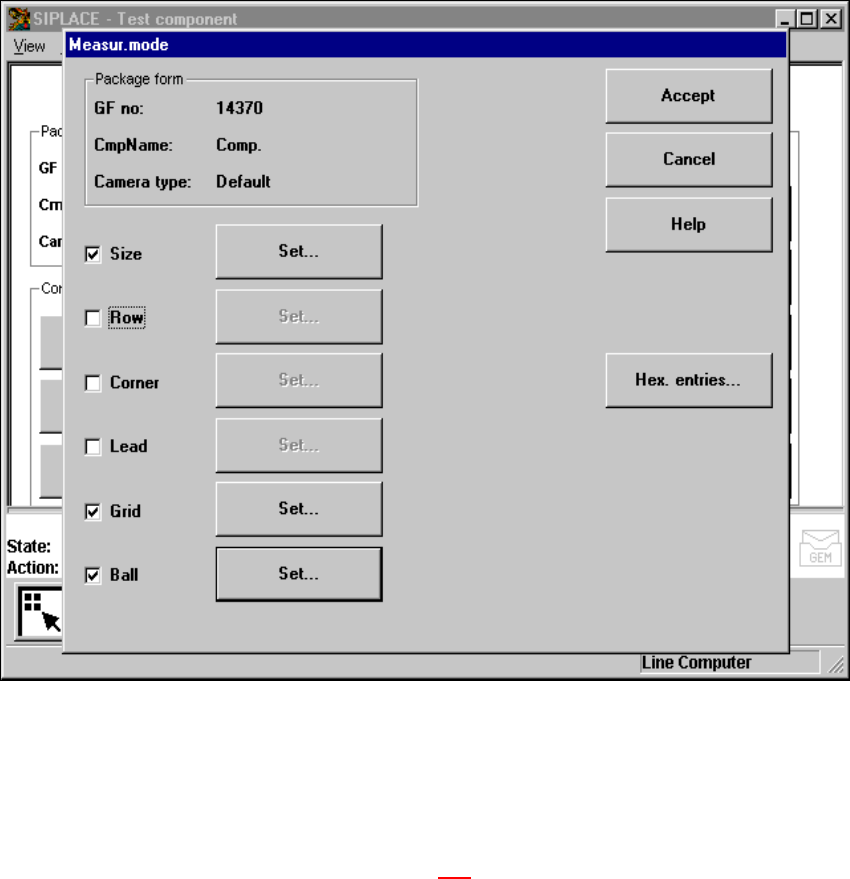
Click on the ’Measuring mode’ field to call up the Measuring mode menu. 6
6
Fig. 6.6 - 34 Test component menu, Meas. mode option
– In the left column of the box, the desired measuring method can be activated or deactivated by
clicking with the mouse. A cross indicates that you have activated the measuring method. The
‘Setting' field for calling up the sub-menu changes from grey to black.
Use the ‘Hex input’ field to call up the ‘Measuring mode 2’ input menu for directly entering hex
values. Please follow the instructions on page 321
.
Å Select ‘Accept’ to close the ‘Measuring mode’ menu. The modified measuring conditions will
be entered into the package form file on the station computer.
Å Select ‘Abort’ to interrupt the operation without transferring the data and to return to the ‘Test
component’ menu.

SIPLACE 80S-20/F4 User Manual 6 Vision functions
Software version SR.407.xx 01/2001 US Edition 6.6 Test Component
323
6.6.4.14 Information on Measurement Modes
As far as conventional components with lead connections are concerned, component centering is
essentially based on four measurement methods used to determine the position (X and Y-coordi-
nates, Φ = skew) of the component and the lead parameters: 6
– Size mode
– Row mode
– Corner mode
– Lead mode
For BGAs (B
all Grid Arrays) and flip-chips new algorithms have been implemented in order to de-
termine the position (X and Y-coordinates, Φ = skew) of the component and the ball parameters
(see Section 6.6.4.4
on page 297 ): 6
– Grid mode
– Ball mode
In accordance with your specifications any measurement method can be omitted from this se-
quence. However, it is not possible to change the way this sequence runs. 6
Definition of the measuring methods 6
– Size
This measurement method has been especially developed for small components. On the basis
of the information on dimension parameters the position and rotation of small components is
determined rapidly and reliably.
This method is very resistant to unwanted intrusive elements such as ink markings.
The size mode also employs profiling. You can have the profile formed along either the width
or the length of the component. You should make your choice within the options field. The de-
fault selection is for profiling along the longer side.
– Row
This measurement method is based on information from one row of leads.
This method is very fast and supplies approximate values for the coordinates and rotational
angle of the component.
– Corner (Component inspection)
The measurement results provide precise information on the coordinates and rotation of the
component, the number of leads, the pitch and the row offset.
This method is not sensitive to fluctuations in the lead dimensions.
– Lead (Leads inspection)
This method is used to obtain information from an inspection of every single lead.