80S-20用户手册.pdf - 第204页
5 Single functions SIPLACE 80S-20 /F4 User Manual 5.3 Single functions, transport Software version SR.407.xx 01/2001 US Edition 204 5.3 Single functions, transport NOTE The travel function s of the x or y axis can onl y …

SIPLACE 80S-20/F4 User Manual 5 Single functions
Software version SR.407.xx 01/2001 US Edition 5.2 Single functions, gantry
203
5.2.9.1 General comments
The "Fluxing" view provides the fluxing functions described below. Click on the appropriate button
to carry out the required function. 5
Go to refill position 5
This function moves the fluxer head to the refill position. It is only possible to refill the flux storage
tank or replace the flux nozzle in this position. 5
Å Click on the Go to refill position button.
The fluxer head moves to the refill position.
5
Rinse fluxer head 5
This function allows you to rinse the piping system of the fluxer head as required in order to re-
move trapped air or flux residue. This can, for instance, be necessary after changing the flux stor-
age tank or when no flux has been applied for some time. 5
NOTE
The flux parameter "No. of rinse cycles" can be used to set how many rinse operations will be car-
ried out (see Chapter 11 Station extensions /Hardware). 5
Å Click on the Rinse fluxer head button.
First the flux nozzle is cleaned on the brush and then the piping system of the fluxer head is
rinsed.
Init. fluxer head 5
This function starts a reference run of the fluxer head. The valve and lifting axis are moved to the
home position. 5
Å Click on the Init. fluxer head button.
The reference run is carried out.
5
5
5 Single functions SIPLACE 80S-20/F4 User Manual
5.3 Single functions, transport Software version SR.407.xx 01/2001 US Edition
204
5.3 Single functions, transport
NOTE
The travel functions of the x or y axis can only be carried out when the machine cover is closed.
To execute this function, press the start button.
As a rule, the gantries only travel slowly. The Collect&Place head is set to travel slowly. 5
Å On the tool bar in the main view, click the symbol which represents the transport you want to
test the functions of (or select the corresponding menu item from the "View" menu, e.g. "Trans-
port 1" for Transport 1).
NOTE
When dual transport is installed and available in the machine configuration, the single func-
tions can be called for either the right-hand transport (Transport 1) or the left-hand transport
(Transport 2). The functions are identical for both right and left. The symbols used to call the
single functions are marked with the number which corresponds to the transport side.
Example for Transport 1 (= right-hand transport or single transport). 5
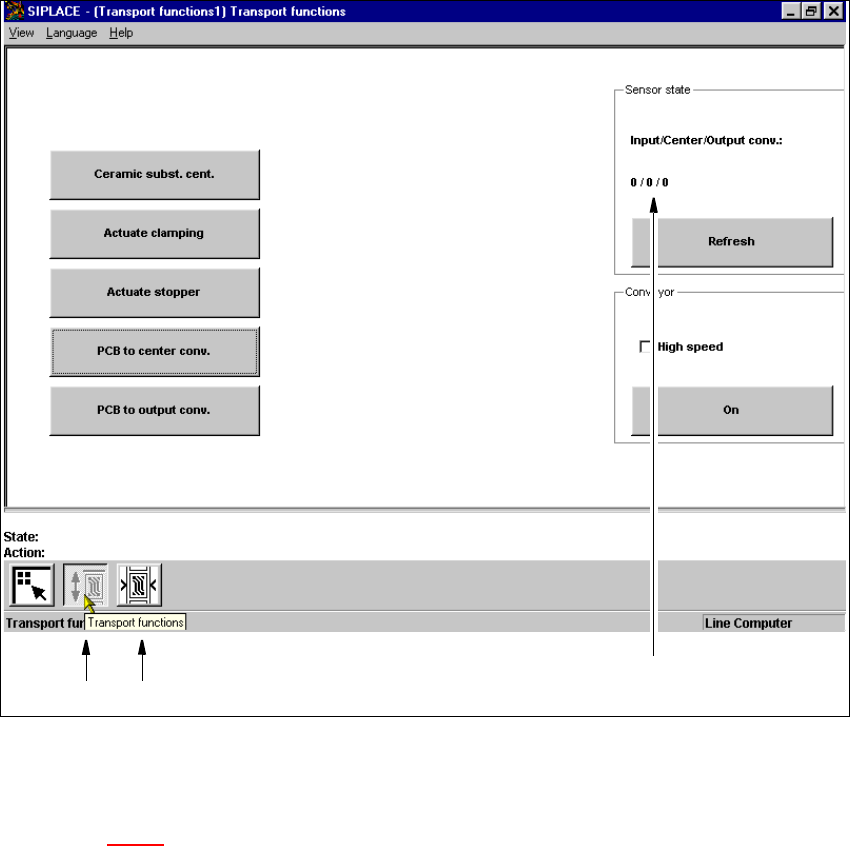
The user interface is switched to the "Transport functions" view of the selected transport (see
Fig. 5.3 - 1
). 5
5
SIPLACE 80S-20/F4 User Manual 5 Single functions
Software version SR.407.xx 01/2001 US Edition 5.3 Single functions, transport
205
5.3.1 "Transport functions" view
The transport functions are used for checking and adjusting the functional modules of the board
conveying systems. 5
5
Fig. 5.3 - 1 "Transport functions" view
Key to Fig. 5.3 - 1
(1) Functions for the board conveying systems
(2) Functions for adjusting the transport conveyor width
(3) Functions to display state of the ultrasonic sensors
5
5
12
3