80S-20用户手册.pdf - 第514页
11 Station extensions /Hardware SIPLACE 80S-20 /F4 User Manual 11.9 Flux dispenser unit Software version S R.407.xx 01/2001 US Edition 514 Vo l u m e : 11 – The volum e of flu x to be app lied for the curre nt compone nt…
SIPLACE 80S-20/F4 User Manual 11 Station extensions /Hardware
Software version SR.407.xx 01/2001 US Edition 11.9 Flux dispenser unit
513
11.9.7.2 Editing the package form list
Å Select the “Package form list” menu in order to edit the data for the flip-chip component to be
placed.
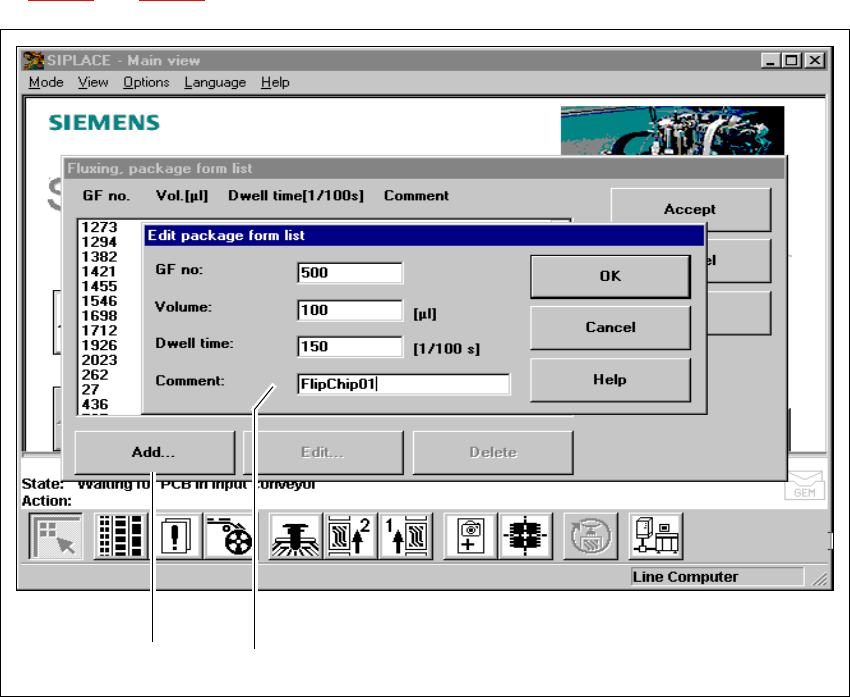
Å You can use this menu to add and edit flip-chip components together with their GF no. See Fig.
11.9 - 7
and 11.9 - 8.
Fig. 11.9 - 7 Fluxing package form list
(1) ‘Add’ button
(2) Input boxes
11
Å Click on the Add button in order to describe a new component for fluxing, and enter the data
in the input boxes.
Å Enter the following data:
GF no: 11
– The package form number of the component
– Package form numbers from 1 to 32000 can be used.
211 111

11 Station extensions /Hardware SIPLACE 80S-20/F4 User Manual
11.9 Flux dispenser unit Software version SR.407.xx 01/2001 US Edition
514
Volume: 11
– The volume of flux to be applied for the current component in (µl).
– You can enter flux volumes from 1 µl to 100 µl.
– We recommend the following values as a guideline:
6 mm x 6 mm component => 8 µl flux
10 mm x 10 mm component => 10-15 µl flux
Holding time: 11
– The time for which the component must be held in the flux after placement.
– This may be set to 0 to 500/100 sec, which corresponds to 0 to 5 seconds.
Comment: 11
– Here you can enter a comment about the component.
11
Å Click on OK to confirm your input.
Å Click on Accept to save the edited package form list.
PLEASE NOTE
You can enter up to 25 package forms on the station computer. 11
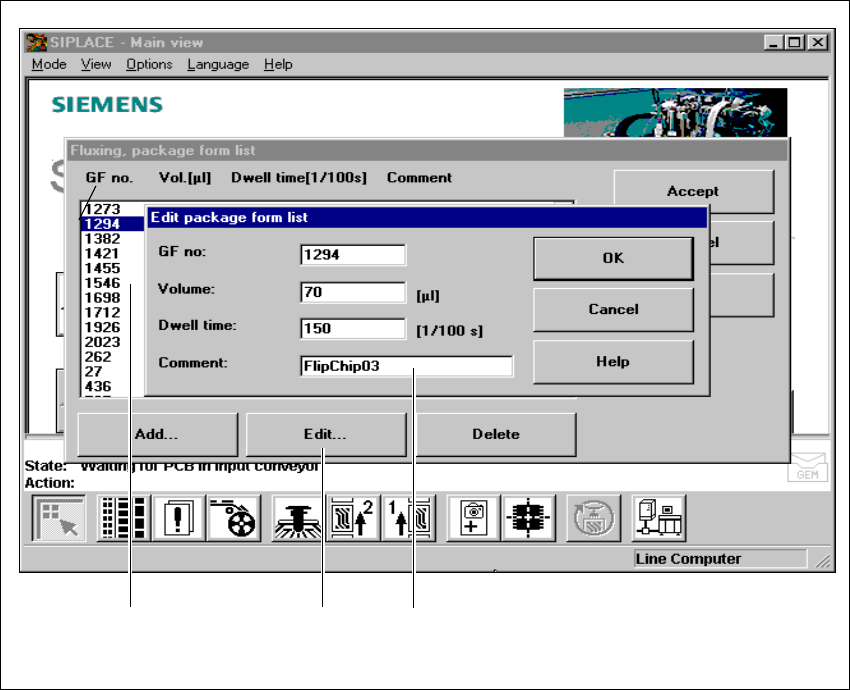
Å To edit a component, simply highlight the line containing that component (see Fig. 11.9 - 8).
Å Click on the Edit button in order to edit an existing package form.
SIPLACE 80S-20/F4 User Manual 11 Station extensions /Hardware
Software version SR.407.xx 01/2001 US Edition 11.9 Flux dispenser unit
515
11
Fig. 11.9 - 8 Editing the fluxing package form list
(1) Highlight the line
(2) ‘Edit’ button
(3) Input boxes
11
Å Edit the data as described for Add.
Å Click on OK to confirm your input.
Å Click on Accept to save the edited package form list.
11
311 111 211