80S-20用户手册.pdf - 第175页
SIPLACE 80S -20/F4 User Manual 4 Placement functions Software version SR.407.xx 01/2001 US Edition 4. 3 Feeders 175 4.3.5.2 Qui t refill position Å Clic k on the Qu it refill position bu tton. The waffle pack tr ays spe …
4 Placement functions SIPLACE 80S-20/F4 User Manual
4.3 Feeders Software version SR.407.xx 01/2001 US Edition
174
4.3.5 "Wafflepack Changer" view
This view contains all the functions needed for refilling and making available waffle pack trays. 4
4
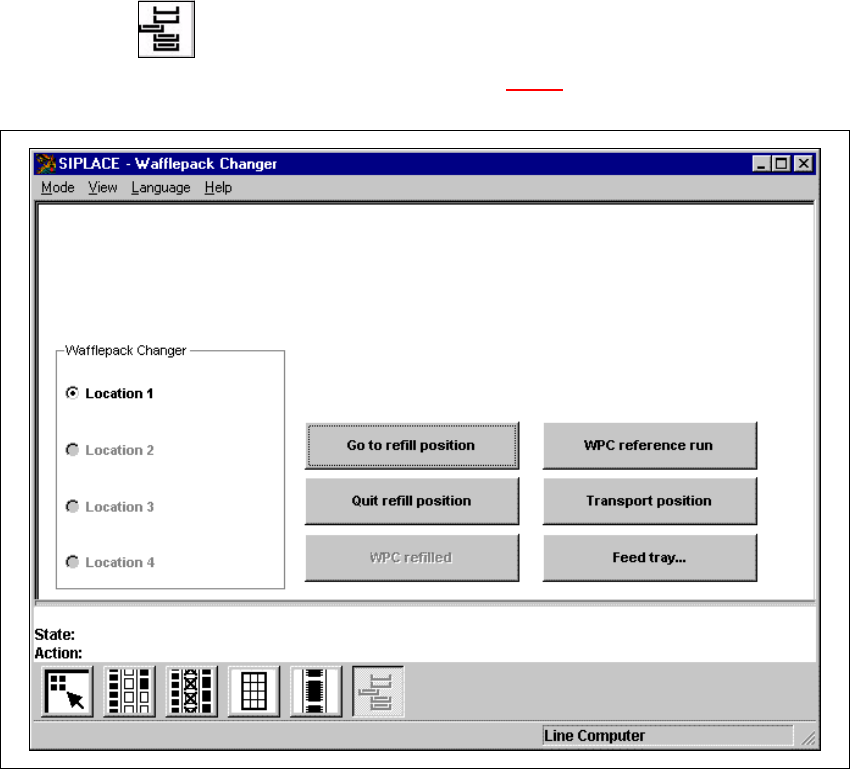
Å Click on the icon.
The "Wafflepack Changer" view is displayed (see Fig. 4.3 - 6
).
4
Fig. 4.3 - 6 "Wafflepack Changer" view
4.3.5.1 Go to refill position
To allow the trays in the waffle pack changer to be refilled, they must be moved to the refill position.
This can be done during placement. If, however, the placement head attempts to access compo-
nents from one of these waffle pack trays, placement is interrupted until the refill position has been
quit. This is indicated by an appropriate status message. 4
Å Activate the option button corresponding to the location of the waffle pack changer.
Å Click on the Go to refill position button.
The waffle pack changer moves all waffle pack trays to the refill position.

SIPLACE 80S-20/F4 User Manual 4 Placement functions
Software version SR.407.xx 01/2001 US Edition 4.3 Feeders
175
4.3.5.2 Quit refill position
Å Click on the Quit refill position button.
The waffle pack trays specified in the setup are moved to, checked and aligned.
4.3.5.3 WPC refilled
As soon as the waffle pack trays which have been identified as being "empty" have been refilled
with components, this must be confirmed, so that the placement head can again access these
trays. This is done using the "WPC refilled" function. 4
Å Click on the WPC refilled button.
This confirms that the waffle pack trays have been refilled.
All the waffle pack trays which have been identified as being "empty" are now regarded as
"full". Placement continues with components from these waffle pack trays.
4.3.5.4 WPC reference run
This function causes the lift of the waffle pack changer to carry out a reference run. 4
NOTE
The waffle pack changer must not be in the refill position when this function is carried out. 4
Å Click on the Stop processing PCB function in the Mode menu.
The current placement operation is halted.
Å Click on the WPC reference run button.
First, any waffle pack tray which has been moved out will be returned to its level. The reference
run is then performed.
4.3.5.5 Transport position
To allow the waffle pack changer to be transported safely, the lift of the waffle pack changer must
be moved to a defined transport position. 4
NOTE
The waffle pack changer must not be in the refill position when this function is carried out. 4
Å Click on the Stop processing PCB function in the Mode menu.
The current placement operation is halted.
Å Click on the Transport position button.
The lift moves to the defined safety/transport position.
4 Placement functions SIPLACE 80S-20/F4 User Manual
4.3 Feeders Software version SR.407.xx 01/2001 US Edition
176
4.3.5.6 Feed tray
This allows you to define the level containing the waffle pack tray to be made available for place-
ment. 4
NOTE
The waffle pack changer must not be in the refill position when this function is carried out. 4
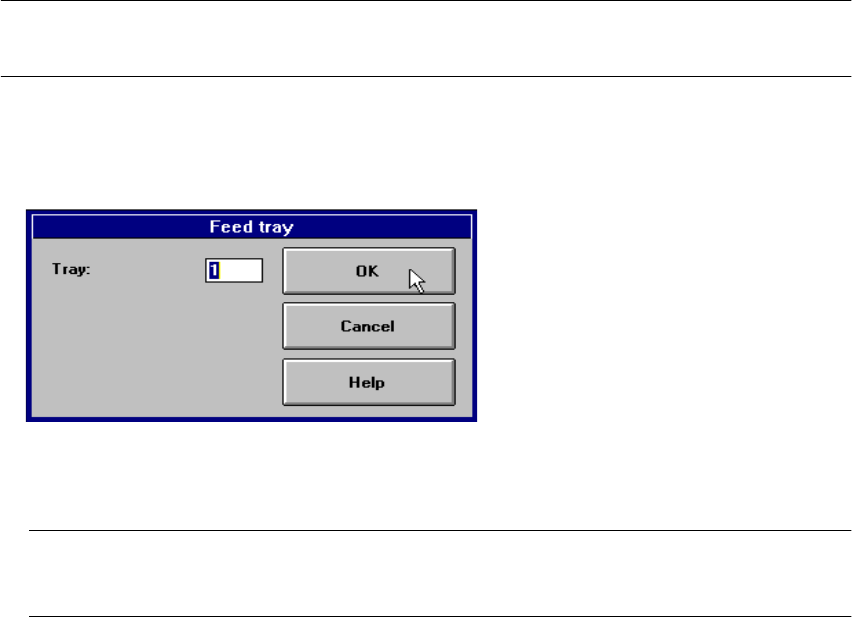
Å Click on the Feed tray button.
The following dialog box is displayed.
4
Å In the text box, enter the number of the required level and confirm your entry with OK. The waf-
fle pack changer moves the waffle pack tray from the selected level to the pick-up position.
NOTE
If a waffle pack tray is already in the pick-up position, it is first moved to its defined level. 4