Oxford-100-Manual.pdf - 第64页
Plasma lab System 100 Oxford Instruments Plasma Technology System Manual 4.3 Commissioning the system Commissioning of the system will be carried out by OIPT in accordance with their standard procedures and any additiona…
System
Manual
Oxford
Instruments Plasma Technology
Plasma
lab
System
100
4.2.3.1
Connecting
the
3-phase
supply
cable
to
the
power
box
If
it
is
necessary
to
connect
the
3-phase supply cable
to
the
power
box, use
the
following
steps.
1)
Ensure
that
the
supply cable
is
not
connected
to
the
safety isolation box.
2)
Remove
the
power
box
cover.
3)
Inside
the
power
box, remove
the
clear plastic safety cover
from
the
power
box
(secured
to
the
right-hand
side
of
the
power
box
by
four
screws).
4)
Connect
the
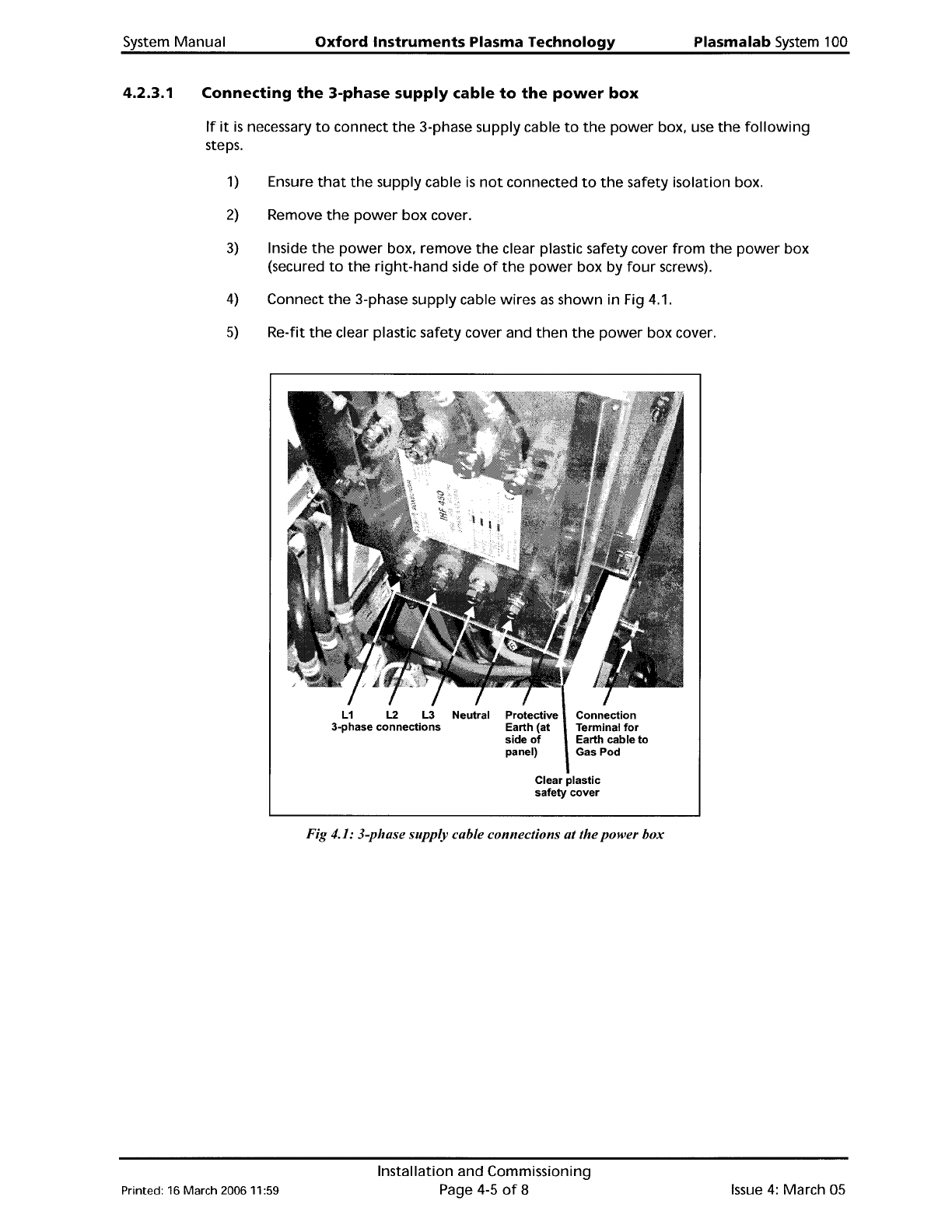
3-phase supply cable wires
as
shown
in Fig 4.1.
5)
Re-fit
the
clear plastic safety cover and
then
the
power
box cover.
L1 L2 L3 Neutral Protective
3-phase
connections
Earth (at
side
of
panel)
Connection
Terminal
for
Earth cable
to
Gas
Pod
Printed: 16 March 200611:59
Clear
plastic
safety
cover
Fig 4.1: 3-phase supply cable connections atthepower box
Installation and Commissioning
Page 4-5
of
8
Issue
4:
March 05
Plasma
lab
System
100
Oxford
Instruments
Plasma Technology System Manual
4.3
Commissioning
the
system
Commissioning
of
the
system
will
be carried
out
by
OIPT
in accordance
with
their
standard
procedures and any
additional
requirements stated in
the
sales contract. Generally, this
will
include
the
following
items:
1)
Checking
that
the
installation
has been carried
out
satisfactorily.
2)
Powering
up
the
system.
3)
Checking
the
operation
of
the
system,
including
the
Emergency
Off
facility
and all
interlocks.
4)
Ensuring
that
the
system can
perform
the
processes specified in
the
sales
contract.
5)
Providing
training
on
the
system.
4.4
System
adjustments
This sub-section gives details
of
adjustments
which
may be necessary
depending
on system
configuration.
In
addition
to
these adjustments,
refer
to
the
Operator
Adjustments sub-
section
in
Section 5
(Operating
Instructions)
of
this manual.
4.4.1
4.4.2
Heater/Chillers
If
your
Plasmalab system has a
remote
Betta-Tech heater/chiller, e.g.
CUSOO,
with
a Eurotherm
Controller,
please
note
the
following.
The
Eurotherm
controller
has a
default
temperature
setpoint. For
the
system
to
operate
correctly, this
setpoint
must be set
to
a
temperature
suitable
for
the
system and
coolant
used.
For example,
if
the
coolant
is
water,
do
not
set
the
setpoint
to
0°
C
or
below.
Check
the
setpoint
before
using
the
system and
if
necessary change
it
in accordance
with
the
instructions given in
the
Eurotherm Controller's manual.
Process
pump
purge
An
inert
gas,
normally
nitrogen,
is
added
to
the
process chamber
primary
mechanical
pump
for
a
variety
of
reasons:
a)
When
pumping
condensable vapours,
it
is
flowed
via
the
gas ballast port. This helps
to
prevent
condensation
during
compression, and reduces
the
amount
of
liquids
such
as
water
vapour
or
SiCI
4
in
the
pump
fluid.
b)
When
pumping
reactive
gases,
it
is
bubbled
through
the
pump
fluid,
to
help
drive
out
acidic compounds.
c)
When
pumping
flammable
or
explosive
gases,
it
is
added
to
dilute
the
gas
below
the
threshold
for
explosion.
d) In
dry
pumps,
the
purge
gas
flow
is
important
for
managing
heat
and
limiting
particle
build
up.
WARNING
DILUTION IS NOT USED
TO
MAKE
THE
EXHUAST
SAFE
TO
BREATH: IT MUST
STILL
BE
DUeTED
AWAY
AND
TREATED APPROPRIATELY.
Issue
4:
March
OS
Installation and Commissioning
Page 4-6
of
8
Printed: 16 March 2006
11
:59
System
Manual
Oxford
Instruments
Plasma
Technology
Plasma
lab
System
100
If
your
Plasmalab system
is
supplied
with
a
dry
pump.
e.g. Alcatel ADP122P
or
ADS602P.
that
includes its
own
purge
gas
monitor,
with
an
output
suitable
for
inclusion in a
hardware
interlock
chain.
it
is
permissible
to
use this instead
of
the
DIPT
purge
kit.
If
your
Plasmalab system
is
supplied
with
an
oil
filled
rotary
pump. e.g. Alcatel A2063C2.
the
purge
kit
supplied
is
configured
for
the
process gases specified.
Note
that
information
about
the
Rotameters used
is
given in
Appendix
R.
For
purge
requirements
not
covered
by
the
standard DIPT
purge
kits
or
dry
pump
purge
gas
monitor
an
additional
purge
supplement
is
included
at
the
end
of
this section.
Inert
pumping
Tools
that
are
pumping
only
atmospheric gases need
no
purge.
other
than
any
minimum
purge
the
specific
pump
requires.
Etch
tools
-
halogen
gases
Tools
that
use gases
containing
halogens
(fluorine.
chlorine, and
bromine
- including
compounds
which
contain
these elements, e.g.
CHF
3
).
are supplied
with
purge
into
the
pump,
via a
rotameter
of
full
scale
at
least 4 standard litres
per
minute
(slpm).
Etch
tools
-
flammable
gases
Certain processes use
the
flammable
gases
hydrogen
(Hz)
and
methane
(CH
4
).
often
in
combination
with
chlorine
(Cl
z
)
to
etch
compound
semiconductors. The
primary
pump
for
these
is
purged
with
sufficient
gas
to
bring
the
exhaust
to
one
third
of
the
lower
flammability
limit.
A
rotameter
is
used
to
set and read
the
flow.
A
flow
switch
monitors
the
purge. The process
gases are
turned
off
by
means
of
a
hardware
interlock
if
the
flow
switch reports
low
flow
below
7.5slpm.
Deposition
processes -
pyrophoric
gases
Tools
that
use silane
to
deposit
thin
films
containing
silicon shall be
purged
with
sufficient
gas
to
bring
the
exhaust
to
one
third
of
the
lower
explosion
limit.
A
rotameter
is
used
to
set and read
the
flow.
A
flow
switch
monitors
the
purge. For
low
rate
processes «25sccm
SiH
4
)
the
process gases are
turned
off
by means
of
a
hardware
interlock
if
the
flow
switch reports
low
flow
below
5.2slpm. For
high
rate
processes «50sccm
Si
H
4
)
the
process gases are
turned
off
by means
of
a
hardware
interlock
if
the
flow
switch reports
low
flow
below
10.5slpm.
Printed: 16 March 200611:59
Installation and Commissioning
Page 4-7
of
8
Issue
4:
March
05