YG300_Ope_E.pdf - 第86页
Chapter 3 Star ting and ending production Contents 1 . S t a r t i n g p r o d u c t i o n 3 - 1 1 . 1 R e s u m i n g o p e r a t i o n f ro m t h e s t o p p e d p o i n t 3 - 4 1 . 1 . 1 L o a d i n g t h e s a v e d …
2-32
2
Basic operation
4
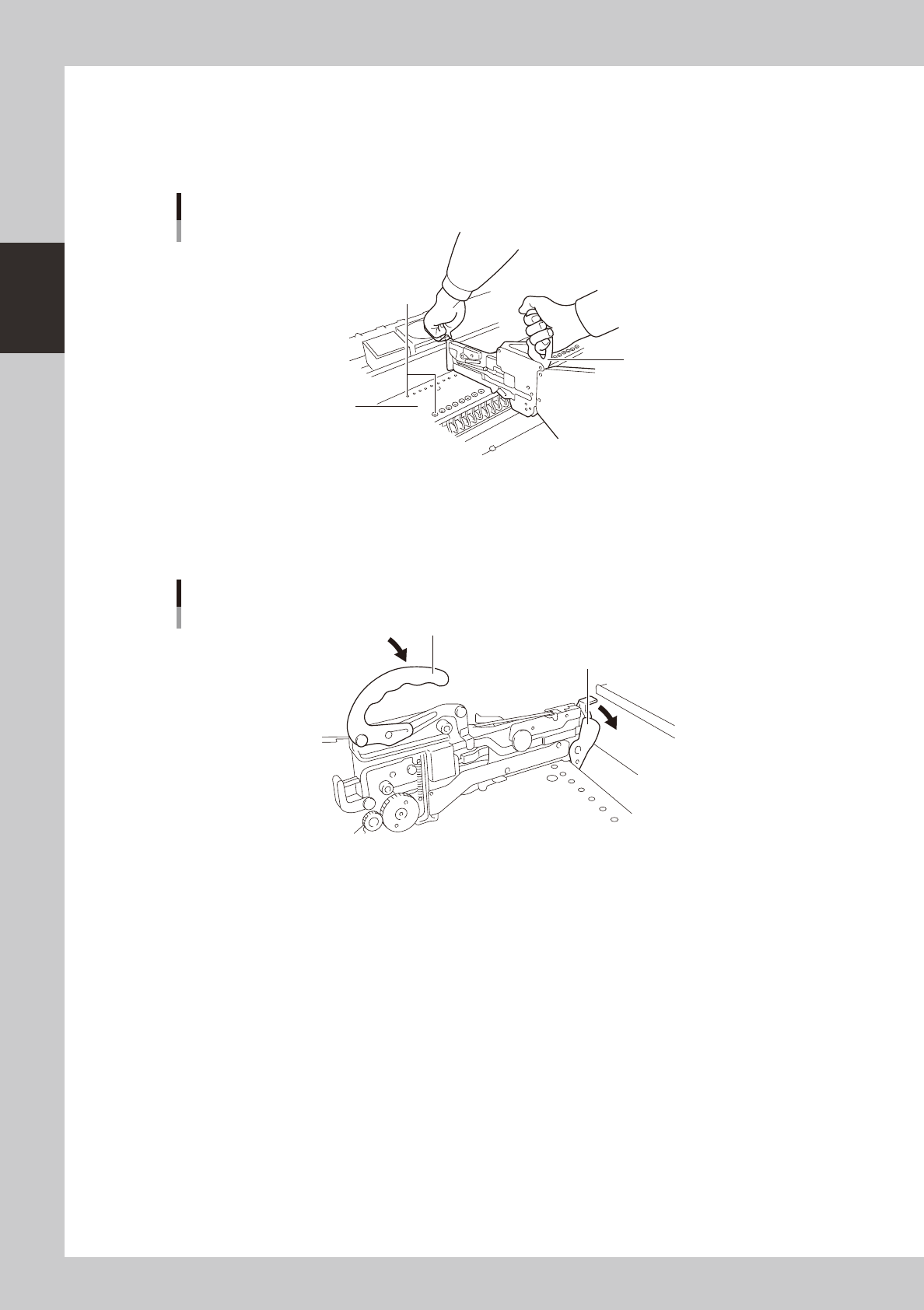
Insert the feeder into the knock-pin holes in the feeder plate.
Hold the edge of the feeder and the clamping lever lock handle while the handle is in the lifted
position. Then lower the feeder from directly above the feeder plate while keeping the feeder
horizontal. The feeder plate has knock-pin holes. Insert the front and rear knock pins on the feeder into
the knock-pin holes securely.
30
18
19
20
21
22
23
24
25
26
27
28
29
35
32
33
34
38
36
37
23
24
25
26
27
28
29
46
47
48
44
45
Attaching the feeder
Knock-pin holes
Feeder plate
Handle
23212-M0-00
5
Push down the clamping lever.
Lower the clamping lever lock handle. Then push down the clamping lever so that it is securely set on
the feeder plate. If the lever is not properly set, the feeder may come off during component mounting
or operation.
1
2
3
4
5
6
7
8
Clamping Lever
Clamping lever lock handle
Clamping lever
23213-M0-00

Chapter 3 Starting and ending production
Contents
1. Starting production 3-1
1.1 Resuming operation from the stopped point 3-4
1.1.1 Loading the saved data 3-5
1.1.2 Editing mount flags 3-5
2.
Ending production and turning power off
3-6
3. Modular error stop function 3-
8
4. Displaying the production monitors 3-1
1
4.1 Production 3-11
4.2 Main 3-1
3
4.3 Detail 3-1
5
4.4 Vision 3-1
7
4.5 Alignment 3-1
9
4.6 Retry 3-2
0
4.7 Fiducial 3-2
1
4.8 Badmark 3-2
2
4.9 Pick Pos. (Pickup position offset) 3-2
3
4.10 Pick Rate Warning 3-2
5
3-1
3
Starting and ending production
1. Starting production
This section describes how to select the board data which is already registered and perform component
mounting.
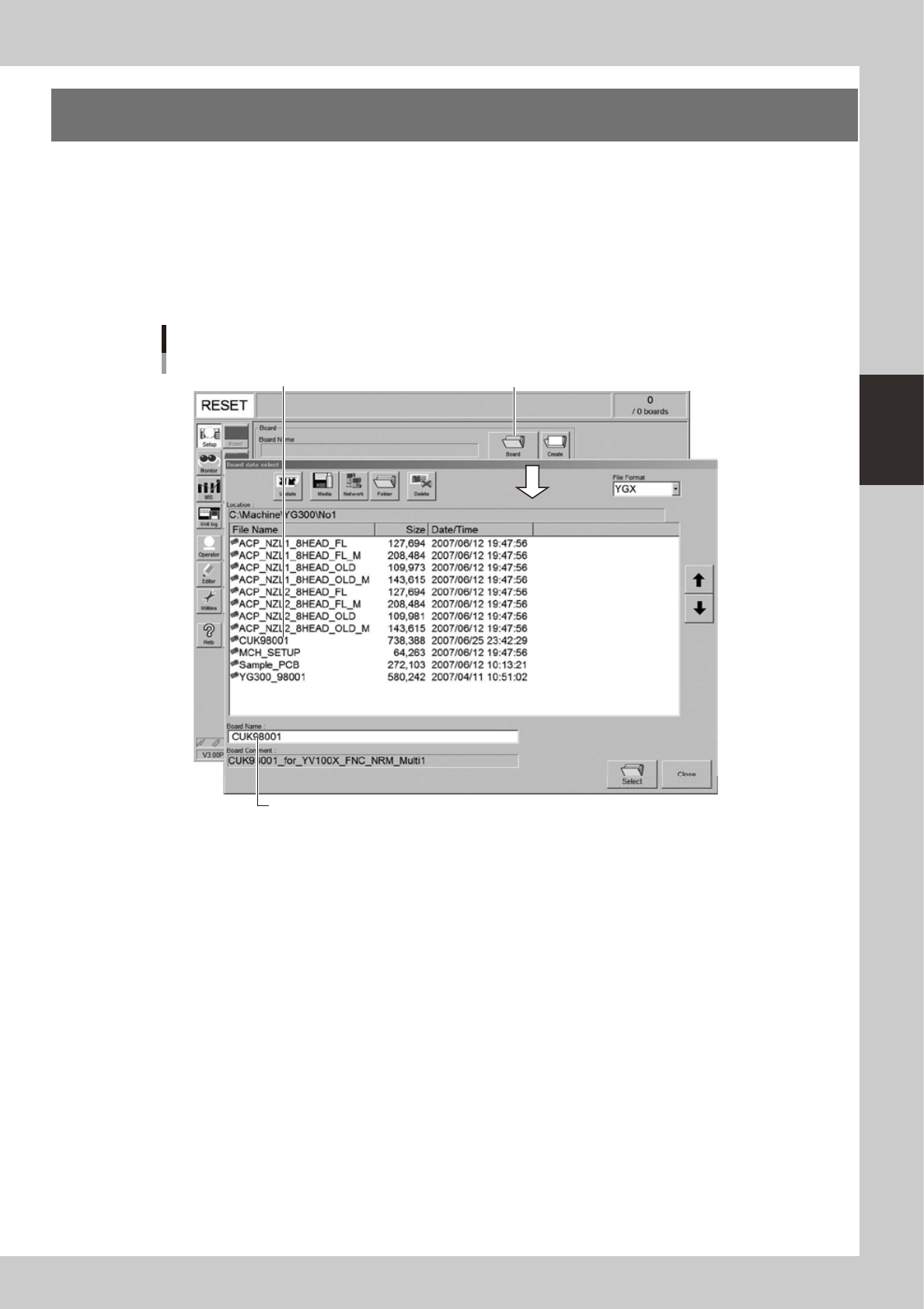
1
Select the board data.
1. When the board data is not yet selected, press the [Board] button on the Setup screen.
A list of registered board data appears.
2. Line up the cursor with the board data to use for production and press the [Select] button.
The machine loads the seleted board data.
Press [Board] button.
Selecting the board data
Select board data from list.
Selected board name is displayed.
24300-M3-00