YG300_Ope_E.pdf - 第95页
3-9 3 Starting and ending pr oduction n H a n d l i n g m o d u l e e r r o r s H a n d l i n g a s i n g l e e r r o r I f a s i n g l e e r r o r o c c u r s , r e s t o r e o p e r a t i o n a f t e r f i r s t c h e …
3-8
3
Starting and ending production
3. Modular error stop function
Even when component mounting on a placement table has stopped due to an error during automatic
operation, this function allows component mounting to continue on other placement tables without stoppage.
A buzzer, signal light, and error indicator light (option) inform the operator when module errors occur.
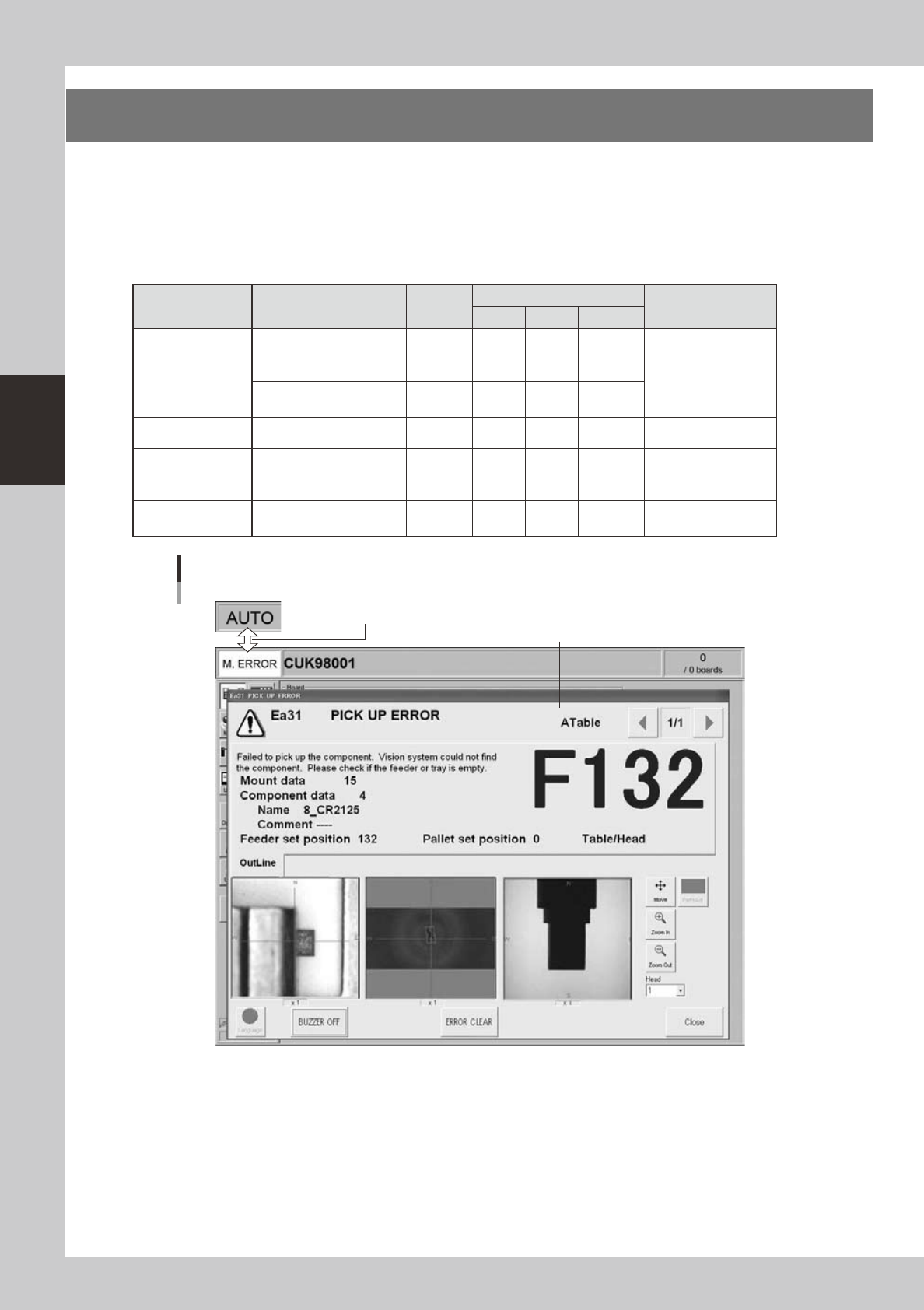
An error dialog also appears on the operating screen, and the status area alternately displays "AUTO" and
"Module Error" once a second.
n
Signal light
Status Description
Buzzer
Signal light
Error indicator light
(option)
Green Red Yellow
Module error
Error occurred on a table
that requires operator
intervention.
ON ---- ---- Flashing
Front and rear
indicators flash.
Operation continues on other
tables.
---- ON ---- ----
Module error reset All tables are in operation. ---- ON ---- ---- ----
All tables stop
More time is needed for
recovery from module
error.
---- ---- ---- ON
Front and rear yellow
indicators light up.
Operation restart
Module error recovery is
complete.
---- ON ---- ---- ----
Screen display during module error stop
Display switches once per second.
Error dialog appears.
24308-M3-00
3-9
3
Starting and ending production
n
Handling module errors
Handling a single error
If a single error occurs, restore operation after first checking the error dialog that appears on the screen. After
eliminating the error, press the [ERROR CLEAR] button to close the error dialog and restart operation.
Handling multiple errors
If multiple errors occur then the error display shows errors starting from the highest priority error. After eliminating the
error, press the [ERROR CLEAR] button and proceed to the next error.
To clear errors and restore operation in a different sequence than shown on the screen, switch to the [Monitor]-
[Production] screen, select the error, and restore operation by following the instructions shown in the Operating
Navigation area and error dialog. After correcting or eliminating the error, press the [Error Clear] button on the
[Monitor]-[Production] screen, or press the [Error Detail] button to open the error dialog and press the [ERROR CLEAR]
button to proceed to the next error.
After clearing all errors, restart operation.
Restarting operation
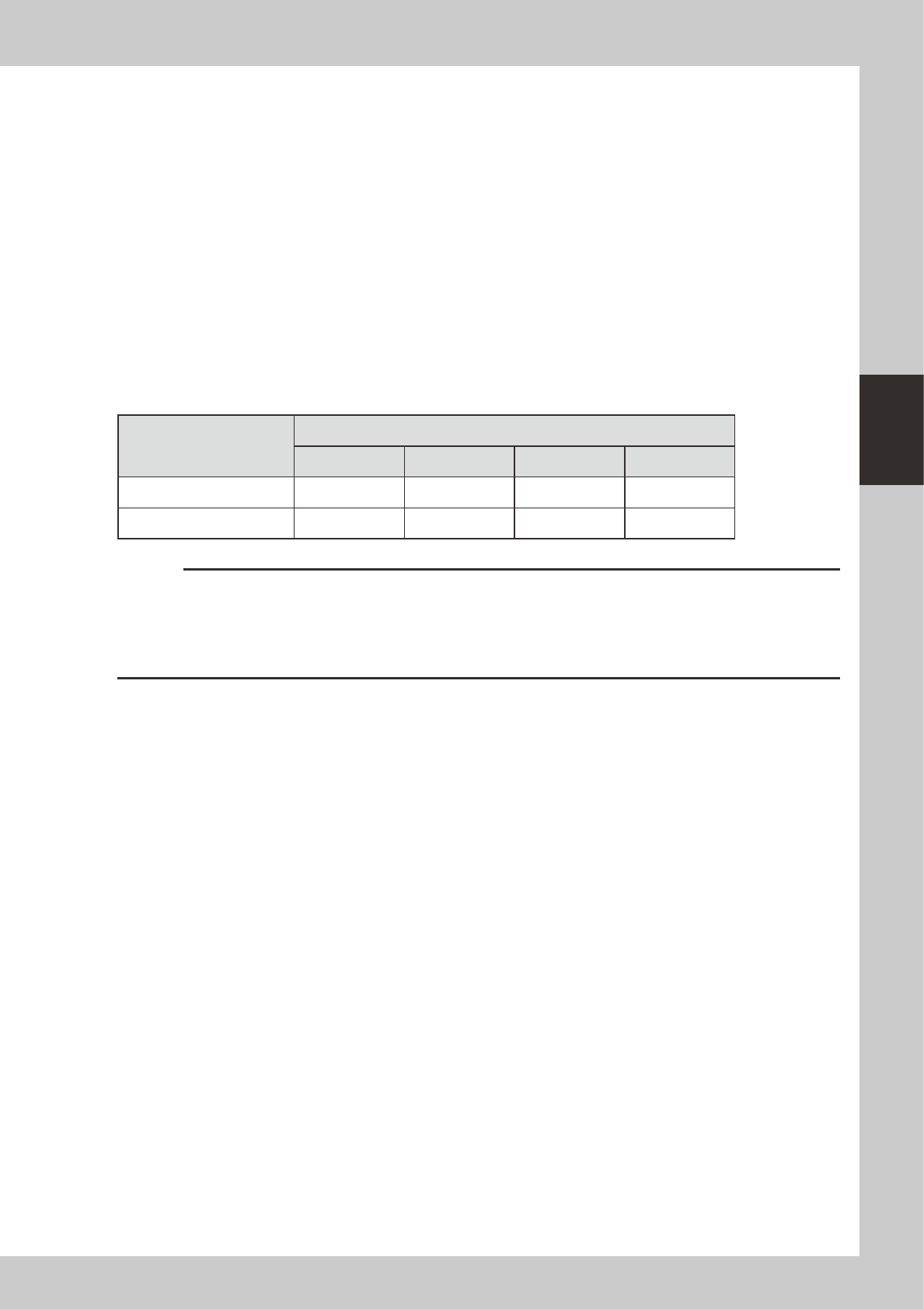
To restart operation, press the [RECOVER] or [START] buttons. The operation restart button to be used depends on the
operator’s current position as shown in the following table.
Current operator position
Module error table / Operation restart button
A B C D
AC table side [RECOVER] [START] [RECOVER] [START]
BD table side [START] [RECOVER] [START] [RECOVER]
c
CAUTION
• Pressing the [START] button will not restart operation in cases where the [RECOVER] button (table on operator side)
must be used to restart operation
• If the errors have not been completely cleared then operation will not restart even if you press the [RECOVER] or
[START] buttons. On the [Monitor]-[Production] screen, check for any errors that are not yet cleared, and after
clearing all error, press the [RECOVER] or [START] buttons to restart operation.
3-10
3
Starting and ending production
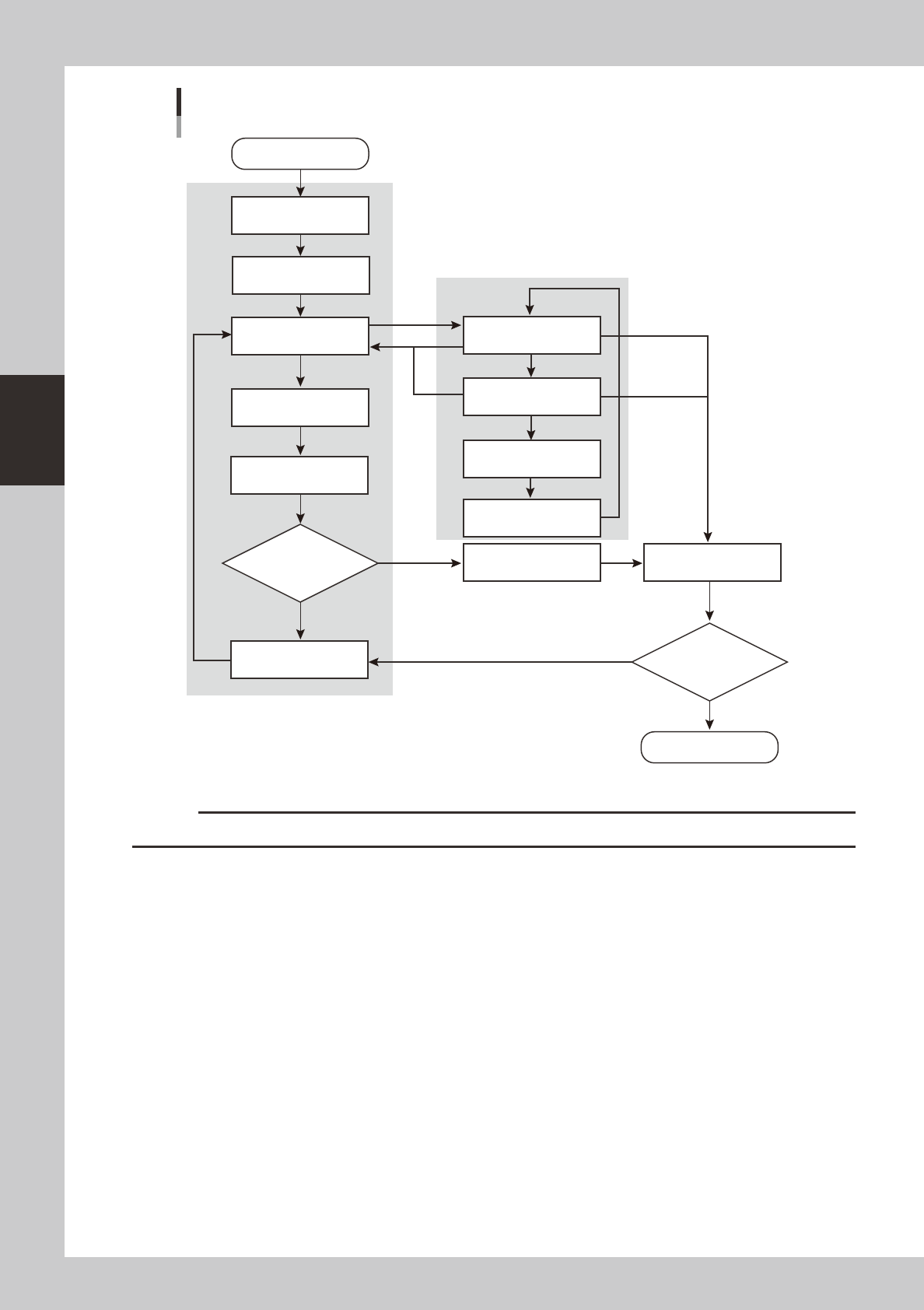
Recovery process on [Monitor]-[Production] screen
Recovery process using error dialog
Module error occurs
Restart operation
Recovery complete
(Restart operation)
Buzzer and signal light turn ON
Error dialog appears
Buzzer OFF
Correct or eliminate error
Correct or eliminate error
Inform that error is corrected
Inform that error is corrected
All errors corrected?
All errors corrected?
Error dialog appears again
Error dialog appears
again if error still remains
Screen before error
occurred appears
Error dialog appears
Open [Monitor]-[Production]
screen
Process flow from module error to recovery
YES
NO
YES
NO
[Close]
[ERROR CLEAR]
[ERROR CLEAR]
[Error Detail]
[ERROR CLEAR]
[RECOVER]
[START]
23302-M3-00
c
CAUTION
Machine stops due to error in the following cases. Entire machine status is "Error" and yellow indicator lamp lights up.
• When recovery from module error is delayed.
• When an upstream placement table cannot carry out a component-mounted board because a downstream placement
table has stopped due to a module error.
• When an upstream placement table cannot carry in a component-mounted board because a downstream placement
table cannot carry out a component-mounted due to a module error on a placement table even further downstream.
• When an upstream placement table stops due to a module error, preventing the next board from carrying out to the
downstream placement table.
• When an upstream placement table cannot carry in the next board because of a module error on a placement table
even further upstream.